
business process management software: Quick guide to boost
Think of business process management software as the conductor of your company’s orchestra. It’s a powerful suite of tools designed to help you map out, automate, and fine-tune all the moving parts of your business, from onboarding a new hire to fulfilling a complex customer order.
The whole point is to make sure every task gets done the right way, every single time. It brings consistency and efficiency to your daily operations.
Unpacking Business Process Management Software

Imagine BPM software as your company's central nervous system. When a new sales order comes in, the system receives that signal. It then processes the information based on a set of rules you've defined and sends out commands to different departments—sales, fulfillment, finance—making sure every step happens in the right order without anyone needing to manually push it along.
This is way more than just a glorified to-do list. It’s a structured environment where you can actually design how work gets done, watch it execute flawlessly, and then look at the data to figure out how to do it even better next time. The end game is to kill bottlenecks, slash human error, and let your team focus on high-value work instead of getting bogged down in repetitive admin tasks.
The Core Functions of BPM
At its heart, BPM is all about a continuous cycle of improvement. It’s not a "set it and forget it" solution; it's a dynamic platform that helps your operations evolve and get smarter over time. This entire cycle is built on four key pillars that work in tandem to make your organization more agile and efficient.
To really get what BPM can do, you also have to understand Business Process Automation and how it brings your process maps to life. Automation is where the theory becomes reality, taking all that manual grunt work off your team’s plate.
This structured approach is catching on in a big way. The BPM software market is projected to skyrocket past USD 113.91 billion by 2035. We're also seeing that 74% of businesses are showing more interest in BPM, and a solid 70% are already using tools for process modeling. People are clearly seeing the value.
A business process is just a series of steps that a group of people take to reach a specific goal. BPM software is the toolkit that digitizes, automates, and optimizes those steps.
Now, let's break down the essential functions that define a truly comprehensive BPM solution.
Core Functions of BPM Software at a Glance
This table neatly summarizes the four pillars that BPM software is built on. Each function plays a critical role in the continuous cycle of process improvement, from initial design to ongoing refinement.
| Core Function | Primary Purpose | Key Activities |
|---|---|---|
| Process Mapping | To visualize and document existing workflows. | Using drag-and-drop tools to create flowcharts, define task dependencies, and assign roles. |
| Task Automation | To execute repetitive tasks without human input. | Setting up automated email notifications, data entry, report generation, and task assignments. |
| Performance Monitoring | To track process health and identify bottlenecks. | Using dashboards to monitor key metrics like completion times, error rates, and resource usage. |
| Continuous Optimization | To refine and improve workflows over time. | Analyzing performance data to redesign processes, test new approaches, and implement changes. |
Together, these functions provide a complete framework for taking control of your operations and driving real, measurable improvements across the board.
What Are The Real-World Wins With BPM?

Bringing BPM software into your business is about so much more than just crossing tasks off a list faster. Sure, a speed boost is a great place to start, but the real magic happens when you unlock the strategic advantages across your entire company. It’s a fundamental shift in how work gets done—one that sparks innovation, slashes risk, and helps you make much, much smarter decisions.
When you hand off the dull, repetitive tasks to automation, you give your team back their most precious resource: time. Instead of getting bogged down in manual data entry or chasing down approvals, they can pour their energy into creative problem-solving and work that actually moves the needle. That shift doesn't just bump up productivity; it does wonders for morale and engagement, too.
Empowering Your Team Through Automation
Think about your new employee onboarding process. It's a classic example. You've likely got HR, IT, and Finance all juggling different manual tasks. This chaos often leads to delays, lost paperwork, and a pretty clunky first impression for your new hire.
Now, picture that same process powered by BPM software. The second HR flips a candidate's status to "hired," the system kicks off a perfectly choreographed sequence:
- IT instantly gets a ticket to set up a laptop and user accounts.
- Finance is prompted to get payroll and benefits enrollment started.
- The hiring manager receives an automatic reminder to schedule those crucial first-week meetings.
This automated workflow means nothing slips through the cracks. It delivers a smooth, professional experience for the new employee and, just as importantly, frees up your HR and IT pros to tackle more strategic projects, like improving company culture or beefing up network security. You're taking the administrative weight off their shoulders so they can focus on the work that truly matters.
Gaining Clarity With Data-Driven Decisions
One of the most powerful things BPM software does is create a single source of truth. Every single step, every delay, and every outcome in a process gets tracked and logged. This treasure trove of data replaces guesswork with genuine, hard evidence.
Instead of running on gut feelings, leaders can glance at a dashboard and see exactly where the bottlenecks are. You can finally answer critical questions with confidence. For instance, a logistics company might analyze its delivery process data and discover that packages are consistently getting stuck at one specific distribution center.
BPM software turns your operations from a black box into a transparent, measurable system. It gives you the clear line of sight you need to make confident, data-backed decisions that drive real growth.
Armed with this insight, they can dig into the root cause—is it a staffing issue? An inefficient sorting method?—and roll out a fix that actually works. This ability to pinpoint and solve problems with precision is a massive competitive advantage. It lets you continuously improve based on facts, not hunches. Many teams use tools like Notion to keep their operational data in one place; you can find tips for managing business communications on the NotionSender blog to see how integrations can help pull everything together.
Strengthening Compliance and Reducing Risk
In many industries, following the rules isn't a suggestion—it's the law. Trying to manage compliance manually is a nightmare of checklists, spreadsheets, and the constant fear of human error. One small slip-up can lead to massive fines, legal headaches, and a serious blow to your reputation.
BPM software gives you a solid framework to build compliance right into your day-to-day workflows. Every process is forced to follow a standardized, pre-approved path, making sure all the required steps are completed in the right order, every single time. For a healthcare provider, this means patient data is handled according to strict privacy laws from the moment a patient walks in the door.
Even better, every action taken in the system is logged, creating a detailed and permanent audit trail. If a regulator ever comes knocking and asks for proof of compliance, you can generate a report in minutes showing exactly who did what and when. This not only makes audits infinitely less stressful but also actively lowers your risk by making your rules impossible to ignore.
Must-Have Features in Modern BPM Platforms
<iframe width="100%" style="aspect-ratio: 16 / 9;" src="https://www.youtube.com/embed/9rk9OQLSoJw" frameborder="0" allow="autoplay; encrypted-media" allowfullscreen></iframe>
Not all BPM software is built the same. While plenty of platforms promise to make you more efficient, the ones that actually deliver are defined by a core set of features that work together to overhaul your operations.
Knowing what these components are is the key to telling a glorified task manager apart from a true process powerhouse.
Think of it like buying a car. Sure, you need an engine and wheels, but the real difference is in the details—the navigation, the safety features, the performance. It's the same with BPM tools. The right combination of features determines whether you just get from A to B or truly optimize the entire journey.
Visual Process Modeling
The foundation of any great BPM platform is the ability to actually see your workflows. A visual process modeler gives you a drag-and-drop canvas where you can map out every single step, decision, and dependency in a process. This isn't just about making a static flowchart; it's about building a dynamic blueprint the software will actually follow.
Look for a modeler that’s intuitive enough for non-developers. Your process experts—the people doing the work day in and day out—should be able to design and tweak workflows without needing to write a line of code. This user-friendly approach is a huge reason the BPM market is expanding so quickly. The process modeling slice of the market alone snagged over 26% of the revenue share in a market projected to jump from USD 20.38 billion in 2024 to a staggering USD 61.17 billion by 2030. You can read the full research on this market surge to see just how critical visualization has become.
This visual approach creates a common language for everyone involved, making complex processes way easier to understand, discuss, and ultimately, improve.
Flexible Form Builders
Processes run on data. Whether it's a customer’s shipping address or the details of an expense claim, you need a clean way to capture information at every stage. That’s where form builders come in.
A good BPM tool lets you create custom forms with specific fields, dropdowns, and validation rules to make sure you get the right data, every time. These forms should also be dynamic, meaning they can change based on the information entered. For instance, if an employee checks "International Travel" on an expense report, the form should automatically pop up extra fields for currency conversion and passport details.
Robust Automation Engine
The automation engine is the heart of any BPM software. It’s what takes your visual process map and brings it to life—executing tasks, sending notifications, and routing information without anyone needing to lift a finger. It works tirelessly in the background, ensuring your processes run exactly as designed, 24/7.
A powerful engine can handle complex logic, conditional branching ("if this happens, then do that"), and tasks that run in parallel. It’s the difference between a simple digital checklist and a fully autonomous workflow that orchestrates work across multiple people and departments without a hitch.
A BPM platform’s value is directly tied to its automation capabilities. The goal isn't just to list tasks but to eliminate them, freeing up your team to focus on strategic initiatives that require human creativity and judgment.
Powerful Integration Capabilities
Your business doesn't operate in a silo, and your BPM software shouldn't either. Modern platforms absolutely must have strong integration capabilities, usually through APIs (Application Programming Interfaces). This lets your BPM tool connect with the other systems you already rely on, like your CRM, ERP, and accounting software.
For example, when a sales rep closes a deal in your CRM, an integration can automatically kick off the customer onboarding process in your BPM software. This seamless flow of data kills manual entry errors and ensures information is consistent across your entire tech stack. If you're looking to connect various tools, it helps to review API documentation to see how different platforms talk to each other.
Real-Time Analytics and Reporting
You can't improve what you don't measure. A non-negotiable feature of any top-tier BPM solution is its analytics and reporting dashboard. This gives you a live look into the health of your processes, tracking key metrics like:
- Cycle Time: How long it takes to complete a process from start to finish.
- Task Duration: The time spent on each individual step.
- Bottleneck Identification: Pinpointing where work is consistently piling up.
- Error Rates: How often mistakes or exceptions are happening.
Look for customizable dashboards that let you zero in on the numbers that matter most to your business. This data-driven insight is what fuels continuous improvement, turning your BPM software from a simple workflow tool into a command center for strategic operational intelligence.
How to Choose the Right BPM Software
Picking the right BPM software for your company is a huge decision. It's not just about buying another tool; it’s about choosing a partner that will fundamentally shape how your business operates and grows for years to come. The market is packed with options, and without a solid plan, it's easy to get swayed by flashy demos and end up with a system that creates more headaches than it solves.
The trick is to do your homework before you even start looking at vendors. A methodical approach, starting with a deep dive into your own needs, will help you cut through the marketing noise and focus on what actually matters for your team.
Start With a Thorough Needs Analysis
Before you can find the right solution, you need to get crystal clear on the problems you’re trying to fix. Vague goals like "improving efficiency" won't cut it. You need to dig in and pinpoint the specific operational pain points that are holding you back. A good needs analysis is the bedrock of any successful BPM project.
Start by mapping out and prioritizing the processes causing the most friction. Is it the painfully slow client onboarding that’s frustrating new customers? Or maybe the chaotic, manual invoice approval workflow that’s always behind schedule? Get specific. Identify exactly where the bottlenecks are, where resources are being wasted, and where your team is feeling the most strain.
Once you have your list of target processes, you need to define what "better" actually looks like. This means setting clear, measurable goals. For instance, you might aim to:
- Cut invoice processing time by 40%.
- Eliminate errors in new hire onboarding completely.
- Boost customer satisfaction scores for order fulfillment by 15%.
These hard numbers will be your north star throughout the selection process. They not only guide your evaluation but also give you a clear way to measure the return on your investment down the road.
Evaluate Key Technical and Functional Factors
With your requirements list in hand, you can start looking at what different vendors have to offer. It's time to move past the sales pitch and dig into the technical details and user experience that will affect your team every single day.
One of the first big decisions is the deployment model. Cloud-based (SaaS) platforms are the go-to for most businesses today. They come with lower upfront costs, handle all the updates for you, and let your team access the system from anywhere. On the other hand, on-premise software, which you host on your own servers, gives you maximum control over your data but comes with a heavy IT lift for maintenance and security.
The rise of low-code and no-code BPM platforms has been a real game-changer. These tools empower the people who actually know the processes inside and out—think department managers or operations specialists—to build and tweak workflows themselves. They use simple drag-and-drop interfaces, which dramatically cuts down the dependency on the IT department.
This shift is huge for business agility. It means your teams can adapt processes on the fly as things change, without getting stuck in a long IT ticket queue.
Compare Vendors Systematically
To make an objective decision, you need an organized way to compare your options. Trying to keep everything in your head is a recipe for disaster. A simple comparison table can be your best friend here, helping you evaluate multiple vendors side-by-side on the criteria that matter most to you.
This structured approach helps you weigh the pros and cons of each business process management software logically, ensuring no critical detail gets overlooked.
Here's a framework you can adapt to get started.
Key Factors for Evaluating BPM Software
| Evaluation Criterion | What to Look For | Why It Matters |
|---|---|---|
| User Experience (UX) | An intuitive, clean interface with drag-and-drop functionality for process modeling. | A clunky UX leads to low adoption. The easier it is to use, the more your team will actually embrace it. |
| Scalability | The ability to handle more users, processes, and data as you grow, without slowing down. | Your software has to support your company's growth, not become a bottleneck itself. |
| Vendor Support | Access to responsive customer support, solid documentation, and maybe even an active user community. | When you hit a snag—and you will—reliable support is non-negotiable for getting back on track quickly. |
| Total Cost of Ownership | Look beyond the sticker price at subscription fees, implementation costs, training, and any customization charges. | The initial price is just one piece of the puzzle. You need to understand the full financial commitment before you sign. |
By working through these steps—from defining what you need to systematically comparing your top contenders—you turn what could be an overwhelming task into a smart, strategic decision. This diligence ensures you pick a BPM software that not only fixes today's problems but also gives you a solid foundation for innovation and growth tomorrow.
Your Roadmap to a Successful BPM Rollout
Picking a great BPM tool is really just the start. The real magic—and the real success—happens during the rollout. Bringing new business process management software into your company isn't a one-time project. Think of it as the beginning of a long-term commitment to getting better, smarter, and more efficient at what you do. A well-thought-out implementation plan is what separates a tool that gathers dust from one that delivers real value and builds a culture that actually wants to be more efficient.
The best way to navigate this journey is in phases. Don't try to boil the ocean with a massive, company-wide overhaul on day one. That's a recipe for disruption, confusion, and a blown budget. The smartest strategies always start with a small, focused pilot project. This lets you prove the software's value on a manageable scale, creating a powerful success story that gets the rest of the organization excited.
The demand for BPM software is booming, mostly because businesses are hungry for automated workflows and cloud-based tools. It’s all part of a bigger push toward digital operations in every industry. You can discover more insights about the BPM market expansion on marketsandmarkets.com to see just how widespread this trend is.
Phase 1: Start Small and Prove Value
Your first move? Pick a single process to pilot. But not just any process. Choose one that is both highly visible and notoriously painful. We all have them—those workflows known for bottlenecks, endless manual data entry, or just plain frustration. Think expense approvals, new client onboarding, or purchase order requests.
Solving a problem everyone already complains about gives you a tangible, celebrated win right out of the gate.
Once you’ve picked your target, you absolutely must involve the people who live and breathe that process every day. Their on-the-ground knowledge is gold. They know where the real hang-ups are, and they’ll be crucial in designing a future state that actually works. If you ignore their input, you’re just building a system nobody will want to use.
A successful pilot project does more than just fix a broken process. It creates your first set of internal champions who can share their positive experiences and build crucial buy-in for a wider rollout.
Phase 2: Secure Sponsorship and Build Momentum
With a successful pilot in your back pocket, you now have the ammo you need: data and testimonials. Use them to get your executives on board. Present a clear, no-nonsense report on the pilot's ROI. Highlight the hard numbers—like reduced cycle times, a 50% drop in errors, or 10 hours saved per week. This kind of evidence turns your BPM idea from an abstract concept into a proven business asset.
Next up is team training, and this is critical. Don't just run a one-off technical demo. You need role-specific training that shows users exactly how the software makes their specific jobs easier. And as people start using it, celebrate the small wins publicly. This keeps the energy high and shows the rest of the company that real, positive change is happening.
This visualization lays out a simple but effective way to think about starting your BPM software journey.
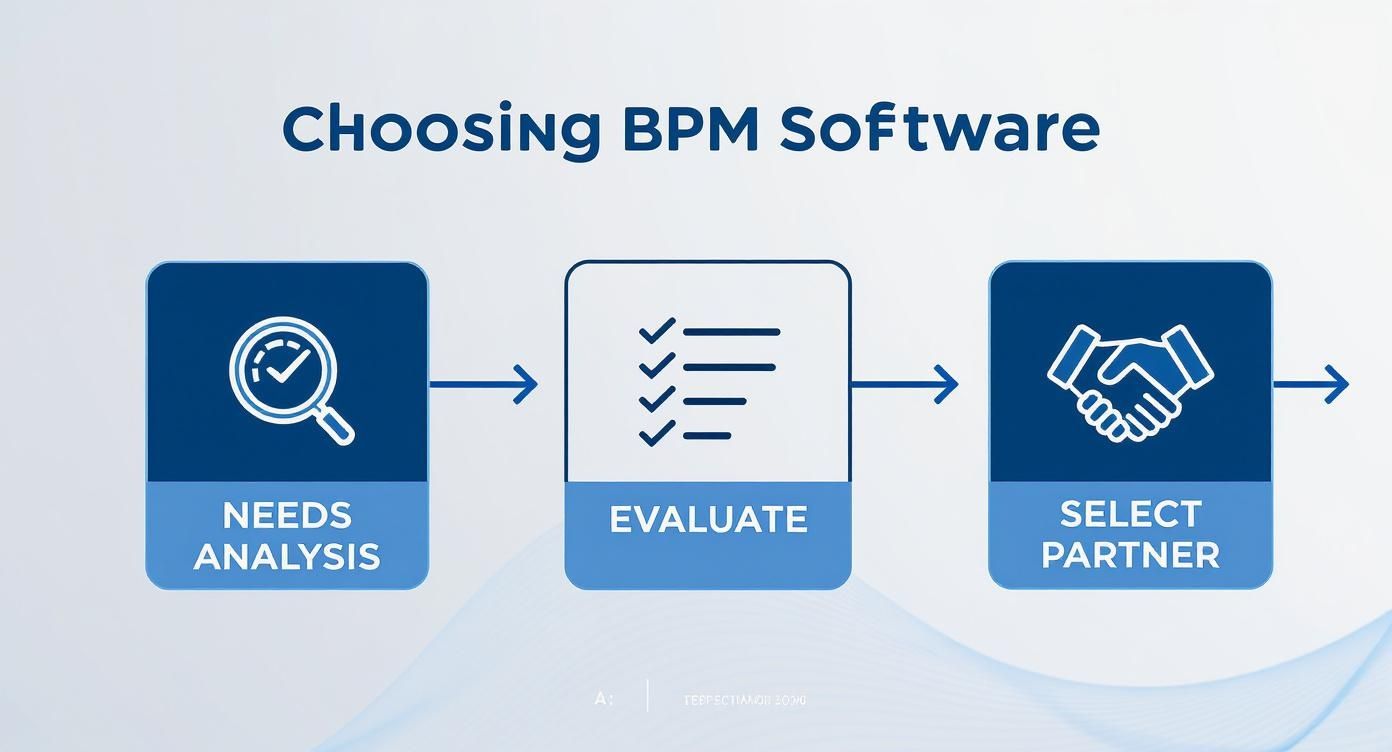
It all starts with a deep dive into your actual needs. This ensures that every decision you make, from evaluation to final selection, is grounded in solving your company's most pressing challenges.
Phase 3: Build a Culture of Continuous Improvement
Getting the software rolled out isn't the finish line. The real goal is to make BPM a permanent part of how your business operates. This often means creating a Center of Excellence (CoE)—a dedicated team that owns BPM strategy, governance, and best practices.
This team becomes the central hub for all things process-related. They ensure consistency, help other departments find their own automation opportunities, and basically become the long-term guardians of your company's efficiency.
To make this culture stick, you have to set realistic timelines. Process improvement is a marathon, not a sprint. It’s an ongoing, iterative journey. By following these key steps, you can guide a successful implementation from start to finish:
- Start with a high-impact pilot to show immediate value.
- Involve end-users from day one to make sure the solution is practical.
- Secure executive sponsorship by using data-driven results from your pilot.
- Train your teams effectively by focusing on how the software solves their daily headaches.
- Establish a Center of Excellence to champion process improvement for the long haul.
Tying your workflows together with your communication tools can make things even smoother. For instance, our guide on sending emails from Notion shows how connecting different apps can automate key steps within a process. Following this kind of approach ensures your BPM software rollout delivers more than just a new tool—it delivers a real, sustainable edge over the competition.
Got Questions About BPM Software? We've Got Answers.
Jumping into a new technology like business process management always brings up a few practical questions. Even when the features and benefits seem clear, it's the "what ifs" and "how does this actually work for me?" that matter most.
We get it. So, let's tackle some of the most common questions we hear from business leaders and project managers. Our goal here is to cut through the noise and give you direct answers, helping you feel more confident as you figure out your next steps.
What’s the Difference Between BPM and Project Management Software?
This is a fantastic question because, on the surface, they can look pretty similar. Both help organize work, but they’re built for completely different jobs. Think of it this way: you wouldn't use a race car for a daily commute. Both are vehicles, but they're designed for very different scenarios.
Project management tools (like Trello or Asana) are for unique, temporary initiatives. They're perfect for projects with a clear start, middle, and end—like launching a new website, planning a marketing campaign, or building an office. The goal is to manage all the one-off tasks needed to get to a specific finish line.
Business process management software, on the other hand, is for your ongoing, repeatable workflows. These are the core operational cycles that keep your business humming day in and day out—things like processing invoices, onboarding a new client, or fulfilling a customer order. BPM isn't about finishing a single project; it’s about making these recurring cycles more efficient, consistent, and better over the long haul.
Can Small Businesses Really Benefit from BPM Software?
Absolutely. In fact, for many small businesses, it’s a total game-changer. The old idea of BPM as a stuffy, enterprise-only system that costs a fortune is completely outdated. Modern cloud-based and low-code solutions have put this powerful technology well within reach for companies of any size.
When you're a small team and everyone is wearing multiple hats, automation isn't a luxury—it's a lifeline. It frees up your crew from getting buried in repetitive admin work, so they can focus on what actually moves the needle: serving customers and coming up with new ideas.
For a small business, BPM isn't about adding bureaucracy; it's about building a foundation to scale. It helps you formalize key workflows early on, preventing the kind of operational chaos that can easily stop growth in its tracks.
Take a boutique e-commerce store, for example. By using BPM to automate its order fulfillment process, a tiny team can handle a huge volume of orders without a hitch. This delivers a slick, professional customer experience that can easily compete with the big guys.
How Much Technical Skill Do I Need to Use BPM Software?
This is where the good news really kicks in. The skill level needed today is a world away from what it used to be. While older BPM systems were clunky and definitely required an IT degree (or at least a developer on speed dial), the modern breed of BPM is built for regular business users.
The big shift has been the rise of low-code and no-code BPM platforms. These tools have intuitive, drag-and-drop interfaces that let the people who actually know the process best—your marketing managers, HR specialists, and operations leads—build and tweak their own workflows.
This is a huge deal. It means your head of sales can adjust the lead follow-up process on the fly, or your office manager can streamline the expense approval workflow without writing a line of code or waiting for IT to get to their ticket. This makes improving your processes faster, easier, and a whole lot more agile.
What Are the First Steps to Get Started with BPM?
My best advice is simple: start small, but think big. The single biggest mistake we see is trying to boil the ocean by overhauling the entire company at once. That’s a surefire way to overwhelm your team and kill the project before it even gets off the ground.
A much smarter approach is to pick a focused pilot project. Find one process that’s causing real, tangible headaches. Look for something that’s manual, clunky, and frustrating for either your team or your customers.
Some great candidates for a first project are:
- Expense reporting and approvals
- New hire paperwork and IT setup
- Customer support ticket escalations
Once you’ve picked your target, map out how it works today and identify the bottlenecks. Then, use your BPM software to design and automate a better way. Nailing this first small win won't just solve a real problem—it will create genuine excitement and build a group of internal champions who will help you roll it out more widely.
At NotionSender, we're all about making your workflows as connected and seamless as possible. By linking your email directly to your Notion workspace, you can automate key communications within all your newly optimized processes. Learn more about how NotionSender can help.

