
6 Essential Project Management Email Templates for 2025
In project management, clear communication isn't just a soft skill; it's the bedrock of success. While sophisticated software abounds, email remains the universal language of business. Mastering it can mean the difference between seamless execution and chaotic miscommunication. For project managers, small business owners, and freelancers alike, the inbox is a critical command center for coordinating tasks, managing expectations, and driving results.
This guide provides six essential, battle-tested project management email templates designed to streamline your workflow, align stakeholders, and keep projects on track. We'll move beyond simple copy-and-paste solutions, breaking down the strategy behind each template. To streamline and standardize your communication, a range of effective email templates can significantly boost your project management efficiency.
You'll gain actionable insights and specific customization tips for every scenario, from kicking off a new initiative to flagging critical risks. You will learn to handle key project milestones including:
- Project Kickoffs
- Status and Progress Reports
- Milestone Completions
- Meeting Agendas
- Risk and Issue Alerts
- Stakeholder Change Requests
By the end, you will have a complete toolkit to transform your inbox into a powerful tool for project excellence. Let’s get started.
1. Project Kickoff Email Template
The project kickoff email is the foundational communication that sets the stage for the entire project lifecycle. It serves as the official starting gun, ensuring every stakeholder, from the core team to key clients, begins with a shared understanding of the project's purpose, scope, and operational plan. This initial alignment is critical for preventing miscommunication, scope creep, and mismatched expectations down the line.

This email acts as a centralized source of truth, formally documenting the project's charter. It consolidates high-level objectives, key deliverables, assigned roles, and communication protocols into a single, digestible message. By sending this email, a project manager establishes clear leadership and creates an immediate sense of structure and momentum.
The Strategic Value of a Kickoff Email
A strong kickoff email is more than just an announcement; it's a strategic tool for risk mitigation. For example, a marketing agency beginning a brand redesign for a major client can use this template to get formal buy-in on the creative brief, timeline, and review cycles before any design work begins. This simple act prevents costly revisions later.
Strategic Insight: The primary goal of the kickoff email is to create proactive alignment. By defining roles and expectations in writing, you create a reference point that can be used to gently correct course throughout the project, ensuring everyone remains accountable to the original plan.
This is a fundamental practice popularized by frameworks from the Project Management Institute (PMI) and Agile methodologies, which emphasize clarity and shared understanding from the outset.
Actionable Tips for an Effective Kickoff
To maximize the impact of your kickoff email, follow these best practices:
- Be Clear, Not Exhaustive: Keep the email body scannable with clear headings and bullet points. Attach detailed documents like the project plan, scope statement, or Gantt chart rather than pasting them into the email.
- Assign Clear Ownership: Explicitly list key team members and their primary responsibilities. This eliminates confusion about who is the point of contact for specific issues.
- Establish Communication Rhythm: Define the "rules of the road." Specify when to expect status updates (e.g., "every Friday by 4 PM"), how to use communication tools (e.g., "all task-related questions in Asana, urgent issues via Slack"), and the schedule for recurring meetings.
- Call to Action: End with a clear next step. This is often a prompt to schedule the formal kickoff meeting, a request to review attached documents, and a request for all recipients to confirm they have read and understood the information.
For a deeper dive into structuring your kickoff meeting, which this email sets the stage for, check out this video:
<iframe width="560" height="315" src="https://www.youtube.com/embed/_bqFlt5Upqk" frameborder="0" allow="accelerometer; autoplay; clipboard-write; encrypted-media; gyroscope; picture-in-picture" allowfullscreen></iframe>
2. Status Update/Progress Report Email Template
The status update email is the rhythmic heartbeat of project communication, providing regular, predictable insights into progress. It’s a recurring report that keeps all stakeholders, from the executive team to individual contributors, consistently informed about accomplishments, upcoming tasks, potential roadblocks, and overall project health. This transparency is crucial for managing expectations, fostering trust, and enabling timely decision-making.
This email serves as a vital tool for both communication and documentation, creating a historical log of the project's journey. By standardizing how progress is reported, project managers can efficiently highlight what's on track, what needs attention, and where the project is headed next. It transforms reactive problem-solving into proactive course correction.
The Strategic Value of a Status Update Email
A well-crafted progress report is more than a simple to-do list; it’s a strategic instrument for maintaining momentum and alignment. For instance, a software development team using this template for weekly sprint updates can clearly show that they are 73% complete with a feature release. This quantitative data allows stakeholders to see tangible progress and helps the project manager justify resource allocation or timeline adjustments if needed.
Strategic Insight: The primary goal of a status update is to create predictable transparency. By establishing a consistent reporting rhythm and format, you eliminate uncertainty and empower stakeholders with the information they need to feel confident and engaged, without needing to constantly ask for updates.
This practice is central to modern project management, with its importance amplified by platforms like Jira and Smartsheet, which build automated reporting features directly into their workflows to streamline this essential communication.
Actionable Tips for an Effective Status Update
To make your progress reports truly effective, follow these best practices:
- Lead with an Executive Summary: Start with 2-3 bullet points that give a high-level overview of the project's status (e.g., Overall Status: On Track). This allows busy stakeholders to get the gist in seconds.
- Use Visual Status Indicators: Employ a simple color-coding system (Green for on track, Yellow for at risk, Red for off track) for key project areas like budget, schedule, and scope. This provides an immediate visual assessment of project health.
- Balance Metrics and Narrative: Include key performance indicators (KPIs) like "Tasks Completed: 15/20" alongside brief qualitative notes explaining any challenges or celebrating key wins. This provides both data and context.
- Structure for Clarity: Organize the email into clear sections: Accomplishments This Period, Goals for Next Period, and Risks/Issues. This predictable structure makes the information easy to digest week after week.
For more guidance on crafting emails that get read and acted upon, you can explore some expert tips for successful emails.
3. Milestone Completion Email Template
The milestone completion email is a crucial piece of communication that serves a dual purpose: it celebrates progress and formally documents the end of a project phase. Sent when a significant goal is achieved, this email acknowledges the team's hard work, summarizes the accomplishments, and smoothly transitions focus to the next stage. It’s a powerful tool for maintaining momentum and ensuring all stakeholders are aligned on the project’s status.

This email acts as both a morale booster and an official project record. By confirming that a deliverable has been accepted or a key phase is complete, it often triggers important next steps, such as client payments or the green-lighting of subsequent project phases. It transforms a simple achievement into a documented, acknowledged checkpoint.
The Strategic Value of a Milestone Email
More than just a "we did it" announcement, this email is a strategic checkpoint. For example, a software company completing its beta testing phase can use this template to announce a 95% bug resolution rate. This quantifies the success, builds client confidence, and formally closes that testing gate, allowing development to move into the final release preparation.
Strategic Insight: The primary goal of the milestone email is to create documented closure and forward momentum. By formally marking a milestone as complete, you lock in progress, secure stakeholder sign-off, and re-energize the team for the next set of challenges.
This practice is central to modern project management platforms like Wrike and ClickUp, which build milestone approvals and goal completion notifications directly into their workflows to ensure progress is tracked and celebrated.
Actionable Tips for an Effective Milestone Email
To make your milestone completion email impactful, follow these key practices:
- Be Timely and Specific: Send the email within 24 hours of the achievement. Instead of saying "good progress," state "Phase 1 is complete, achieving 20% better performance than our target."
- Recognize Contributions: Publicly thank key team members by name for their specific contributions. This personal touch is a powerful motivator.
- Provide Proof: Attach or link to the final deliverables, screenshots, or reports. This provides tangible evidence of the accomplishment and facilitates formal review.
- Set the Next Stage: Clearly state what this milestone completion unlocks. For instance, "With design approved, we will now begin the development phase, with the first sprint review scheduled for [Date]."
- Call for Sign-Off: If required, explicitly ask the relevant stakeholder for formal approval. A clear "Please reply with your final approval by EOD Friday" leaves no room for ambiguity.
4. Meeting Request/Agenda Email Template
A well-structured meeting request email is the difference between a productive, focused session and a chaotic, time-wasting discussion. This template transforms a simple scheduling request into a strategic tool for ensuring every participant arrives prepared, understands the meeting's purpose, and knows what is expected of them. It establishes order before the meeting even begins, maximizing its value and respecting everyone's time.
This email is more than a calendar invite; it's a mini-charter for the meeting itself. It clearly outlines the objectives, provides a detailed agenda with time allocations, and lists any required pre-reading or preparation. By sending this email, a project manager sets a professional tone, enforces discipline, and significantly increases the likelihood of achieving the desired outcomes.
The Strategic Value of a Meeting Agenda Email
A clear agenda email is a powerful tool for maintaining project momentum. For instance, a product team scheduling a sprint planning meeting can use this template to list user stories for review, ensuring developers and designers have pre-analyzed the requirements. This preparation allows the meeting to focus on estimation and task allocation rather than basic comprehension, cutting meeting time in half.
Strategic Insight: The primary goal of this email is to front-load the cognitive work. By providing all necessary context and preparation materials beforehand, you shift the meeting from a forum for information discovery to a platform for decision-making and action.
This approach is heavily influenced by productivity cultures like Amazon's "6-page memo" philosophy, where silent reading and preparation precede discussion, ensuring meetings are reserved for high-level debate and alignment.
Actionable Tips for an Effective Meeting Request
To maximize the impact of your meeting request email, follow these best practices:
- Lead with the "Why": Start with a clear, one-sentence objective for the meeting. For example, "The goal of this meeting is to finalize the Q3 marketing budget."
- Timebox Your Agenda: Assign a specific time limit to each agenda item. This keeps the conversation on track and ensures all critical topics are covered.
- Specify Required Prep: Explicitly state what each participant needs to do before the meeting (e.g., "Please review the attached budget variance analysis and come prepared with questions").
- Clarify Roles and Decisions: For each agenda item, note who is leading the discussion and what kind of outcome is expected (e.g., "Decision," "Discussion," "FYI").
- Make Logistics Effortless: Place virtual meeting links, dial-in numbers, and physical locations prominently at the top of the email for easy access.
By integrating these practices, you can create a system for more efficient meetings. You can even streamline this process further by using powerful integrations. For example, you can learn more about how to use Notion to send and schedule emails to manage your meeting communications directly from your project workspace.
5. Risk/Issue Alert Email Template
The risk/issue alert email is a critical communication tool for flagging unexpected problems, blockers, or potential threats that could derail a project. Its purpose is to escalate an issue with clarity and urgency, providing key stakeholders with the necessary information to make a swift, informed decision. This structured alert prevents panic and ensures that problems are addressed systematically rather than reactively.
This email template serves as a formal record of an identified risk or issue, detailing its potential impact and outlining a clear path forward. By sending this communication, a project manager moves a problem from awareness to action, formally requesting guidance, resources, or a decision from leadership. It is an essential component of proactive project management, ensuring that nothing critical falls through the cracks.
The Strategic Value of a Risk/Issue Alert Email
A well-crafted risk alert email is a project-saving instrument. For instance, if a software development team discovers a critical security vulnerability, this template allows them to immediately communicate the severity, the required pause in development, and the proposed remediation plan to executives. This prevents a minor issue from escalating into a catastrophic data breach and demonstrates responsible oversight.
Strategic Insight: The primary goal of a risk alert email is to accelerate resolution. By presenting the problem, its impact, and proposed solutions in one concise package, you remove ambiguity and empower decision-makers to act quickly, minimizing damage to the project timeline, budget, or scope.
This practice is fundamental to frameworks like PMI's risk management processes and ITIL's incident management protocols, which emphasize structured communication as the cornerstone of effective problem resolution.
This decision tree helps visualize the standard escalation path based on an issue's severity.
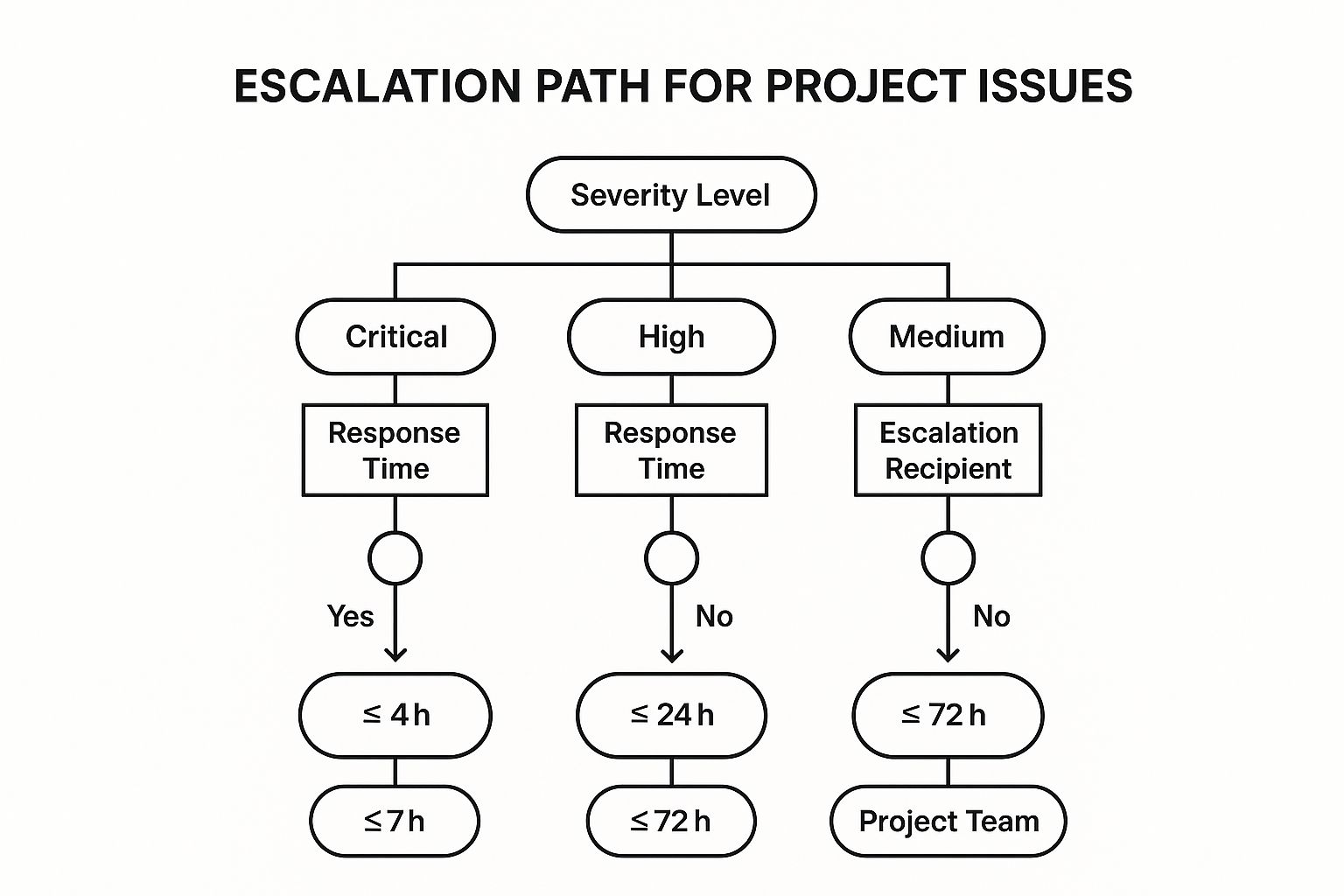
The visualization clarifies that the urgency of the response and the level of management involved directly correlate with the assessed severity of the risk.
Actionable Tips for an Effective Risk/Issue Alert
To ensure your alert gets the immediate attention it needs, follow these best practices:
- Signal Urgency in the Subject: Use clear prefixes like [URGENT], [HIGH PRIORITY], or [ACTION REQUIRED] to ensure the email is opened immediately. Include the project name and a brief issue summary (e.g., "[URGENT] Project Alpha: Critical Vendor Failure").
- Lead with the Bottom Line: Start with a one-sentence summary of the impact. For example, "This issue will delay the launch by two weeks and requires an immediate decision on an alternative vendor."
- Present Solutions, Not Just Problems: Always include at least one recommended solution, along with its pros and cons. Including a "do nothing" option with its consequences can also powerfully frame the need for a decision.
- Set a Clear Deadline: Explicitly state when you need a decision. For instance, "We need a final decision by EOD Thursday, October 26th, to secure a new vendor without further timeline impact."
6. Stakeholder Communication/Change Request Email Template
A change request email is a formal mechanism for managing the inevitable evolution of a project's scope, timeline, or budget. It moves "scope creep" from a whispered conversation into a structured, documented process, ensuring that any deviation from the original plan is carefully considered, approved, and accounted for. This email is the cornerstone of effective change control, protecting the project from uncontrolled expansion and ensuring all stakeholders are aligned on any modifications.
This email template provides a standardized format to present a proposed change, detail its impact, and request formal approval. It transforms a potentially contentious issue into a transparent business decision, documenting the justification, potential risks, and benefits. By formalizing this communication, project managers maintain control, manage expectations, and create a clear audit trail for project decisions.
The Strategic Value of a Change Request Email
A well-structured change request email is a critical tool for maintaining project health and stakeholder trust. For instance, a software development team can use this template to formally request a two-week timeline extension and a budget increase to accommodate a new API integration requested by the client mid-sprint. This prevents the team from absorbing the extra work at a loss and ensures the client understands the trade-offs.
Strategic Insight: The primary goal of a change request email is to convert a problem into a decision. Instead of letting scope changes quietly derail the project, this template frames the change as a clear choice for stakeholders, complete with costs, benefits, and consequences.
This disciplined approach is central to frameworks like PRINCE2 and PMI's change management practices, which emphasize that all changes must be formally assessed and approved before implementation.
Actionable Tips for an Effective Change Request
To ensure your change request is received clearly and acted upon swiftly, follow these best practices:
- Assign a Unique ID: Number all change requests sequentially (e.g., CR-001, CR-002) for easy tracking and reference in your project's change log.
- Quantify the Impact: Be specific. Use a simple table or bullet points to show the "before" and "after" state of the budget, timeline, and deliverables. Vague requests are easily dismissed.
- Define the "Why": Clearly articulate the rationale behind the change. Explain the benefits of approving it (e.g., "adds critical user functionality") and the consequences of not approving it (e.g., "the product will not meet a key market demand").
- Set a Clear Deadline: Specify a date by which you need a decision. This creates a sense of urgency and prevents the request from languishing, which can stall project momentum. Mastering the tone of this request is crucial; check out these 10 tips to send emails that make the other person smile to ensure your message is received positively.
Project Management Email Templates Comparison
| Email Template | Implementation Complexity 🔄 | Resource Requirements ⚡ | Expected Outcomes 📊 | Ideal Use Cases 💡 | Key Advantages ⭐ |
|---|---|---|---|---|---|
| Project Kickoff Email Template | Medium: Requires input from multiple stakeholders, detailed preparation | Moderate: Time to compile comprehensive info and visuals | High: Aligns stakeholders, sets clear expectations, establishes foundation | New project launches, multi-team or client projects | Sets clear expectations, improves alignment and accountability |
| Status Update/Progress Report | Medium-High: Frequent preparation, consistent formatting needed | Medium-High: Regular data collection and report generation | High: Maintains transparency and engagement, enables trend analysis | Active or critical phase projects requiring ongoing status tracking | Builds trust, reduces ad-hoc inquiries, early problem detection |
| Milestone Completion Email | Low-Medium: Sent on milestone completion, uses structured content | Low: Requires milestone data and recognition input | Medium-High: Boosts morale, formal acceptance, momentum maintenance | Milestone achievements, phase completions, client approvals | Boosts morale, documents acceptance, motivates team |
| Meeting Request/Agenda Email | Low: Structured but straightforward, requires planning | Low: Minimal resources, mainly agenda and logistics | Medium: Increases meeting focus and productivity | Scheduling project meetings, reviews, planning, decision sessions | Improves productivity, clarifies purpose, aids preparation |
| Risk/Issue Alert Email | Medium: Urgent, requires concise impact and mitigation info | Moderate: Needs quick info gathering and escalation clarity | High: Enables rapid response, accountability, and issue management | Critical project risks, blockages, urgent decision needs | Facilitates rapid response, documents issues, proactive mgmt |
| Stakeholder Communication/Change Request | Medium-High: Formal process with approvals, detailed impact analysis | Moderate-High: Coordinated inputs, formal documentation | High: Controls scope, formalizes agreements, reduces conflicts | Scope/timeline/budget changes, formal approvals, contractual modifications | Prevents scope creep, ensures alignment, documents approvals |
Integrate and Automate: Your Next Steps to Email Mastery
The journey through this collection of project management email templates reveals a powerful truth: effective communication is not about reinventing the wheel for every email. Instead, it’s about building a robust, repeatable system that ensures clarity, consistency, and accountability at every stage of your project’s lifecycle. From the initial kickoff to managing unexpected risks and celebrating milestones, these templates provide the strategic scaffolding you need to lead with confidence.
The core takeaway is that a template is more than just pre-written text; it’s a strategic tool. Each one is engineered to preempt common questions, manage expectations, and document critical decisions. By adopting these frameworks, you move from reactive communication, where you’re constantly putting out fires, to a proactive model where you guide the project narrative and keep all stakeholders aligned and informed.
From Templates to a Seamless System
Mastery of these templates isn't just about copying and pasting. The real transformation happens when you integrate them into your daily project management workflow. This means moving beyond a simple document of saved drafts and embedding these communication protocols directly into your project management software and processes.
Think of it this way:
- Your Project Kickoff Template becomes the first official artifact in your project plan.
- Your Status Update Template is scheduled as a recurring task.
- Your Risk Alert Template is linked directly to your risk register.
This integration creates a cohesive ecosystem where communication is a natural extension of your project execution, not a separate, time-consuming chore. Establishing this system reduces the cognitive load on you and your team, freeing up mental bandwidth to focus on complex problem-solving rather than on how to phrase a simple progress report.
The Next Level: Automation and Efficiency
Once you have a system in place, the next logical step is automation. Why manually send a weekly status update if it can be triggered automatically from your project dashboard? This is where the true power of modern project management tools comes into play. By connecting your templates to your project data, you can create a powerful, self-sustaining communication engine. For instance, you can set up automations that populate your status report template with recently completed tasks or flag risks as they are logged.
This level of integration transforms your email strategy from a series of manual actions into a sophisticated, automated workflow. For project managers, small business owners, and freelancers, this efficiency is game-changing. It not only saves countless hours but also significantly reduces the chance of human error. Exploring general business process automation benefits can reveal even more ways to streamline operations beyond just email. Ultimately, by leveraging both standardized project management email templates and automation, you create a scalable, reliable system that supports project success and lets you focus on delivering exceptional results.
Ready to stop manually drafting project emails? NotionSender integrates directly with your Notion workspace, allowing you to automate these very templates from your project dashboards. Streamline your communication and get back to managing your project, not your inbox, by trying NotionSender today.

