
Your Ultimate Guide to a Powerful Content Repurposing Strategy
A solid content repurposing strategy is your ticket off the content creation hamster wheel. It’s the difference between constantly churning out new ideas from scratch and strategically getting more mileage from the work you’ve already poured your heart into.
It’s all about working smarter, not harder. You take one successful asset and spin it into multiple formats for different platforms, drastically expanding its reach and impact.
Why Content Repurposing Is a Smarter Strategy

The pressure to constantly feed the content machine is real. As marketers and business owners, we often feel like we’re just trying to keep our heads above water, pumping out new blog posts, social updates, and emails just to stay visible. It's an exhausting and frankly, inefficient way to operate.
A content repurposing strategy completely flips that script.
Instead of only chasing what’s new, you amplify your greatest hits. It’s a conscious decision to squeeze a better return out of your initial investment of time, research, and creativity. Think of it less like a content factory and more like a content amplifier.
Maximizing Your Best Work
Every single piece of content you create has untapped potential. That deeply-researched blog post that took ten hours to write shouldn't just live on your website and hope for the best. It's packed with raw material for dozens of other assets.
Let’s say you snag a powerful customer story from an email exchange—maybe one you captured with NotionSender. That single testimonial can be spun into gold:
- A detailed case study for your blog, highlighting tangible results.
- A series of eye-catching quote graphics for Instagram and LinkedIn to build social proof.
- A key segment in your next email newsletter to build trust with subscribers.
- The main talking points for a short video explaining how you solve real customer problems.
This is the core of an effective repurposing mindset. You take one proven idea and adapt it for different audiences and platforms, making sure your message hits home far and wide. For a deeper dive, check out these 8 Smart Content Repurposing Strategies to get the most out of every piece you create.
Building Brand Authority and Consistency
When you consistently share valuable insights across multiple channels—all originating from a core piece of content—you hammer home your expertise. This repetition, delivered in fresh formats, builds serious brand authority and makes your message stick.
A smart content repurposing strategy isn't about being lazy; it's about being strategic. It ensures your most valuable ideas reach the largest possible audience in the formats they prefer, building brand consistency and saving your most precious resource: time.
This approach also nails your message consistency. Since every repurposed asset comes from the same source material, your brand voice and key value props stay perfectly aligned. It doesn't matter if someone finds you on TikTok, LinkedIn, or your email list—they get a cohesive brand experience that builds trust over time.
Ultimately, repurposing isn’t just a tactic; it’s a sustainable engine for growth. It allows you to maintain a powerful presence and connect with different audience segments without burning out your team or your budget.
Building Your Content Repurposing Foundation

Before you jump into turning your best work into new formats, you need a solid game plan. A real content repurposing strategy isn’t something you stumble into; it’s built on a foundation of clear goals and a deep understanding of what’s already clicking with your audience.
Doing this groundwork saves you from the classic mistake: wasting time and energy repurposing content that never really resonated in the first place.
So, where do you start? With clear, actionable goals. And I don't mean vague aspirations like "more engagement." Let's get specific.
- Increase organic traffic by turning a high-ranking blog post into a series of short video tutorials.
- Generate 20% more leads by converting a popular webinar into a downloadable checklist or an email course.
- Boost brand authority on LinkedIn by creating a carousel post from an in-depth case study.
Think of these goals as your North Star. They ensure every new asset you create is actually pushing a business objective forward. Without that clarity, your efforts will feel scattered and, frankly, won't drive the results you’re looking for.
Conduct a Thorough Content Audit
Your existing content library is a goldmine. Seriously. To find the real gems, you need to roll up your sleeves and do a proper content audit. This is all about systematically reviewing what you’ve already published to find your "pillar" content—the high-performers that are just begging to be repurposed.
First, pull everything into one place. A simple spreadsheet is fine, but a Notion database is even better for this. In fact, we have a whole guide on how to get the most out of Notion.so that can help you set up an effective system.
For each piece of content, track the metrics that actually matter for your goals:
- Website Traffic: Which blog posts are consistently bringing in the most organic visitors month after month?
- Engagement Rate: What social posts, videos, or articles have the most likes, shares, and comments?
- Conversion Rate: Which assets—like webinars or e-books—are generating the most email sign-ups or downloads?
- Backlinks: What content has earned the most links from other credible websites?
This data-driven approach takes the guesswork out of the equation. You’re no longer just picking your favorite article; you’re pinpointing content that has already proven its value. These are your strongest starting points.
Create a Smart Prioritization Framework
Okay, so you've identified your top performers. Now what? You need a way to decide what to tackle first. A simple prioritization framework can bring some much-needed order to the chaos and help you focus your efforts for maximum impact. Think of it as a scorecard for your content.
This is where a structured approach really shines. It ensures you're not just staying busy, but being truly productive.
Prioritizing your content audit allows you to focus on assets with the highest potential return. Instead of guessing, you use data on traffic, engagement, and strategic value to make informed decisions, ensuring your repurposing efforts are both efficient and effective.
A simple table is perfect for organizing and ranking your content. By assigning scores based on performance, relevance, and potential, you create a clear roadmap for your team.
Here's a straightforward framework to help you identify and prioritize content for repurposing based on its performance and strategic value.
Content Audit and Prioritization Framework
| Content Asset (e.g., Blog Post, Webinar) | Key Performance Metric (e.g., Views, Conversion Rate) | Audience Relevance Score (1-5) | Repurposing Potential (Low, Medium, High) | Priority |
|---|---|---|---|---|
| "Ultimate Guide to Email Automation" | 15,000 monthly views | 5 | High | 1 |
| "Q3 2024 Customer Success Webinar" | 450 attendees, 12% conversion rate | 4 | High | 2 |
| "5 Quick Tips for Project Managers" | 2,100 social shares | 5 | Medium | 3 |
| "Company Culture Video" | 800 views, low engagement | 2 | Low | 4 |
This methodical process transforms your content archive from a messy digital closet into a well-organized toolkit.
And the data doesn't lie. Well-executed repurposing strategies can generate 3.5 times more engagement compared to just creating single-format content from scratch. Once you have this solid foundation in place, you’re ready to start creating.
Creative Ways to Repurpose Your Best Content
Once you've pinpointed your top-performing content, the fun really starts. A smart content repurposing strategy is about more than just turning a blog post into a tweet. It's a total reimagining of how a core idea can live and breathe on different platforms, reaching entirely new corners of your audience.
Let's walk through how your biggest content wins can spawn an entire ecosystem of valuable assets. This isn't about creating more noise; it's about amplifying your best message in formats people actually want to consume.
Transforming a Webinar into a Content Goldmine
A single, hour-long webinar is a repurposing powerhouse. It's already packed with expert insights, visuals, and audience Q&A. Don't just let that recording gather digital dust on your website.
Instead, you can slice and dice that one event into a dozen high-value pieces:
- SlideShare Presentation: Upload the presentation deck directly to SlideShare or LinkedIn. This is a super low-effort way to get in front of a professional audience hunting for quick, visual takeaways.
- Podcast Audio Clips: Just pull the audio. You could release the whole thing as a special podcast episode, but an even better move is to chop it into 5-10 minute "highlight" clips, each focused on a single, powerful tip.
- In-Depth Blog Post: Get the webinar transcribed and use that text as the skeleton for a detailed blog post. Embed the full video recording, then pull out key quotes and screenshots to break up the text.
- Quote Graphics for Social Media: Snag the most impactful one-liners or stats shared during the talk. Fire up a simple design tool and turn them into shareable quote graphics perfect for Instagram, LinkedIn, or Facebook.
A webinar isn't a one-and-done event. It’s a content engine waiting for you to turn the key. Every new piece you create drives traffic back to the original, creating a feedback loop that just keeps giving.
Turning Customer Stories into Trust Signals
Your customer success stories are pure gold. They’re the social proof that nudges prospects off the fence. A lot of the time, these stories start as simple email threads. You can easily capture and organize these gems using a tool like NotionSender to create and send emails directly from Notion.
Once you have that raw material, it's time to transform it into marketing assets that do the selling for you.
A customer's glowing feedback, tucked away in an email, can become:
- A Compelling Video Testimonial: Just ask! Reach out to the happy customer and see if they'd be willing to record a short video. A simple, authentic clip shot on a smartphone often feels more genuine and hits harder than a polished, high-production shoot.
- A Data-Rich Infographic: Did your product help a customer boost revenue by 40% or reclaim 10 hours a week? Visualize it. Turn the hard numbers from a case study into a sharp, shareable infographic that tells the story at a glance.
- An Email Campaign Highlight: Feature that customer's story in your next email newsletter. Use a powerful quote as the subject line to grab attention and include a clear call-to-action to read the full case study on your blog.
Don't just tell people your product works—show them. Repurposing customer success stories turns happy clients into your most effective sales team, building trust and credibility with every shared experience.
This approach gives your best stories the long life they deserve, making sure they reach new people long after the initial win.
Deconstructing Your Blog Posts for Maximum Reach
Your long-form blog posts are absolute treasure troves. The trick is to deconstruct them into smaller, platform-native formats instead of just spamming links everywhere. Think of each major section or key idea within the post as its own potential piece of content.
From just one comprehensive article, you can spin off:
- LinkedIn Carousels: Every key heading or bullet point in your blog post can become a slide in a LinkedIn carousel. This visual, swipeable format is perfect for breaking down complex topics into easy-to-digest steps.
- Twitter/X Threads: Summarize the main arguments of your post in a thread. Hook them with a strong opening tweet, dedicate one tweet to each key point, and cap it off with a link back to the full article for anyone who wants the deep dive.
- Short-Form Video Scripts: Your article's outline is basically a ready-made script. One of the most effective tactics right now involves creating YouTube Shorts from existing video, but you can also just talk to the camera, explaining each point from your post.
By breaking down your content this way, you meet your audience where they are, in the format they prefer, all while pulling them back to your core assets.
How to Streamline Your Repurposing Workflow
A brilliant strategy is just a nice idea until you can execute it consistently. The real secret to a winning content repurposing strategy isn't just about having great ideas—it's about building an efficient system that makes creating and distributing new assets feel almost automatic. This is where you graduate from theory to smooth, repeatable marketing operations.
Without a defined workflow, repurposing quickly descends into chaos. You need a simple, repeatable process that just works, removing friction and saving your team’s mental energy. The best place to start is with reusable templates.
Think about building a set of branded Canva templates for Instagram carousels, or maybe a standard checklist in Notion for turning a video script into a blog post. These simple assets lock in consistency and slash production time.
Build an Automated Central Hub
The real game-changer, though, is creating a central hub to manage everything, supercharged with automation. This is where tools like NotionSender really shine. Instead of letting brilliant ideas get lost in your inbox or scattered across random apps, you can bring your entire process under one roof.
Imagine forwarding an email with a killer customer quote directly to a dedicated address. A few seconds later, it automatically pops up in your 'Content Ideas' database in Notion. No more copy-pasting. No more manual entry.
This diagram shows what that kind of structured flow looks like in practice, breaking down a single large asset into multiple smaller ones.
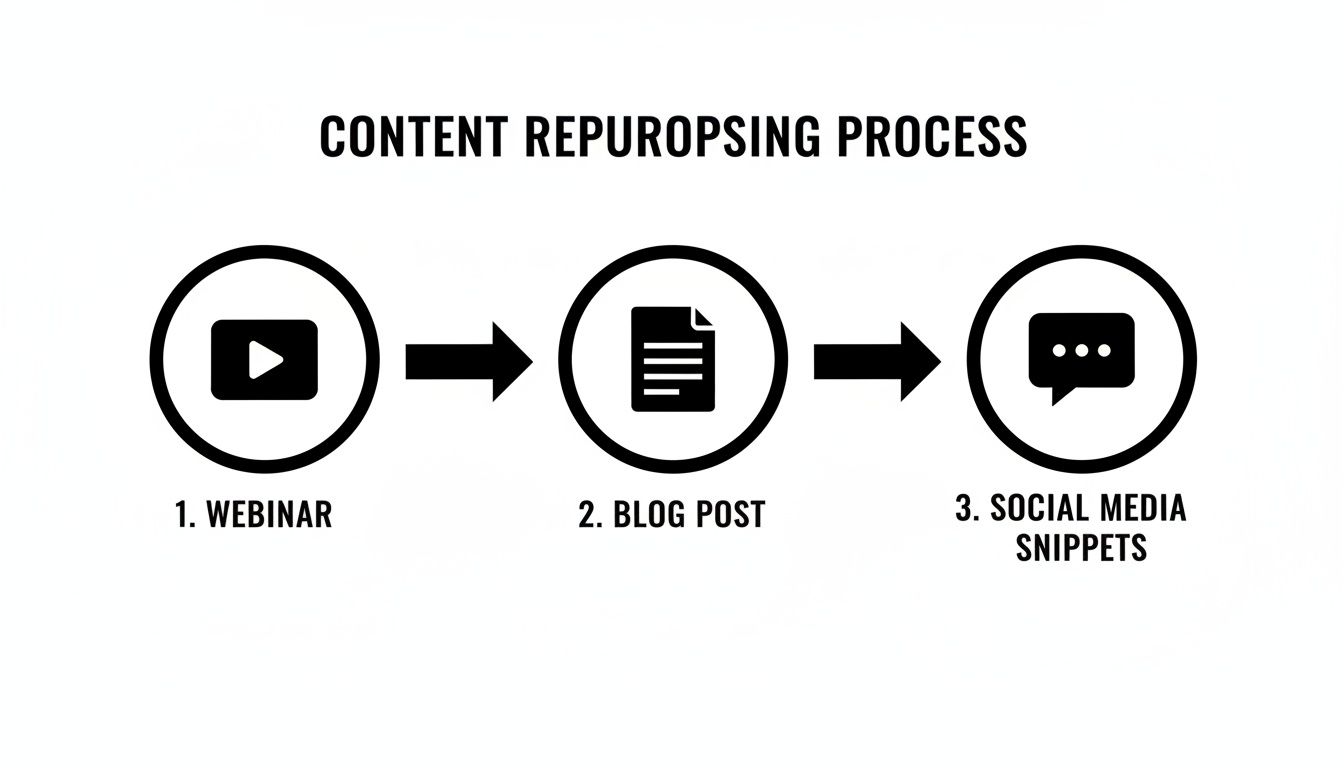
This visualizes how one big-ticket piece of content, like a webinar, can be systematically deconstructed into smaller assets for different channels. It’s a factory, not a one-off project.
This system isn't just about feeling organized; it's essential for scaling your efforts. The data backs this up, too. Nearly half of all marketers report that repurposed content actually performs better than net-new content. With content demands jumping by 40% every year, repurposing is no longer just a nice-to-have—it's a must-do to keep up.
Automate Your Distribution and Scheduling
Once your new assets are ready, the next bottleneck is getting them in front of your audience without burning hours on manual posting. Automation is your best friend here.
You can connect your Notion content calendar directly to social media scheduling tools. This lets you plan and automate posts weeks or even months out, ensuring you have a steady, consistent presence on platforms like LinkedIn, Twitter, and Instagram without the daily grind.
And don't forget email. Using NotionSender, you can take it a step further:
- Schedule email campaigns that drop snippets of your repurposed content right into your subscribers' inboxes.
- Trigger automated emails to share a new infographic or video clip with specific audience segments.
- Build a drip campaign that delivers pieces of a repurposed webinar over several days, keeping your audience engaged.
The goal is to build a centralized command center where you can manage the entire content lifecycle from one place. This integration—bringing email, project management, and content planning into a single workspace—is where the magic happens.
The point of a streamlined workflow is to make content repurposing a default part of your marketing, not an occasional chore. By leaning on templates and automation, you build a sustainable system that constantly gets more mileage out of your best work with very little manual effort.
By pairing a smart hub with distribution automation, you create a powerful engine that runs in the background. This frees you up to focus on the high-level strategy and creative work that truly moves the needle. If you want more ideas for making Notion your command center, check out our guide on 7 ways to use Notion to send emails and more.
Measuring the Real Impact of Your Repurposing Efforts
So you’ve turned one blog post into a dozen different assets. That feels great, right? It feels productive. But the real question is, how do you know if any of it is actually working?
A truly successful content repurposing strategy isn't about volume. It's about measuring what genuinely moves the needle for your business, not just chasing vanity metrics like a flurry of likes and shares.
<iframe width="100%" style="aspect-ratio: 16 / 9;" src="https://www.youtube.com/embed/m8CNuz3-lpA" frameborder="0" allow="autoplay; encrypted-media" allowfullscreen></iframe>
While engagement is a nice ego boost, it doesn't pay the bills. The entire point is to connect your repurposing efforts to tangible business outcomes. This means you have to shift your focus from those surface-level stats to the key performance indicators (KPIs) that actually reflect your bottom line.
Moving Beyond Vanity Metrics
It's way too easy to get caught up in the instant gratification of a post getting a ton of likes or a video racking up views. We've all been there. But those numbers rarely tell the whole story.
The real impact lives in the metrics that show a clear line from your repurposed content to a valuable customer action.
Instead of getting excited about views, start tracking the KPIs that signal genuine progress:
- Lead Generation: How many new email subscribers did that checklist you pulled from a blog post actually generate?
- Conversion Rates: Of the people who landed on your blog from that LinkedIn carousel, what percentage signed up for a demo?
- Audience Growth on Key Channels: Is your podcast—the one you created from webinar audio—steadily growing its subscriber base month over month?
These are the numbers that prove you're getting a real return on your investment (ROI). They show that your strategy isn't just creating noise; it's actively filling your sales pipeline and building an audience that sticks around.
The best measurement plans don't just count clicks and views; they trace the customer journey. You want to be able to prove that a specific repurposed asset directly led to a valuable action, like a lead magnet download or a free trial signup.
By zeroing in on these deeper metrics, you can confidently say which repurposing tactics are driving growth and which are just eating up your time. That kind of data-driven clarity is what separates a busy content team from an effective one.
How to Accurately Attribute Your Results
Attribution is one of the trickiest parts of measuring content ROI. How do you know for sure which piece of content gets the credit for a conversion?
Thankfully, there’s a simple but incredibly powerful tool for this: UTM parameters.
UTM parameters are just short bits of text you add to the end of a URL to track where your clicks are coming from. They let you see exactly which sources, mediums, and campaigns are driving traffic and conversions inside your analytics platform.
For example, when you share an infographic you made from a blog post on LinkedIn, your link might look like this:
yourwebsite.com/blog/your-post?utm_source=linkedin&utm_medium=social&utm_campaign=infographic-repurpose
This simple addition tells your analytics tool that anyone who clicks this specific link came from:
- Source: LinkedIn
- Medium: Social Media
- Campaign: The infographic repurposing effort
Setting up these parameters is a small task that provides massive insight. It allows you to definitively say things like, "Our repurposed infographic on LinkedIn generated 25 new leads last month." Without them, you're just guessing.
Creating a Powerful Feedback Loop
Ultimately, the goal of measurement isn't just to make a pretty report. It's to create a feedback loop that makes your entire content repurposing strategy smarter over time. The data you collect should directly inform what you do next.
Take a look at your results every quarter to spot patterns. Maybe you'll find that turning your blog posts into short video tutorials drives 50% more qualified leads than turning them into text-based Twitter threads. That’s a crystal-clear signal to double down on video.
Use this feedback to constantly refine your approach. By consistently tracking what’s working and what’s not, you can systematically optimize your repurposing, making sure you’re always putting your resources into the formats and channels that deliver the best possible results. This iterative process is what turns a good strategy into a great one.
Got Questions About Content Repurposing? Let's Talk.
Putting a content repurposing strategy into motion is one thing; making it stick is another. It's where the rubber meets the road that the real questions pop up. Over the years, I've seen the same practical hurdles trip people up, separating the strategies that look great in a slide deck from the ones that actually drive results.
Let’s get into the nitty-gritty and tackle some of the most common questions I hear. My goal here is to give you clear, no-fluff answers you can run with today.
How Often Should I Actually Be Repurposing Content?
Everyone wants a magic number, but there isn't one. A good rule of thumb, though, is to give your high-performing, evergreen content a major refresh every 6-12 months. I'm talking about a full-on repurposing cycle: update the stats, swap in new examples, and spin it off into formats you haven't tried before.
For the day-to-day stuff, like turning a brand-new blog post into social media snippets, you should do it right away. The moment the original piece is live, the clock is ticking.
The key is to think in terms of a distribution calendar. You can schedule different repurposed assets to go out across various channels for weeks, or even months. This gets you maximum mileage from a single piece of content without burning out your audience. A core "how-to" guide might get a big annual overhaul, while you can repurpose new customer testimonials the moment they come in.
What are the Biggest Repurposing Mistakes People Make?
The single biggest mistake? Lazy copy-pasting. Just taking a block of text from a blog post and dumping it into a LinkedIn update is a recipe for failure. A detailed, professional LinkedIn article and a casual, punchy Twitter thread are two different languages. Every platform has its own vibe and expectations—ignore that, and your content will fall flat.
Another classic error is trying to breathe life into dead content. If the original piece never resonated with your audience, why would a repurposed version? It’s a waste of time and energy. Always start with your proven winners—the posts, videos, or guides that already have traction.
And please, don't forget to update the original. If you’re repurposing a blog post from last year, take five minutes to check the data, fix broken links, and freshen up the examples. It keeps your entire content ecosystem credible and high-quality.
The whole point of repurposing is to amplify your best work, not to spread mediocrity. Fight the temptation to just "spray and pray." Be deliberate. Be strategic. Adapt your proven content to fit the unique context of each new platform.
Finally, a critical oversight is neglecting measurement. If you're not tracking which repurposed formats are actually moving the needle, you're just guessing. You have to know what works to get better over time.
We're a Small Team. How Can We Realistically Manage This?
For small teams or solo creators, the name of the game is ruthless prioritization. Don't even think about trying to repurpose every article into ten different formats. That's a one-way ticket to burnout.
Instead, get focused.
- One Pillar at a Time: Each month, pick just one high-performing piece of pillar content to work with. That's it.
- Pick 2-3 High-Impact Formats: Don't try to be everywhere. If you know you can knock a LinkedIn carousel and an email newsletter segment out of the park, stick to those.
- Embrace Efficient Tools: Templates are your best friend. A handful of pre-designed Canva templates for social graphics can literally save you hours.
Using a central hub like Notion is a game-changer for planning your workflow and keeping all your assets in one place. The goal is consistency over volume. A well-executed plan for one great piece of content will always beat a scattered, half-baked attempt at ten. Start small, build a system you can repeat, and you'll punch way above your weight.
Ready to build a streamlined, automated hub for your content strategy? With NotionSender, you can capture ideas, manage your content calendar, and distribute your repurposed assets through email—all from your favorite workspace. Start centralizing your content workflow today.

