
How to follow up with clients: Quick, proven tactics to close more deals
An effective follow-up is really just a simple, repeatable system: get the right message to the right person at the right time. This isn't about sending aimless "just checking in" emails. It's a strategic process built on three things: persistence, personalization, and providing value in every single interaction. When you get this right, following up stops feeling like a chore and becomes your best tool for closing deals.
Why Your Follow-Up Strategy Is Losing You Money
Let's be blunt: a weak or non-existent follow-up process is a massive hole in your business. This is about more than just sending a reminder; it’s about building a system that stops opportunities from falling through the cracks. Too many people pour all their energy into the initial pitch or meeting, then just sit back and hope the client will make the next move. That's a costly assumption.
The reality is your clients are swamped. Your proposal is just one of dozens of things on their plate. Without a gentle, thoughtful nudge from you, that great conversation you had can easily get buried and forgotten.
The Real Cost of Silence
Doing nothing is expensive. When you don't follow up, you're not just risking one deal. You're sending a message that you might not be that serious or organized. Over time, this quiet failure chips away at your reputation and leads to some serious financial losses.
In fact, it’s one of the biggest reasons businesses lose out. A staggering 41% of sales leaders in the US point directly to poor follow-up as the cause for losing accounts. That number alone shows just how critical consistent engagement is after the first chat. You can read more about the impact of customer retention strategies to see the full picture.
A follow-up is your chance to stay top-of-mind, build trust, and gently guide a client toward a decision. Each interaction is a building block in the relationship, proving you are a reliable and attentive partner.
Before we jump into the "how-to," let's lay a solid foundation. A great follow-up system isn't complex. It just needs to be smart, combining good timing, personal touches, and the right amount of persistence.
To make this crystal clear, I've broken it down into a simple framework.
The Four Pillars of an Effective Follow-Up Strategy
Think of these four pillars as the essential building blocks for any successful follow-up plan. They work together to turn promising conversations into closed deals. Once you get these down, you'll have a reliable process that keeps you connected with clients without ever feeling pushy or disorganized.
| Pillar | Key Objective | Example Tactic |
|---|---|---|
| Timing | Reach out when you're most likely to be top-of-mind. | Send a summary email within an hour of your meeting. |
| Channel | Use the communication method your client prefers. | Follow up a proposal email with a LinkedIn connection request. |
| Message | Provide new value, not just a reminder. | Share a relevant case study or a helpful article. |
| Frequency | Be persistent without being annoying. | Create a multi-touch sequence that spaces out contact. |
Mastering these four elements is the key to creating a system that not only works but feels natural for both you and your clients.
Finding the Perfect Follow-Up Timing and Cadence
Knowing exactly when to follow up with a client feels like it should be an art, but it’s really more of a science. The goal is simple: stay on their radar without becoming a nuisance. And honestly, the single biggest advantage you have, especially with new leads, is speed.
The best time to act is right after you've interacted with them. That first hour is when you have all the momentum. Responding within this "golden hour" after someone shows interest can be the difference between a closed deal and a completely missed opportunity. This is non-negotiable for initial inquiries.
The Power of Immediate Action
How much does timing really matter? A lot. Companies that get back to leads within five minutes are a staggering 100 times more likely to make contact and actually convert them. The drop-off after that is brutal. Waiting just a day can slash response rates by 11%, and after five days, your chances of getting any kind of reply plummet.
This isn't just about new leads, either. After a meeting or once you've sent a proposal, a quick follow-up shows you're on top of things, attentive, and serious about earning their business.
I always make it a rule to send a quick summary email within an hour of a meeting. It locks in the key points and outlines the next steps while the conversation is still fresh in everyone’s mind.
Structuring Your Follow-Up Cadence
A structured schedule, what we call a follow-up cadence, takes all the guesswork out of the process. Instead of wondering if it’s too soon or too late to reach out, you have a solid plan tailored to the situation.
Here’s a sample cadence you can steal and adapt:
- Day 1 (Post-Meeting): Within an hour, send that thank-you email. Keep it brief, summarize the discussion, and confirm what happens next.
- Day 3: Haven't heard back? Time for a gentle nudge. This is a great opportunity to add value—maybe share a relevant article or a case study you mentioned.
- Day 7: Switch up the channel. If you've only used email, a short, polite LinkedIn message referencing your email can work wonders.
- Day 14: Send another email, this time focused on a specific pain point from your meeting. Offer a quick thought or a potential solution they hadn't considered.
- Day 21: This is your "closing the loop" email. Politely ask if they're still interested or if their priorities have shifted. It’s a low-pressure way to get a final answer.
This multi-touch approach keeps you persistent without being pushy. Each touchpoint is a chance to provide more value, which is how you build trust. For even more control, you might look into mastering the art of scheduled texts to hit them at the perfect moment.
Just remember, most of the time, the sweet spot is between five and eight touchpoints. If you get radio silence after that, it's usually best to press pause and try again in a few months, unless you get a clear signal to keep going. This data-driven approach keeps your follow-up game strong and professional.
Crafting Follow-Up Messages That Actually Get a Reply
Let's all agree to stop sending the dreaded "just checking in" email. It's the laziest form of follow-up, and honestly, it rarely works. Every message you send is a chance to add real value and push the conversation forward, not just poke someone for a status update.
The whole game changes when you shift your mindset. Stop thinking about what you need (a reply, a signature, a decision) and start focusing on what they get. This simple switch turns your follow-up from a self-serving nudge into something they're actually happy to see in their inbox.
Go Beyond the Generic Template
Personalization is your secret weapon. A generic, copy-pasted message feels like it was blasted to a hundred other people—because it probably was. It's incredibly easy to ignore. A truly personalized email, on the other hand, proves you were paying attention and are genuinely invested.
It's not as hard as it sounds. You can do this by:
- Referencing a specific detail from your last conversation. "You mentioned you were struggling with X, so I thought of you when I saw this..." shows you listen.
- Sharing a genuinely useful resource. Found a new industry report, a killer article, or a case study from a similar company? Send it their way. It shows you're thinking about them outside of a sales context.
- Offering a small piece of advice or a quick thought that could help them right now. Keep it brief and to the point.
The best follow-up messages don't ask for something; they give something. This simple act of generosity builds trust and makes the recipient far more likely to engage.
This approach keeps you top-of-mind in a positive way. You become a resource, not a pest.
Subject Lines That Demand to Be Opened
Your subject line is the gatekeeper. It doesn't matter how brilliant your email is if it never gets opened. Vague, lazy subject lines like "Following Up" or "Checking In" are a one-way ticket to the archive folder.
Instead, get specific and compelling. Give them a reason to click.
Try a few of these frameworks:
- Question-Based: "A quick question about [Their Project Goal]"
- Value-Oriented: "A resource for your [Specific Challenge]"
- Next Steps: "Next steps for [Project Name]"
Clarity and context are everything. They should know exactly who it's from and what it's about before they even open it. If you want to really master this, check out our deep-dive guide on how to send the perfect email to get the response you want.
Frameworks for Common Scenarios
Having a couple of go-to frameworks saves a ton of time and mental energy. Here are a couple of real-world examples you can adapt.
The Gentle Nudge (3-5 days after a proposal)
This one is all about being helpful, not pushy. You're just making sure they have everything they need.
- Subject: Following up on the [Project Name] proposal
- Body: Hi [Name], Hope you’ve had a great week. Just wanted to follow up on the proposal I sent over on Tuesday. Do you have any initial questions I could help answer as you look it over? Also, this article on [Relevant Topic] made me think of our conversation about [Their Goal]—thought you might find it useful.
The "Closing the Loop" Email (after several attempts)
If you've sent a few follow-ups with no response, it's time to politely close the loop. This often gets a surprisingly fast reply because it gives them an easy out.
- Subject: Checking in on [Project Name]
- Body: Hi [Name], I'm following up one last time on our conversation about [Project Name]. I know how quickly priorities can shift. Are you still interested in moving forward? If now isn’t the right time, no problem at all—just let me know, and I’ll stop reaching out.
This final message is professional, respects their time, and puts the ball in their court. It's the perfect way to either re-engage them or cleanly close the file and move on.
Using Multiple Channels to Stay Top of Mind
Relying just on email to follow up is like trying to have a conversation in a crowded, noisy room. It’s way too easy to get lost in the shuffle. Your clients are everywhere—LinkedIn, email, maybe even on the phone—and your follow-up strategy needs to reflect that reality. A smart approach uses different channels to tell one cohesive story.
This isn’t about bombarding people from all sides at once. It’s about creating a natural, thoughtful sequence that feels helpful, not just noisy. Each channel has its own vibe and strengths, and a good plan makes them work together.
For example, you might kick things off with a detailed proposal sent via email. A day or two later, a LinkedIn connection request with a quick note referencing that email can work wonders. It’s a simple move, but it reinforces who you are and shows you’re on the ball.
Building Your Multi-Channel Sequence
Crafting a multi-channel sequence isn't about making things complicated for yourself; it's about stacking the odds in your favor. By diversifying your touchpoints, you meet your client where they are and make it almost impossible to forget you.
And it works. Really well. In fact, sales sequences that use three or more channels—like email, phone calls, and social media—see a 287% higher purchase rate than those that stick to a single channel. You can dig into the full impact of multi-channel outreach strategies to see just how powerful this is.
Here’s a blueprint for a 10-touch sequence you can adapt:
- Touch 1 (Day 1): Email the meeting recap or proposal.
- Touch 2 (Day 2): Send a LinkedIn connection request with a personal note.
- Touch 3 (Day 4): Follow up with a genuinely valuable resource (a case study, an article, a tool).
- Touch 4 (Day 7): Engage with their content on LinkedIn. A thoughtful comment, not just a "like."
- Touch 5 (Day 10): Send another follow-up email, this time with a new insight or idea.
- Touch 6 (Day 14): Pick up the phone for a brief, friendly call.
- Touch 7 (Day 15): If you left a voicemail, send a quick email referencing it. "Hey, just left you a quick message..."
- Touch 8 (Day 21): Share another helpful piece of content via email.
- Touch 9 (Day 25): Pop up on their LinkedIn again with another insightful comment or share.
- Touch 10 (Day 30): Send a final, no-pressure "closing the loop" email.
This kind of structured flow keeps you persistent without being annoying. Every step has a purpose and offers something new, showing you're consistently thinking about their needs.
Keeping Your Message Consistent and Valuable
It doesn't matter if you're sending an email, a LinkedIn message, or leaving a voicemail. The core of your message should always hit three key points: make it personal, add real value, and have a clear call to action.
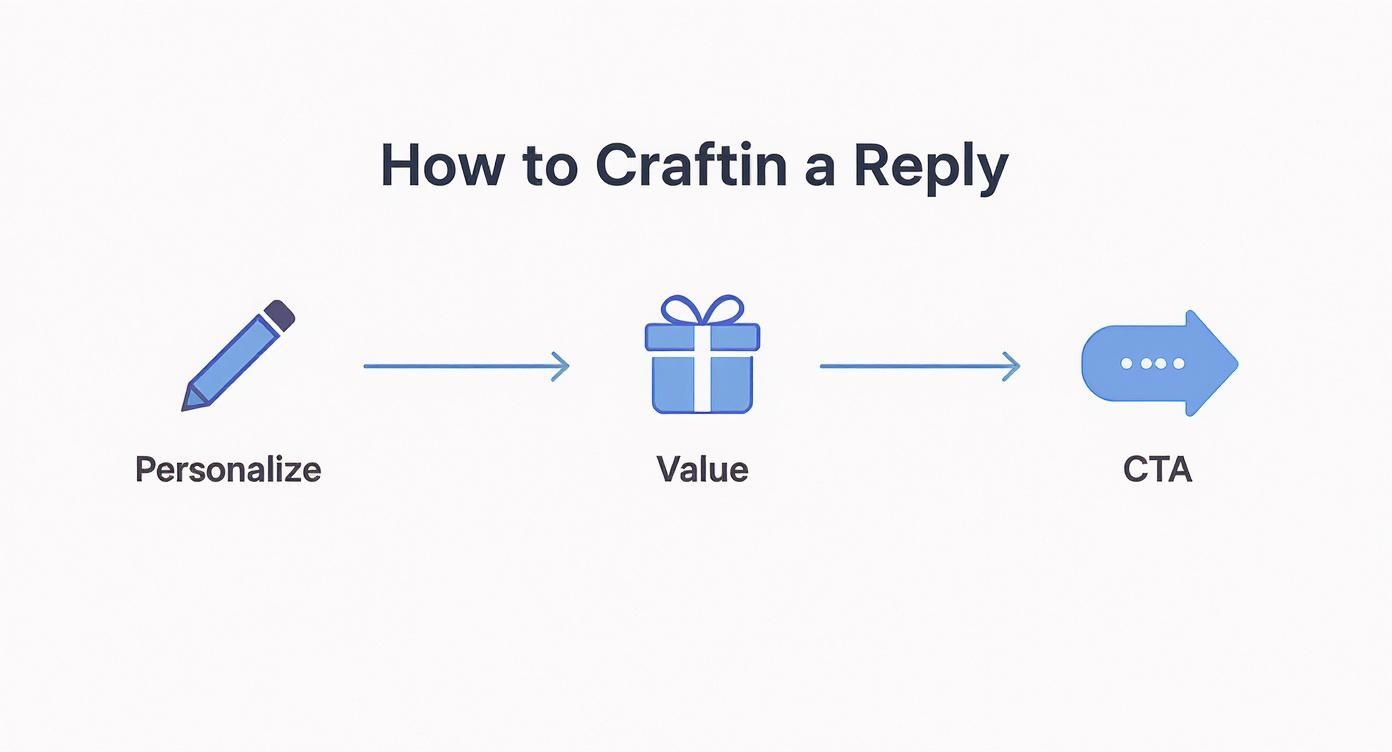
This simple framework is a great reminder that every touchpoint has to be more than just a "checking in" message. It needs to be a valuable interaction on its own.
Your goal is to become a welcome presence in their inbox and on their social feeds. When you consistently offer value, your follow-ups feel less like a sales pitch and more like a helpful partnership.
When you nail this, the entire dynamic shifts. You’re no longer just asking for an update; you’re actively contributing to their world, which makes them far more likely to respond and engage.
All the strategies we’ve talked about—the timing, the personalized messages, the multi-channel sequences—are incredibly powerful. But let's be honest, trying to juggle all of that manually in a spreadsheet is a surefire way to let great opportunities slip through the cracks. This is where we move from theory to practice and build an automated system that does the heavy lifting for you.
An intelligent follow-up system isn't about being lazy; it's about being smart. It works quietly in the background, freeing you up to focus on what you do best: building real relationships. With the right setup, you can create a bulletproof workflow that guarantees no client ever gets forgotten.
Building Your Client Hub in Notion
First things first, you need a central source of truth. A well-organized database is the bedrock of any good automation, and you can build a surprisingly powerful client relationship manager (CRM) right inside Notion. This isn't just a static contact list; it's a living dashboard that tells you exactly who to talk to, and when.
Your Notion client database needs a few key properties to make the automation tick. Think of them as triggers for your workflow:
- Last Contacted: A simple date property you update after every single interaction.
- Next Follow-Up: This is where the magic starts. Use a formula property that automatically calculates the next contact date based on your cadence (e.g.,
Last Contacted+ 7 days). - Status: A dropdown property to track where each client is in your pipeline (e.g., Lead, Proposal Sent, Onboarding).
With just these three properties, you get a bird's-eye view of your entire pipeline. No more guessing who needs your attention next.
Creating and Scheduling Emails with NotionSender
Once your database is dialed in, NotionSender acts as the bridge to your email. This is where you stop copy-pasting and start automating. Instead of manually typing out every message, you can build and save personalized email templates directly within your Notion workspace.
The real power comes from using Notion’s template expressions to pull client data right into your emails. A simple Hi @ClientName automatically populates the correct name for each recipient, making personalization a breeze. If you're new to this, you can learn how to create and send email from Notion to see just how straightforward the setup is.
With your templates ready to go, you can schedule emails to be sent based on that ‘Next Follow-Up’ date in your database. This means your perfectly timed messages go out like clockwork, without you having to lift a finger.
Keeping a Perfect Record of Communication
One of the biggest headaches with client follow-ups is losing the thread of a conversation. We’ve all been there, digging through old email chains trying to remember what was last said. It's inefficient and looks unprofessional.
An integrated system's key advantage is the ability to automatically save entire email threads back to the client's page in Notion. This creates a flawless, centralized record of every interaction.
Every reply and back-and-forth gets captured, giving you the complete context you need for your next touchpoint. You'll never have to hunt through your inbox again.
To really level up your process, it's worth exploring some of the impressive AI tools for automating follow-ups and nurturing leads available today. When you combine a solid organizational hub with smart automation, you’re not just sending emails—you’re building a follow-up machine that consistently turns conversations into conversions.
Measuring Your Follow-Up Success and Making It Better
<iframe width="100%" style="aspect-ratio: 16 / 9;" src="https://www.youtube.com/embed/MbRmRd5N_w4" frameborder="0" allow="autoplay; encrypted-media" allowfullscreen></iframe>
A great follow-up strategy isn't something you just set and forget. It has to evolve based on what's actually working. To make any real improvements, you have to measure what matters, and that means looking right past vanity metrics like simple open rates.
Real success is buried in the numbers that directly connect to your goals. Tracking the right KPIs creates a powerful feedback loop, letting you fine-tune your approach with hard data, not just guesswork.
Key Metrics to Track
So, what should you be watching? Here are the big three that tell the true story of your follow-up efforts:
-
Reply Rate: This is your north star. It’s the clearest signal of how many people are actually engaging with your messages. A low reply rate is a huge red flag that something in your messaging isn't connecting.
-
Conversion Rate Per Sequence: This metric answers the crucial question: how many people take the action you want (like booking a meeting or signing a proposal) after going through a full follow-up sequence?
-
Sales Cycle Length: Are your follow-ups actually speeding things up? Track the time it takes from your very first contact to a closed deal. If that number is shrinking, you're on the right track.
The name of the game is continuous improvement. The best way to do this is by A/B testing just one element at a time—whether it's your subject line or your call-to-action. It's the only way to get a clean read on what truly resonates with your clients and drives better results.
A great place to start is by testing your subject lines to see which variations get more people to click. If you need some inspiration, you can explore some proven email marketing tricks to increase your open rates and apply those same principles to your tests.
Common Follow-Up Questions Answered
Even with a killer strategy, some parts of the follow-up game can feel a little... awkward. We've all been there, wondering if we're crossing that fine line between persistence and just being plain annoying.
It's simpler than you think. The secret is to add value with every single interaction.
If each message you send offers a new resource, a fresh insight, or a relevant case study, you’re positioning yourself as a helpful partner. The annoyance factor kicks in when you just send those repetitive, self-serving "just checking in" emails that only ask for an update. Nobody likes those.
What If a Client Goes Silent?
It’s the classic scenario. You had a great conversation, you sent over the proposal, and then... crickets. It happens to the best of us.
When a client goes completely dark, it's time to switch up your game. After you’ve sent a few of those value-packed follow-ups and still heard nothing, the next move is to send a polite "closing the loop" email.
This message gives them an easy out and acknowledges that things might have changed on their end. Something simple like, "I know priorities can shift quickly. Are you still interested in this, or should I close the file for now?" often gets a surprisingly fast reply because it takes the pressure off. It’s a professional way to either restart the conversation or get the closure you need to move on.
Remember, a client’s silence is rarely about you. They’re juggling a dozen other priorities, and your proposal is just one piece of their puzzle. A well-crafted, respectful follow-up system keeps you on their radar without adding to their stress.
Finally, getting your tools right is what makes this all work consistently. You don't need some overly complex, expensive CRM to pull this off. Start with a solid foundation, like a client database in Notion, and connect it with an automation tool that can handle the scheduling and personalization. This kind of setup ensures no one ever slips through the cracks, freeing you up to focus on what really matters: building the relationship.
Ready to build a follow-up system that actually works? NotionSender plugs directly into your Notion workspace, letting you schedule personalized emails, save entire conversation threads, and put your whole client communication workflow on autopilot. Learn how to automate your follow-ups with NotionSender today.

