
Top picks for marketing automation software comparison: HubSpot vs Mailchimp
When you start comparing marketing automation software, you quickly notice a fundamental split in philosophy. On one side, you have the sprawling, all-in-one platforms like HubSpot and Mailchimp. On the other, you have focused, specialized tools like NotionSender that are built to deeply integrate with a specific workflow you already use.
The right choice for you has nothing to do with which is "better"—it's about whether you need a brand-new, standalone marketing machine or something that can supercharge your existing operational hub.
Why Your Business Needs Marketing Automation

Let's be honest, finding the right marketing automation software can feel like a monumental task. These platforms are so much more than fancy email senders. They're the engine that lets you build out sophisticated customer journeys, genuinely nurture your leads, and pull back the curtain on the data that should be guiding your every move.
This guide is here to cut through the noise. We're going to skip the generic feature lists and instead compare the top platforms based on what businesses like yours actually need.
The timing couldn't be more critical. The global marketing automation software market was valued at USD 7.23 billion in 2025 and is on a rocket ship trajectory, projected to hit USD 18.36 billion by 2030. That’s not just a trend; it's a fundamental shift in how modern marketing gets done. You can dig into more of the market's growth data on mordorintelligence.com.
Whether you’re a scaling business looking for an end-to-end solution or a creator who lives and breathes inside Notion, this breakdown will clarify the practical differences and help you land on the right fit.
Key Benefits of Marketing Automation
Picking the right platform isn’t just an expense; it’s an investment that pays real dividends, often immediately. Here’s what you stand to gain:
- Significant Time Savings: Imagine all the repetitive tasks—welcome emails, lead follow-ups, audience tagging—just happening. That’s what automation does. It frees up your team to think bigger.
- Personalization at Scale: You can finally send the right message to the right person at the right time. Automation lets you tailor content based on actual user behavior, making every customer feel understood.
- Improved Lead Nurturing: Gently guide potential customers from curious onlookers to happy buyers. Targeted, timely communication builds the trust needed to make a sale.
- Data-Driven Decision Making: Stop guessing. Get a clear view of what’s working and what’s not, from campaign performance to customer lifetime value, so you can double down on your wins.
A classic mistake is getting wowed by a platform with a million features you'll never use. A much smarter approach is to pinpoint your biggest bottleneck—is it lead nurturing? Workflow chaos? Content management?—and find the tool that solves that one thing exceptionally well.
The rest of this guide dives deep into a side-by-side comparison, looking at the major players through the lens of specific, real-world business needs.
| Platform Type | Primary Focus | Ideal User Profile |
|---|---|---|
| All-in-One Hub | Comprehensive CRM, sales, and marketing features | Scaling businesses needing a unified system. |
| Email-Centric | Powerful email campaign and list management | Small businesses focused on direct marketing. |
| Workflow-Integrated | Deep connection with a productivity tool | Creators and teams who manage their work in one hub. |
Core Criteria for Evaluating Automation Software

Starting a marketing automation software comparison without a clear checklist is a lot like grocery shopping when you’re starving—you’ll grab everything that looks good and end up with a cart full of stuff you don’t actually need.
To make a smart choice, you first have to define what's non-negotiable for your business. This isn't about chasing the longest feature list. It's about finding a tool that provides real, practical value day-to-day.
The right software shouldn't force you to overhaul your entire process. It should slide right into your existing workflow and make it better. This is especially true if your team lives and breathes in a tool like Notion. How well a platform connects to your current tech stack is a massive deal.
Automation and Workflow Depth
At the end of the day, marketing automation is all about building smart, trigger-based workflows. Don't just ask if a platform does automation; ask how deep it really goes. Can you build complex, multi-branch journeys based on actual user behavior, or are you stuck with basic, one-track email sequences?
A genuinely powerful workflow builder lets you do things like:
- Set complex triggers: For example, firing off an email when a user visits the pricing page twice but doesn't sign up.
- Use conditional logic: Creating "if this, then that" splits that send users down different, more relevant paths.
- Integrate external actions: Like automatically updating a contact's status in your CRM the moment they click a specific link.
The whole point is to map your ideal customer journey inside the tool. If the platform's logic can't handle your strategy, it’s the wrong fit, no matter how slick its other features are. This single capability directly impacts how well you can nurture someone from a curious visitor into a paying customer.
Your evaluation shouldn't be about finding the tool with the most automation triggers. Instead, focus on finding the one with the right triggers that align perfectly with your specific sales cycle and customer touchpoints.
Segmentation and Personalization Power
Great marketing is sending the right message to the right person at the right time. A platform’s segmentation engine is what makes that possible. It determines just how precisely you can slice and dice your audience.
Some tools only offer basic segmentation, like filtering by city or sign-up date. The best systems, however, let you create ultra-specific segments based on granular behavioral data.
Look for the ability to segment contacts based on:
- Email engagement (who opened, who clicked, who replied)
- Website activity (specific pages viewed, time spent on site)
- Purchase history and where they are in your sales funnel
- Custom tags and properties that you define yourself
This level of precision is what fuels real personalization—the kind that goes way beyond just using a contact's first name in the subject line.
And while you're looking at email features, it’s critical to understand why marketing emails land in spam. A platform's delivery reputation and technical setup can make or break whether your carefully crafted campaigns ever get seen. For more on this, check out our guide on how to increase your open rates with these 10 email marketing tricks.
By focusing on these core criteria—workflow depth, segmentation power, and seamless integration—you can confidently pick a tool that will truly help grow your business.
HubSpot vs. Mailchimp: A Nuanced Comparison
Putting HubSpot and Mailchimp head-to-head isn't just about comparing features; it's about understanding two completely different marketing philosophies. HubSpot is built as an all-in-one growth platform, while Mailchimp is a powerhouse email tool that has bolted on other features over time. This single distinction is the key to figuring out which one is right for you.
A direct marketing automation software comparison quickly shows that HubSpot revolves around its central CRM. Every automation, every campaign, every little interaction is designed to funnel data back into a unified contact record. Mailchimp, on the other hand, grew out of the email list, so its core strength will always be in creating and managing fantastic email campaigns.
The right choice really boils down to your business model. Are you a B2B company with a long, complex sales cycle that needs deep lead intelligence? Or are you a creator or e-commerce brand focused on building a loyal audience with incredible emails? Your answer points directly to the right platform.
Automation Workflow and Journey Building
The biggest hands-on difference between HubSpot and Mailchimp is the depth of their workflow builders. HubSpot’s journey builder is a visual, multi-branching canvas made for complicated, non-linear customer paths. It pulls together actions across email, your website, social media, and even your sales team.
For instance, a B2B marketer on HubSpot could create a workflow that:
- Kicks off when a contact downloads an ebook.
- Waits three days, then sends a follow-up email with a case study.
- Uses an "if/then" branch to see if the contact visited the pricing page.
- If they did, it automatically creates a task for a salesperson in the CRM.
- If they didn't, it sends them another piece of content to keep them engaged.
Mailchimp’s automation is powerful in its own right, but it's much more linear and email-centric. Its "Customer Journeys" are perfect for automated email sequences like welcome series, abandoned cart reminders, or re-engagement campaigns. You can set up triggers and rules, but the logic is simpler and stays mostly within the world of email.
HubSpot is king when it comes to orchestrating complex, multi-channel B2B sales cycles where sales and marketing have to be perfectly aligned. Mailchimp absolutely shines at driving e-commerce sales and audience engagement through smart, trigger-based email sequences.
Segmentation and Audience Intelligence
Both platforms give you robust segmentation tools, but they come at it from different angles. HubSpot’s segmentation is welded to its CRM, letting you build lists based on a nearly infinite mix of demographics, website activity, sales deal stages, and any custom data you can think of.
You can get hyper-specific, creating lists like, "Contacts in the tech industry who watched our demo video but haven't been contacted by sales in 30 days." This is only possible because every scrap of data lives in one system, which is vital for businesses that need to see the entire customer lifecycle.
Mailchimp’s segmentation is also highly capable but is laser-focused on e-commerce and email engagement. You can easily segment users by their purchase history, campaign engagement (opens, clicks), and even predicted demographics. This makes it a beast for an online store that wants to send a special offer to customers who have purchased twice but haven't bought anything in the last 90 days.
HubSpot vs. Mailchimp: A Practical Breakdown
When you're deciding between these two, it's less about which is "better" and more about which is better for a specific job. One is a full toolbox, the other is a specialized power tool. This table breaks down their core differences based on what you’re trying to achieve.
| Feature Category | HubSpot Analysis | Mailchimp Analysis | Best For |
|---|---|---|---|
| Workflow Automation | Multi-channel, complex branching logic, CRM-integrated tasks. | Primarily email-focused, linear sequences, strong e-commerce triggers. | B2B companies with long sales cycles. |
| Segmentation | Deep CRM data, lifecycle stages, website activity, sales data. | Purchase history, email engagement, predictive demographics. | E-commerce stores and content creators. |
| Analytics | Full-funnel attribution, revenue reporting, campaign influence. | Email-specific metrics, A/B testing, audience growth tracking. | Teams needing to prove marketing ROI. |
| Core Philosophy | An all-in-one CRM and growth platform. | A powerful email marketing and audience engagement tool. | Businesses wanting one system of record. |
Ultimately, choosing between them is a strategic decision. If your business depends on building deep customer relationships over time, HubSpot’s all-in-one approach is tough to beat. But if your main goal is driving results through expertly crafted emails, Mailchimp offers a more focused and powerful tool for that specific job.
Analytics and Campaign Reporting
When you look at analytics, the difference is night and day. Mailchimp provides best-in-class email marketing reports. You get clean, detailed insights on open rates, click-through rates, and audience growth, making it simple to see which campaigns are hitting the mark.
HubSpot’s reporting goes way beyond email metrics into full-funnel attribution. Because it ties marketing actions directly to sales outcomes in the CRM, it can answer the big-picture questions. You can build a report showing exactly how much revenue was generated from a specific blog post or ad campaign. For marketers who need to prove their direct financial impact, this kind of closed-loop reporting is a game-changer.
Comparing Pricing Models and Integration Ecosystems
A platform’s flashy features don’t mean a thing if the pricing guts your budget or it refuses to talk to the tools you already use every day. When you get down to it, the real make-or-break factors in any marketing automation software comparison are the total cost of ownership and how well the tool plays with others. These two things decide if you’re setting yourself up for an affordable win or a long-term headache.
Looking at pricing is never just about the number on the homepage. Many platforms reel you in with a low entry price, but the costs scale aggressively based on your contact list, how many emails you send, or which features you actually need. What looks like a bargain today can quickly become a major line item on your expense report as your business grows.
Dissecting the Total Cost of Ownership
HubSpot and Mailchimp give us a perfect look at two different pricing philosophies, and both have their own trap doors and hidden costs. Getting a handle on these nuances is the only way to accurately forecast what you’ll really be spending.
HubSpot’s pricing is all about feature tiers, built around its massive Marketing Hub. Those starter plans? They’re often just a ramp-up to a much bigger financial commitment. The real automation and CRM magic is locked away in the Professional and Enterprise tiers, which can easily jump your bill to $890 per month or more. It’s an incredibly powerful all-in-one system, but it demands a serious investment.
Mailchimp, on the other hand, ties its pricing almost entirely to your contact count. Its initial plans feel much more accessible, but the costs can spike as your list grows. The moment your business ticks over from 10,000 to 11,000 contacts, you could be looking at a sudden, steep price hike that changes the entire value proposition.
The most common pricing trap is underestimating your own growth. Always look at a platform's pricing tiers two steps ahead of where you are right now. A tool that’s a steal today might be unsustainable in 12 months if its costs scale faster than your revenue.
Just as important as cost is connectivity. To really compare platforms, you have to dig into their available integration ecosystems. A tool's ability to sync with your other software is what keeps your data flowing and prevents frustrating information silos.
Evaluating Integration Capabilities
Your marketing automation platform should be the central hub of your tech stack, effortlessly connecting all the moving parts. The quality of these connections can make or break your team's efficiency. HubSpot and Mailchimp both have huge marketplaces with hundreds of integrations.
HubSpot really shines with its deep, native integrations, especially with heavy hitters like Salesforce and e-commerce giants like Shopify. Its real strength is creating a true two-way data sync. This enriches your contact profiles with data from all over, giving you a single source of truth for every customer.
Mailchimp also has a solid library of integrations, particularly for e-commerce and CMS platforms. The catch is that more advanced connections often lean on third-party tools like Zapier. This adds another subscription cost and another potential point of failure to your workflow.
The Critical Notion Integration Question
For any team that lives and breathes in Notion, the integration story gets a lot more personal. You need a seamless bridge between your marketing platform and your workspace. Anything less is just a source of friction.
Here’s how the big players handle this specific challenge:
- HubSpot and Notion: There’s no official, native integration here. To connect them, you’re forced to use a third-party connector. It might work for simple data dumps, but it falls short when you want to trigger complex automations directly from a change in a Notion database.
- Mailchimp and Notion: It’s a similar story. Getting Mailchimp and Notion to talk requires a middleware service. This setup often feels clunky, with delayed data syncs or manual steps that slow down a fast-paced workflow.
This is precisely where a purpose-built tool like NotionSender stands apart. It was created specifically to solve this problem, offering a deep, native connection that effectively turns your Notion database into a full-blown marketing automation engine. For teams that want to build their own custom workflows, NotionSender even provides detailed API documentation to learn more about its capabilities.
NotionSender: The Workflow-Centric Alternative
While giants like HubSpot and Mailchimp are busy building sprawling, all-in-one marketing empires, a different kind of tool has been quietly taking shape. Instead of asking you to migrate your entire operation into their world, these workflow-centric platforms integrate deeply into the tools you already use every day.
This is exactly where NotionSender carves out its space in the marketing automation software comparison. It’s not trying to be another HubSpot. It offers a powerful, elegant solution for a very specific—and rapidly growing—group of people.
Its entire value proposition is built on a native, seamless connection to Notion. For the millions of freelancers, content creators, and agile teams who run their entire lives out of Notion—managing CRMs, projects, and content calendars—this is a genuine game-changer. NotionSender turns a standard Notion database into a surprisingly dynamic marketing engine.
This approach flips the traditional model on its head. You’re not exporting contacts to a separate platform anymore; you’re managing everything from the workspace you’re already in. This isn't just a matter of convenience; it’s a fundamental workflow upgrade that tears down data silos and keeps your team perfectly in sync.
Turning Your Notion Database Into a Campaign Engine
The core idea behind NotionSender is deceptively simple but incredibly powerful: send personalized emails and automated campaigns directly from your Notion databases. This means your contact list, customer CRM, or project tracker is your mailing list. No more clunky CSV imports or fighting with unreliable third-party connectors.
Picture a freelancer managing their client pipeline in a Notion database. With NotionSender, they can set up a workflow where changing a client’s status from "Proposal Sent" to "Follow-Up" automatically triggers a pre-written, personalized email. This is true automation, built right on top of the systems you already have.
NotionSender’s philosophy is clear: your marketing tool shouldn’t force you into a new ecosystem. It should elevate the one you’ve already meticulously built. This focus on deep integration over broad functionality is what sets it apart.
This tight integration also makes a huge difference for personalization. You can pull any property from your Notion database—a client's name, a project title, the last contact date—and use it as a dynamic field in your emails. This opens the door to a level of context-aware communication that all-in-one platforms often struggle to match without a ton of custom setup.
Use Cases for the Notion-Centric Professional
So, where does a specialized tool like NotionSender really outshine the competition? The answer is in any scenario where Notion is the undisputed source of truth. Its focused design makes it the better choice for specific, high-value tasks that bigger platforms tend to overcomplicate.
Think about these real-world examples:
- Content Creators and Course Builders: A creator can manage their entire email course from a single Notion database. Each row is a lesson, and NotionSender automatically drips them out on a pre-set schedule to a subscriber list that also lives in Notion.
- Freelancers and Small Agencies: A project manager can trigger status update emails just by dragging a client's card to a new "Project Stage" in their Notion board. This keeps clients in the loop without adding another manual task to their plate.
- Small Businesses with a Notion CRM: A sales team can use NotionSender for automated lead nurturing. When a new contact gets added to their Notion CRM, a welcome email series can kick off instantly, with all the engagement data syncing right back to the contact’s Notion page.
For anyone who has ever found themselves wishing they could just create and send an email directly from Notion, this tool is the definitive answer. It’s built on the premise that your operational hub and your marketing tool should be one and the same.
The Verdict: When to Choose NotionSender
The right choice really depends on your situation. If you’re building a large marketing and sales department from scratch and need a single, all-encompassing system, HubSpot is built for that kind of scale. If your main goal is running polished, e-commerce-focused email campaigns, Mailchimp offers an incredibly effective solution.
However, if your entire business workflow—from project management and content planning to client relations—already lives inside Notion, NotionSender isn't just another option; it's the most logical and efficient choice. It enhances the processes you already have instead of forcing you to learn new ones, making it the perfect tool for professionals who value integration and workflow coherence above all else.
Making a Confident Software Decision
<iframe width="100%" style="aspect-ratio: 16 / 9;" src="https://www.youtube.com/embed/hxDvCZ8LrJQ" frameborder="0" allow="autoplay; encrypted-media" allowfullscreen></iframe>
Alright, let's pull all this together. Picking the "best" marketing software isn't about finding the one with the most bells and whistles. It's about finding the one that solves your biggest headache, fits your budget, and slots neatly into how you already work.
Forget the endless feature lists for a moment. The real decision boils down to a simple question: does this tool address my most pressing bottleneck right now? A clear line exists between all-in-one platforms and laser-focused tools. Each has its place, and your choice should be a reflection of your team's size, your technical comfort level, and what you're actually trying to accomplish.
Matching the Platform to Your Profile
To cut through the noise, let's map each platform to the people who will get the most out of it. These aren't just guesses; they're based on real-world situations we've seen time and time again.
-
For B2B Companies Needing a Single Source of Truth: HubSpot is the undisputed king here. If you need marketing, sales, and customer service teams all singing from the same hymn sheet, this is your platform. Its power comes from the integrated CRM, giving you a 360-degree view of the entire customer journey. When aligning teams and proving ROI is the name of the game, HubSpot has the muscle.
-
For Small Businesses & Creators Focused on Email: Mailchimp is your go-to. If your world revolves around building a loyal audience through email, it's hard to beat. It’s perfect for e-commerce shops, bloggers, and small businesses that live and die by their newsletters and campaigns. You get best-in-class email editing, templates, and analytics without the complexity of a full-blown marketing suite.
-
For Professionals Who Live and Breathe Notion: This is where NotionSender shines. It’s built for one specific purpose: to empower people who already run their entire workflow inside of Notion. It doesn’t try to pull you into a new ecosystem; it plugs directly into your existing one, turning your databases into a powerful, automated communication machine.
This decision tree helps visualize how to pick the right path based on your core business focus.
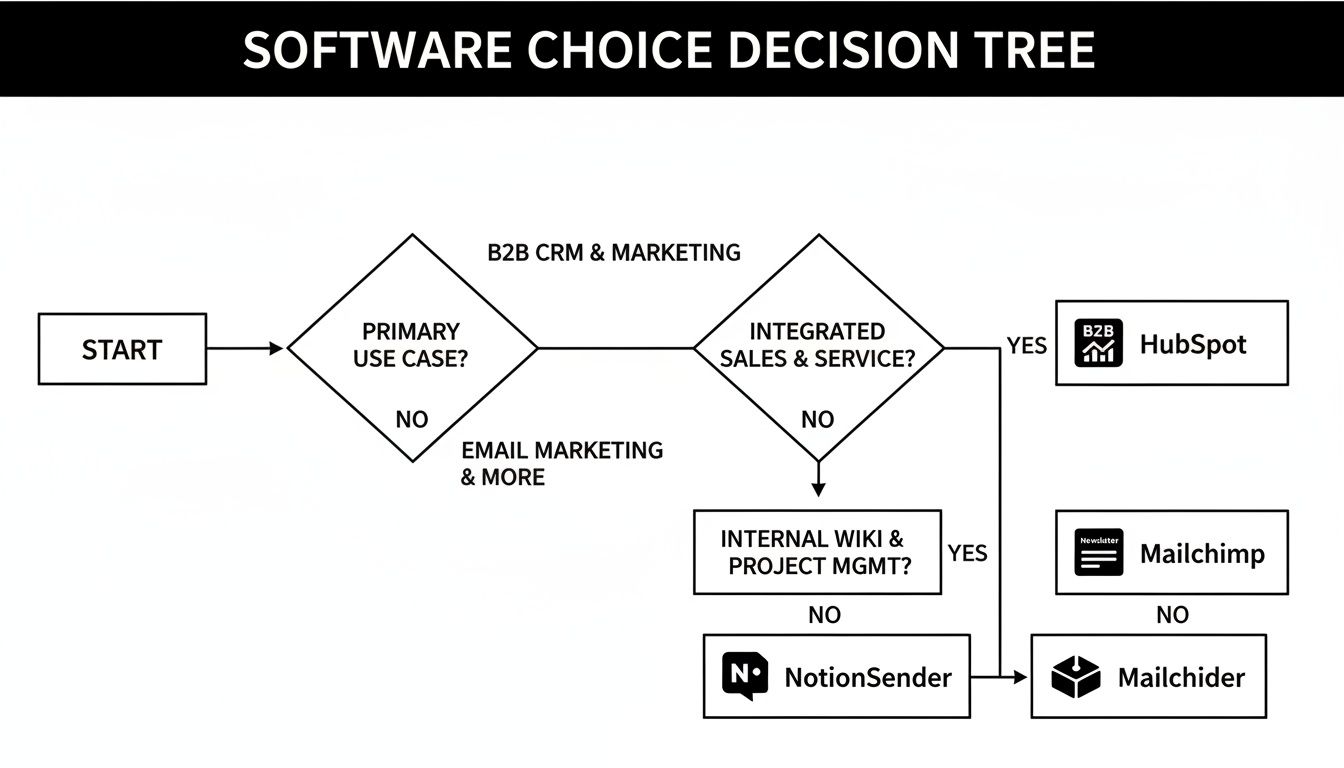
As you can see, the right tool aligns directly with your primary objective—whether that's complex B2B growth, direct-to-consumer email, or supercharging the workflow you already have.
The smartest move is to pick the software that pours gasoline on your existing fire. Don't force your team to learn a completely new way of working unless you're truly ready for that kind of massive project.
Ultimately, you’ll feel confident in your choice when the platform feels like a natural extension of your strategy. Match the tool to your goals, and you'll get the return you're looking for.
Common Questions, Answered
When you're comparing marketing automation tools, a few key questions always seem to pop up. It's easy to get lost in feature lists, but what really matters is finding the right fit for how you work right now and where you plan to go. Let's tackle some of the most common sticking points.
All-In-One vs. Niche Tools
The biggest fork in the road is choosing between a sprawling, all-in-one platform and a specialized, niche tool. It’s a fundamental difference in philosophy.
Platforms like HubSpot want to become the central nervous system for your entire business—marketing, sales, customer service, the works. They offer a massive suite of features designed to work together under one roof. On the other hand, a niche tool like NotionSender isn't trying to replace your whole stack. Its entire purpose is to do one thing exceptionally well: integrate deeply with your existing Notion workflow.
The right choice comes down to a simple question: Do you need a brand-new, self-contained operating system, or do you need a powerful plugin that enhances the system you already love?
Knowing When You Need Automation
So, when is the right time to pull the trigger on automation? The signs are usually pretty clear. You’re ready when the manual, repetitive tasks start feeling less like work and more like a bottleneck. If your team is spending hours every week sending welcome emails, manually segmenting contacts, or chasing down leads, automation will give you that time back almost immediately.
Another tell-tale sign is when your audience grows just past the point where you can keep things personal. You know you should be sending tailored messages, but you simply don't have the bandwidth to do it for everyone by hand. That's the sweet spot. Software can handle the heavy lifting of personalization at scale, letting you maintain that high-touch feel as you grow.
The moment you realize you don't have the data to actually understand your customer journey is the moment you need automation. A good platform doesn't just send emails; it gives you the insights you need to make your entire funnel smarter.
Switching Platforms in the Future
What if you outgrow your first choice? Let's be honest, changing your marketing automation software is a serious undertaking, but it's far from impossible. The real work is in the migration—moving contact lists, rebuilding your automated workflows, and getting your campaign history from one system to another. It can be a headache.
Because of that, it's always smart to think about scalability from the start. Picking a tool that has room to grow with you is almost always better than planning to switch in a year or two. But if your needs fundamentally change, most modern platforms have solid data export tools to help you make the move.
Ready to turn your Notion workspace into a powerful marketing engine? NotionSender offers the deepest integration available, letting you manage campaigns without ever leaving your workflow. Get started for free today!

