
Marketing automation software for small business: Boost Growth with Workflows
Imagine having a tireless team member who works 24/7. This person welcomes new customers, follows up with leads, and personalizes every conversation without ever taking a coffee break. That’s the real power of marketing automation for a small business.
It's not about replacing you. It's about cloning your best efforts so you can actually scale.
What Is Marketing Automation and Why Does It Matter

Think of marketing automation as your digital assistant. It's simply software that takes care of all those repetitive marketing tasks for you. It handles the time-consuming jobs that are crucial for growth but often get pushed aside when you're busy running the show.
This isn't some complex, big-company luxury anymore. For small teams, it’s a survival kit.
Instead of manually sending every single welcome email or trying to remember who to follow up with, you set up rules and workflows that do it automatically. This is how you deliver timely, personalized messages to your audience at scale—something that used to require a whole marketing department.
The Shift from Manual to Automated
For years, only massive corporations could afford the leg-up that automation gives you. But today, accessible and genuinely user-friendly marketing automation software for small business has completely leveled the playing field.
This shift couldn't have come at a better time, because customers now expect personalized interactions, whether they're dealing with a global brand or the local shop down the street.
Here’s how automation bridges that gap for you:
- Consistency: Every new subscriber gets the same high-quality welcome, building trust from the very first interaction.
- Efficiency: You can easily free up dozens of hours a week. That's more time to focus on strategy, new products, or building real customer relationships.
- Personalization: The software can segment your audience based on what they do, letting you send targeted offers to people who are already interested—all without lifting a finger.
The bottom line is, marketing automation lets a small business punch far above its weight. It makes sure no lead is ever forgotten and no opportunity gets missed, creating a system for growth that works even when you aren't.
A Practical Example of Automation
Let's make this real. Imagine someone signs up for your newsletter. Without automation, that new lead might just sit in a list, waiting for you to find time to send a campaign.
With automation, a pre-built "welcome series" kicks in immediately.
The system sends a welcome email instantly. A few days later, it might send another one highlighting your best-selling products. If that person clicks on a specific product link, the software can automatically "tag" their profile with that interest.
This simple action paves the way for future, highly relevant promotions. The entire nurturing process happens on autopilot, guiding a potential customer toward a purchase while you focus on other things. It’s this ability to build relationships at scale that makes it a game-changer.
Tangible Benefits of Automation for Your Business
Jumping into a new tool can feel like a leap of faith, but the right marketing automation software isn't about abstract ideas—it’s about delivering real, measurable results. It directly tackles the most common headaches small businesses face: never enough time, tight resources, and the constant struggle to keep up with bigger players. By automating key tasks, you’re basically building a growth engine that works for you 24/7.
This isn't just about shaving off a few minutes here and there. It's about completely changing how you operate, giving you back dozens of hours every single week. Imagine what you could do with that time—brainstorm new products, perfect your services, or personally connect with your most important customers.
Boost Your Lead Generation and Nurturing
Every single person who visits your website or signs up for your newsletter is a golden opportunity. But without a system, it's easy for these leads to slip through the cracks. A busy week hits, follow-ups get forgotten, and a warm prospect goes cold.
Marketing automation acts as your always-on safety net. It makes sure every new lead is captured, welcomed, and guided along a thoughtful path.
- Immediate Engagement: The second someone subscribes, they get a welcome email. This makes a professional first impression right when their interest is at its peak.
- Consistent Follow-Up: You can build a workflow that sends a series of helpful emails over a few days or weeks, educating them about your brand and moving them toward a purchase—all without you lifting a finger.
- Behavioral Targeting: The software can see which links a lead clicks and automatically sort them based on what they're interested in. This opens the door for much more personal and effective messages down the road.
By setting up an automated system for lead nurturing, you guarantee no opportunity is missed. You build a consistent pipeline of engaged prospects who feel seen and understood, which dramatically increases the odds they'll become customers.
Increase Sales Productivity and Reduce Overhead
For a small team, efficiency is everything. Automation supercharges your sales efforts by taking over the repetitive, administrative grunt work, freeing you and your team to focus on what you do best: closing deals. When follow-ups, reminders, and initial outreach are all on autopilot, productivity just naturally goes up.
The numbers back this up. Small businesses using marketing automation see a 14.5% jump in sales productivity and also manage to cut their marketing overhead by 12.2%. This kind of efficiency helps level the playing field, allowing smaller companies to operate with the same precision as much larger organizations.
Understanding the financial impact is key, and you can dig deeper into calculating your email marketing return on investment to see the full picture.
Deliver Personalized Experiences at Scale
Today's customers expect to be treated like individuals. They want to feel like you get them, not like they're just another email address on a massive list. For a small business, trying to provide that one-on-one attention manually becomes impossible as you grow.
This is where automation is a game-changer. It lets you deliver highly personalized experiences to hundreds or even thousands of people all at once.
- Customer Segmentation: Automatically group customers based on things like their purchase history, where they live, or how engaged they are. A local coffee shop, for instance, could send a special offer only to customers living within a five-mile radius.
- Dynamic Content: Change parts of an email based on who's receiving it. An e-commerce store can show product recommendations based on what a customer has bought before.
- Milestone Emails: Celebrate customer anniversaries or birthdays with automated, personal messages that build loyalty and make your brand feel more human.
With automation, you can design a customer journey that feels personal and attentive from start to finish. This doesn't just improve the customer experience; it drives repeat business and helps build a loyal community around your brand—the foundation for any long-term success.
Core Features Every Small Business Platform Needs
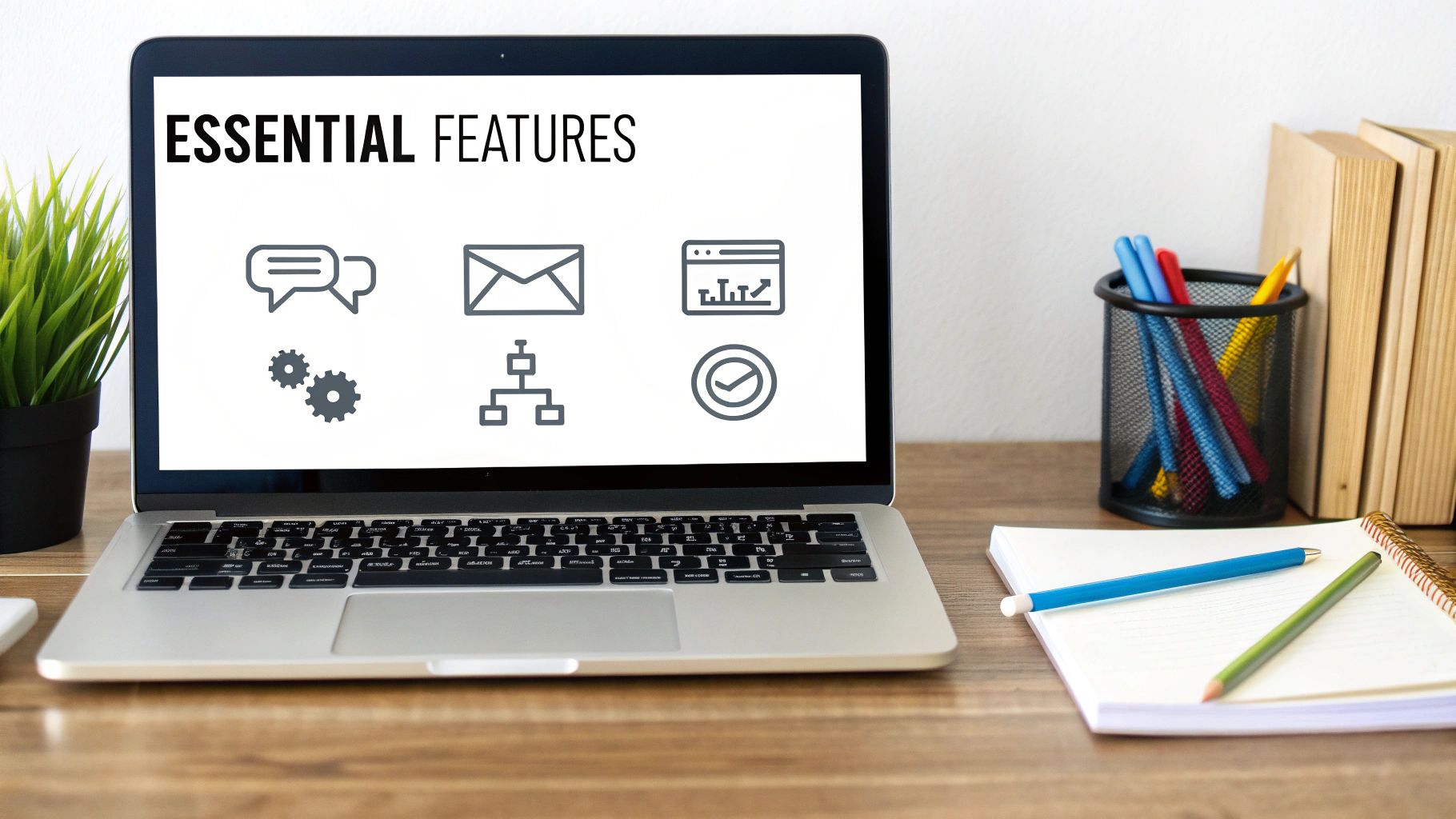
When you're shopping for marketing automation software, the sheer number of options can feel overwhelming. It's easy to get lost in a sea of technical jargon and flashy features you'll probably never use.
The secret isn't finding a tool that does everything. It’s about finding the one that does the right things for your small business. Forget the complicated machinery; think of it as hiring a small, hyper-efficient digital team that works around the clock.
To make the right hire, you first need to define the roles you need to fill. A great platform should act as your tireless email marketer, your organized lead coordinator, and your sharp-eyed data analyst, all rolled into one. Let's break down the must-have features that will actually make a difference.
Powerful Email Marketing Automation
At its core, marketing automation is all about smart communication. This feature is the engine of your entire email strategy, letting you build automated sequences—often called "drip campaigns"—that run on their own. We're talking about something way more powerful than just blasting out a monthly newsletter.
This is the tool that lets you create a welcome series for new subscribers, sending a perfectly timed chain of emails to introduce your brand and build trust from day one. You can set up educational mini-courses, nurture leads over several weeks, or follow up with customers after a purchase. It ensures every single person gets a consistent, thoughtful experience, no matter when they find you.
There are many ways to manage this, and a great way to centralize the process is by exploring the 7 ways to use Notion to send emails.
Lead Management and Scoring
New leads are the lifeblood of any growing business, but let's be honest—not all leads are created equal. Lead management gives you a central hub to capture, track, and organize every prospect so no one falls through the cracks or gets lost in a messy spreadsheet.
Lead scoring takes this to the next level. Think of it as a built-in radar that highlights which leads are hot and which are just browsing. The system automatically assigns points to leads based on the actions they take:
- Visited your pricing page? +10 points.
- Opened three of your emails this week? +5 points.
- Filled out your "Request a Demo" form? That's a big one. +20 points.
Once a lead’s score hits a certain threshold, the system can automatically flag them for your sales team. This simple process ensures you’re always focusing your energy on the people who are closest to making a decision.
Customer Segmentation Capabilities
Sending the same generic message to your entire email list is a surefire way to get tuned out. Customer segmentation is the ability to slice your audience into smaller, highly-targeted groups based on their behavior, interests, or demographics. It's the key to making your marketing feel personal, not robotic.
Segmentation is the difference between shouting a generic message into a crowd and having a quiet, relevant conversation with an individual. It’s how you make every customer feel like they are your only customer.
For instance, an e-commerce business could create segments for:
- First-Time Buyers: Send them a special welcome discount and tips on how to use their new product.
- Loyal Customers: Reward them with early access to sales or exclusive offers.
- Inactive Contacts: Try to win them back with a re-engagement campaign and a compelling reason to return.
This level of precision makes your marketing feel genuinely helpful, which is exactly what builds long-term loyalty.
Simple Analytics and Reporting
You can't improve what you don't measure. Any marketing automation software for small business worth its salt must have clear, easy-to-digest analytics. This is your command center, showing you exactly what’s working so you can make decisions based on data, not guesswork.
Good reporting should give you instant access to key metrics like email open rates, click-through rates, and form conversion rates. It helps you answer the important questions: "Which subject line got more people to open our email?" or "How many leads from our last campaign turned into actual customers?" This insight is what allows you to fine-tune your efforts and get the best possible return on your investment.
Key Features in Marketing Automation Software
To bring it all together, here’s a quick-glance table that breaks down these essential features and explains why each one is so critical for a small business.
| Feature | What It Does | Why It Matters for a Small Business |
|---|---|---|
| Email Automation | Sends pre-written email sequences (drip campaigns) based on specific triggers or schedules. | Frees up your time, ensures consistent communication, and nurtures leads without manual effort. |
| Lead Management | Provides a central database to capture, track, and organize all your contacts and potential customers. | Prevents leads from getting lost and gives you a complete history of every interaction. |
| Lead Scoring | Automatically assigns points to leads based on their actions and engagement level. | Helps you identify the "hottest" leads so you can focus your sales efforts where they'll have the most impact. |
| Customer Segmentation | Divides your audience into smaller groups based on behavior, demographics, or purchase history. | Allows you to send highly relevant, personalized messages that resonate much better than generic blasts. |
| Analytics & Reporting | Tracks key metrics like open rates, clicks, and conversions, presenting them in clear dashboards. | Shows you what’s working and what’s not, enabling you to optimize your strategy and prove your ROI. |
Looking at these features together, you can see how they form a complete system. It’s not about having one shiny tool; it’s about how they all work in concert to help you attract, engage, and retain customers more effectively.
Powerful Automation Workflows You Can Build Today
Knowing the theory is great, but seeing marketing automation in action is where things get exciting. Workflows are the real engine of your automation strategy—they're the pre-built journeys you design for your contacts, turning abstract ideas into actual, revenue-driving processes.
Think of a workflow like a simple recipe. It has a trigger (what kicks things off), a series of actions (the steps to follow), and a clear goal (the delicious final result). The best part? Building these recipes is surprisingly simple, especially when you start with the ones that give you the most bang for your buck.
Let's walk through four essential workflows you can set up right now.
The Welcome Email Series
First impressions are everything. When someone new subscribes to your newsletter or signs up, their interest in what you do is at its peak. A welcome email series is your chance to grab that moment, make a fantastic impression, and pull them deeper into your world.
- Trigger: A new contact subscribes to your email list.
- Goal: Introduce your brand, build some trust, and nudge them toward their first purchase or interaction.
Here’s what a simple but effective welcome series can look like:
- Email 1 (Sent Immediately): Deliver on your promise (like a discount code or free guide), say a warm hello, and share a quick bit about your brand's story. This first touchpoint should feel personal and confirm their subscription went through.
- Email 2 (Sent 2 Days Later): Show off your greatest hits. Highlight your best-selling products or most popular blog posts. This helps new subscribers quickly understand what you’re all about and what other people love.
- Email 3 (Sent 4 Days Later): Bring in the social proof. Sprinkle in some customer testimonials, glowing reviews, or user-generated photos to build credibility and show your products in the wild.
This single sequence can turn a passive subscriber into a genuine fan, all while you're busy with other things.
The Lead Nurturing Campaign
Let's be real: not everyone is ready to buy the second they meet you. A lead nurturing campaign is for those folks who have shown some interest—maybe they downloaded an ebook—but aren't quite ready to pull out their wallet. The goal is to build a relationship by continuing to provide value.
- Trigger: A contact downloads a lead magnet (e.g., an ebook or checklist).
- Goal: Educate the prospect, speak to their pain points, and position your product as the obvious solution, guiding them toward a sale.
Think of this workflow as your digital salesperson, working 24/7 to build relationships. It makes sure that when your leads are finally ready to buy, your brand is the first one that comes to mind.
A good lead nurturing campaign isn't pushy. It simply educates prospects on how you can solve their problems, keeping you top-of-mind until the timing is right. It’s the foundation for turning casual interest into long-term loyalty.
The Abandoned Cart Reminder
If you run an e-commerce business, this workflow is non-negotiable. Study after study shows a huge percentage of online shopping carts are left behind before checkout. This automated sequence is your single best tool for clawing back that otherwise lost revenue.
- Trigger: A customer adds an item to their cart but bounces without finishing the purchase.
- Goal: Remind the customer about the awesome stuff in their cart and give them a gentle nudge to complete the transaction.
Here’s a proven abandoned cart sequence that just works:
- Email 1 (Sent 1-2 Hours Later): A simple, friendly reminder. Something like, "Did you forget something?" often does the trick. Always include a picture of the item(s) they left behind.
- Email 2 (Sent 24 Hours Later): Time to address any hesitation. You could highlight your easy return policy, link to customer support, or include a few product reviews to build their confidence.
- Email 3 (Sent 48-72 Hours Later): Create a little urgency. A small, time-sensitive discount ("Complete your order in the next 24 hours for 10% off!") can provide that final push they need.
This one workflow can have a massive, immediate impact on your bottom line by converting hesitant shoppers into happy customers.
The Customer Re-engagement Campaign
It happens. Over time, some customers just drift away. A re-engagement campaign, or "win-back" campaign, is your proactive shot at reconnecting with these dormant contacts before they're gone for good. After all, it's way cheaper to keep a customer than to find a new one.
- Trigger: A contact hasn't opened an email or made a purchase in a specific timeframe (say, 90 or 180 days).
- Goal: Remind inactive subscribers why they liked you in the first place and give them a compelling reason to come back.
Your approach could be a friendly "We miss you!" email, a special offer just for them, or even a quick survey asking for their feedback. You can even run this entire process from your project management hub. Our guide on how to create and send email from Notion shows how tools like NotionSender can help centralize these kinds of tasks, keeping your email list clean and your audience active.
How to Choose the Right Automation Software
<iframe width="100%" style="aspect-ratio: 16 / 9;" src="https://www.youtube.com/embed/f1lTMzWygTA" frameborder="0" allow="autoplay; encrypted-media" allowfullscreen></iframe>
With so many platforms out there all claiming to be the best, picking the right marketing automation software can feel overwhelming. The secret isn't finding the tool with the longest feature list. It's about finding the one that solves your specific problems without burying you in complexity and cost.
Think of it like buying a car. You wouldn't get a giant pickup truck just to navigate tight city streets and hunt for parking. In the same way, you don't need enterprise-level software with a five-figure price tag when you're just starting to automate your follow-up emails. The goal is a perfect match for where you are now, and where you plan to go.
Start With Your Budget and Understand the Pricing
Before you even glance at a single feature, you have to know what you can actually afford. Marketing automation tools have wildly different pricing models, and you need to know exactly what you’re paying for.
- Per-Contact Pricing: Many platforms charge you based on the number of contacts in your database. This is great when you're small, but the costs can balloon quickly as your list grows.
- Tiered Plans: Other tools bundle features into different price tiers. Just be careful you're not forced into an expensive plan for one or two advanced features you'll rarely, if ever, use.
- Usage-Based Pricing: Some platforms bill you based on the number of emails you send. This can be a smart move if you have a big list but only send emails occasionally.
Always look for a free trial or a free plan to get your hands on the software before you commit. To get a better feel for the landscape, check out these 12 best marketing automation tools for small business.
Prioritize Ease of Use and Must-Have Integrations
The most powerful software in the world is totally useless if it’s too confusing to operate. As a small business owner, your time is your most valuable resource. Look for platforms with intuitive, drag-and-drop builders and clean dashboards that make sense at a glance.
Integrations are just as critical. Your marketing automation software has to connect seamlessly with the tools you already depend on, like your website builder (WordPress), e-commerce platform (Shopify), or your CRM. A smooth integration means you aren’t manually exporting and importing data between systems, which defeats the entire purpose of automation.
A great platform should feel like a natural extension of your existing workflow, not another complicated system you have to fight with every day. The right tool simplifies your work, it doesn’t add to it.
This flow chart gives you a clear picture of how automation can welcome new leads, nurture them over time, and even re-engage them automatically.
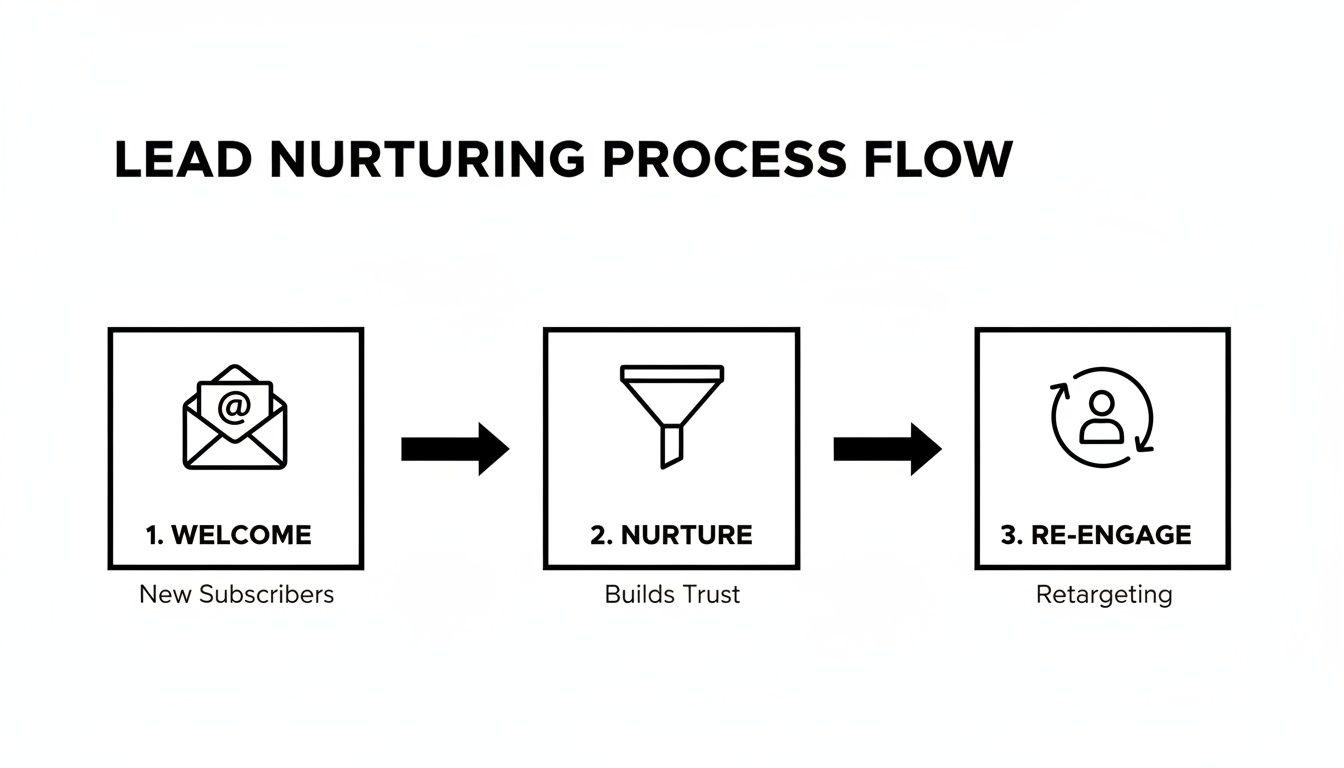
It’s a perfect visual for how a well-chosen tool can guide a customer through their journey without you having to lift a finger for every single step.
Make Sure the Platform Can Scale With You
Finally, think about where your business will be in two or three years. The software you pick today should be able to grow right alongside you. Trust me, migrating all your contacts, workflows, and historical data to a new platform down the road is a massive headache you want to avoid.
Take a look at the provider’s higher-tier plans. What advanced features become available as you scale? You want to see a clear upgrade path for when you need more horsepower. The right marketing automation software for small business becomes a true partner in your growth, delivering real results every step of the way.
Bring Your Marketing Home with NotionSender
For the millions of small businesses that basically live inside Notion, the constant back-and-forth between their main workspace and other marketing tools is a serious time-waster. Every time you switch platforms, you create little islands of data that don't talk to each other. This forces you to manually sync info, which kills the very efficiency you were hoping to gain.
That's where a tool built to bridge this exact gap comes in.
NotionSender is a powerful piece of marketing automation software for small business teams who already organize their world in Notion. It connects directly to your databases, effectively turning them into the command center for all your email campaigns. Forget about clunky integrations or exporting CSV files all day. Your customer database, content calendar, and email outreach can finally live together in one place.
How It Works in the Real World
Let’s look at a super common scenario. Say you have a detailed customer database in Notion where you track everything—contact status, last purchase date, engagement level, you name it. To send a targeted campaign, you'd typically have to export that list and upload it into a separate email platform.
With NotionSender, that whole process gets folded right into your existing workflow:
- Filter Your Database: First, you’d create a new view in your Notion database to zero in on a specific group, like "Customers who haven't purchased in 90 days."
- Trigger the Email: Next, you connect NotionSender to that specific view. From there, you can write and schedule a personalized re-engagement email that automatically goes out to every single person on that list.
- Update in Place: Once an email is sent, NotionSender can automatically update the contact's record right back in Notion, maybe adding today's date to a "Last Contacted" property. Your data stays perfectly in sync, no manual effort required.
When your main operational hub is directly connected to your marketing outreach, you create a single source of truth. This simple shift cuts down on errors, saves a ton of time, and ensures your marketing is always based on the most current customer info.
The whole idea is to centralize your work, which drastically simplifies your tech stack and your daily to-do list.
For those with more technical needs, you can even build custom solutions by digging into the NotionSender API documentation. This makes powerful automation accessible without ever having to leave the platform where you already get your best work done.
Got Questions? We've Got Answers
Stepping into the world of marketing automation can feel like a big move, and it's natural to have a few questions. Let's tackle some of the most common ones we hear from small business owners, so you can move forward feeling confident.
What’s This Going to Cost Me?
This is usually the first question on everyone's mind, and the answer is surprisingly flexible. Pricing for marketing automation tools varies a lot, which is great news for small businesses.
Many platforms offer a free starting point, perfect for when you're just dipping your toes in. These free plans often cover you for your first 500 or 1,000 contacts. Once you're ready to grow, paid plans typically start in the $10-$30 per month ballpark. From there, the cost usually scales up with your needs—things like how many contacts you have, the number of emails you send, or whether you need fancier features like a built-in CRM. The key is to find a tool that fits your budget now but gives you room to grow later.
Isn't This Stuff Too Complicated for a Beginner?
Not at all. It might sound intimidating, but modern tools are built with people like you in mind. Forget clunky, confusing software—think user-friendly interfaces, drag-and-drop editors, and pre-built templates that do most of the heavy lifting for you.
You don't have to become a tech wizard overnight. Start simple. Set up a basic welcome email for new subscribers. Once you're comfortable with that, you can try something a little more advanced. Before you know it, you'll be experimenting with things like lead scoring and segmenting your audience based on their behavior. Plus, most companies have a ton of tutorials and support teams ready to help you out.
Can I Connect It to My Website or Online Store?
Absolutely. In fact, this is one of the most powerful features of good marketing automation software for small business. The best platforms are designed to play nicely with the tools you already use every day.
They connect seamlessly with website builders like WordPress, e-commerce platforms like Shopify and WooCommerce, and all sorts of CRMs. This integration is what makes the magic happen—it syncs your customer data, tracks what people buy, and triggers game-changing workflows like abandoned cart reminders. Before you pick a tool, just double-check its integrations list to make sure your current setup is on there. It's a non-negotiable for a reason—almost half (47%) of small businesses are already using automation for things like social media, showing just how essential these connections are. You can dig into more stats about marketing automation adoption rates if you're curious.
Ready to bring this level of automation into the tool you already live in? NotionSender turns your Notion workspace into command central for all your email marketing. Start automating your email marketing today.

