
Notion Pricing Plans: A Quick Guide to notion pricing plans

Notion's pricing starts with a generous Free plan for individuals. From there, it scales up to the Plus plan at $10 per user/month for small teams, the Business plan at $20 per user/month for companies that need more power, and a custom-priced Enterprise plan for large organizations.
The real trick is figuring out which one actually fits your workflow and collaboration style.
How to Choose the Right Notion Plan for You

Picking a Notion plan can feel a bit overwhelming at first glance, but it really just boils down to matching the features with what you actually do every day. This guide is your roadmap to understanding the four main tiers: Free, Plus, Business, and Enterprise.
Our goal isn’t to find the cheapest option. It’s to find the one that will genuinely boost your productivity without you bumping into frustrating limits later on. We'll look at who each plan is really built for, from solo creators mapping out their life's work to big companies needing tight security controls.
To get a feel for the market, it's sometimes helpful to see how much other software tools structure their pricing, which provides a bit of context for what's standard in the SaaS world.
Before we dive into the nitty-gritty of each plan, here’s a quick overview to get you started.
Notion Pricing Plans at a Glance
This table gives you a high-level comparison of the main tiers so you can quickly see where you might fit.
| Plan | Price (Per User/Month) | Ideal For | Key Features |
|---|---|---|---|
| Free | $0 | Individuals, students, personal projects | Unlimited blocks, collaborative workspace, 7-day page history, up to 10 guests |
| Plus | $10 | Small teams, startups, freelancers | Everything in Free, plus unlimited block uploads, 30-day page history, up to 100 guests |
| Business | $20 | Companies and departments | Everything in Plus, plus private teamspaces, SAML SSO, 90-day page history, up to 250 guests |
| Enterprise | Custom | Large organizations | Everything in Business, plus advanced security, audit logs, dedicated manager, unlimited page history |
As you can see, the right plan really depends on your team size and specific needs for things like security and collaboration.
Matching Tiers to Your Workflow
The first step is always to understand what you truly need. Are you a freelancer juggling personal projects and client work, or are you a project manager trying to keep multiple teams on the same page? Your answer completely changes which plan offers the best value.
The Free plan, for example, is incredibly powerful for one person. But its collaboration features are intentionally limited to nudge growing teams toward an upgrade.
Once you start adding people, the decision-making process shifts. You'll need to ask yourself a few key questions:
- Collaboration Needs: How many people need full editing access versus just viewing or commenting on specific pages as a guest?
- Security Requirements: Is your data sensitive? Do you need features like single sign-on (SSO) or private teamspaces to keep things locked down?
- Version Control: Is a 7-day page history enough to recover from an "oops" moment, or do you need a 90-day (or even unlimited) safety net for compliance or peace of mind?
We’ll also touch on how tools like NotionSender integrate with every plan, which is important to know before you commit. And as you get more comfortable with the platform, be sure to check out these 10 tips to help you get the most out of Notion.so to supercharge your setup.
The Free Plan: A Powerful Personal Dashboard

Let’s be honest, most "free" software tiers are just glorified trials, designed to push you into a paid plan. But Notion's Free plan is genuinely different. It’s a completely functional and incredibly powerful dashboard for individuals.
Think of it less like a restrictive demo and more like a complete personal workshop. It’s perfect for students organizing notes, freelancers tracking projects, or really anyone looking to bring some order to their personal life.
The killer feature for solo users? Unlimited blocks. In Notion, a "block" is any piece of content you add—a paragraph, a to-do item, an image, you name it. This means you can build a massive personal wiki or track every last detail of a project without ever hitting a content limit.
Of course, this personal workshop has its limits, especially when you start working with others or dealing with bigger files. Understanding these boundaries is key to knowing when it's time to upgrade.
Key Features and Limitations
The Free plan gives you a fantastic foundation to build on, but it's important to know where the guardrails are. For individual use, it’s often more than enough to get organized and stay that way for a long time.
- Unlimited Blocks for Individuals: Go wild. Create as much content as your heart desires for your personal projects.
- Collaborative Workspace: You can invite up to 10 guests to view, comment on, or edit specific pages. This is great for sharing a project with a client for feedback.
- 7-Day Page History: Made a mistake? No problem. You can restore any page to a previous version from the past week, giving you a nice little safety net.
- 5MB File Upload Limit: This is the big one. It's perfectly fine for documents and small screenshots, but it becomes a real headache if you need to upload high-res images, videos, or hefty PDFs.
The Free plan is the ultimate sandbox. It lets you explore almost every core feature Notion offers without spending a dime. It sets a clear benchmark for what’s possible before you even think about paying for more power.
When You Might Outgrow the Free Plan
The moment you need true teamwork is usually when the Free plan starts to feel a bit cramped. As soon as you add a full-fledged team member (not just a guest), Notion will switch you to a "limited block trial," which is its not-so-subtle way of telling you it's time to upgrade.
Imagine you're a freelance writer. You can easily manage your entire editorial calendar, drafts, and notes all by yourself on the Free plan. But the second you hire a virtual assistant who needs full, ongoing access to that entire workspace, you'll hit that collaboration wall.
It's a similar story with tools like NotionSender. You can connect it to your free workspace and save emails to a Notion database without any issues. But if your workflow involves archiving lots of emails with large attachments, that 5MB file limit will quickly become a constant bottleneck, pushing you toward a paid plan with unlimited uploads.
Upgrading to the Plus Plan for Growing Teams
The free version of Notion is fantastic for getting your own life organized, but once you start bringing other people into the mix, you'll feel its limits pretty quickly. Those limitations start to feel like walls closing in when collaboration becomes a daily thing.
This is exactly where the Plus plan comes in. It’s the natural next step for small teams, freelancers juggling multiple clients, and startups that have officially outgrown their first sandbox setup.
Think of it like graduating from a solo workshop to a full-blown shared studio. The single biggest change is that the team block limit is completely gone. Everyone can build, edit, and contribute without that nagging fear of hitting a content ceiling. This freedom is what you need to create the shared knowledge bases, team wikis, and project hubs that can actually grow with you.
Unlocking True Team Collaboration
But the Plus plan is about more than just knocking down walls. It introduces features built specifically to make teamwork smoother and a lot more secure. You’re not just getting more space; you’re getting better tools to manage it.
- Unlimited File Uploads: That tiny 5MB file limit? Gone. This is a game-changer for anyone working with high-res images, design mockups, video files, or chunky PDF reports.
- 30-Day Page History: Your safety net gets a major upgrade, expanding from just one week to a full month. It’s a huge relief knowing you can easily restore a page after a clumsy mistake without breaking a sweat.
- Up to 100 Guests: While the Free plan taps out at 10 guests, the Plus plan gives you a ton more breathing room. It's perfect for agencies or consultants who need to bring clients into specific project pages for feedback and sign-offs.
Imagine a small marketing agency just starting out on the Free plan. As they land more clients, they'll suddenly find themselves trying to share large design files and needing a longer version history to track all the requested changes. Upgrading to Plus lets them create a dedicated, collaborative client portal for every single project, no compromises needed.
Analyzing the Cost and Value
Jumping to a paid plan means taking a serious look at the investment. Notion has tweaked its pricing a bit to better line up with its features. For new users, the Plus plan now runs $12 per user per month.
If you opt to pay annually, though, that price drops to the equivalent of $10 per user. That’s a ~17% savings, which is a pretty sweet deal for budget-conscious teams and freelancers.
The Plus plan isn't just an expense; it’s an investment in how your team operates. The cost is easily balanced out by the time you save by not having to cook up workarounds for file size limits or stressing about losing important work.
How Plus Powers Up NotionSender
For those of us using tools like NotionSender, the Plus plan is where the magic really happens. The unlimited blocks and higher API rate limits mean you can build some seriously sophisticated email workflows right inside Notion.
You can archive entire client conversations, save emails with huge attachments, and automate all sorts of communication without ever hitting a content limit. It transforms Notion from a simple database into a complete client communication hub.
You can get a better sense of what’s possible by checking out our guide on sending emails directly from your Notion workspace. The Plus plan is really the foundation you need to build powerful systems that pull all your projects and comms into one central place.
Scaling with the Business Plan for Advanced Control

As a company grows, its needs shift. Open, freewheeling collaboration gives way to a demand for structured, secure control. This is exactly where the Business plan comes in. It’s built for established teams and entire companies that need more than just a shared workspace—they need a secure, well-managed command center.
It's like upgrading from a vibrant co-working space to a private office floor with keycard access. You get the tools to manage who sees what, streamline how people log in, and lock down your company's most important information. This plan isn't just about adding more features; it’s about putting a real system of governance and security in place.
Unlocking Granular Control and Security
The jump from the Plus plan to Business introduces a set of features focused squarely on administration and security. For many scaling companies, these aren't just nice-to-haves; they're non-negotiable for compliance and sane management.
- SAML SSO (Single Sign-On): Lets your team log in with their existing company credentials. This is a huge win for security and a massive time-saver for your IT department.
- Private Teamspaces: These are invite-only, siloed spaces for sensitive information. Perfect for an HR department’s files or a finance team's confidential data, making it completely invisible to the rest of the company.
- Bulk PDF Exports: A straightforward way to create offline backups or archives of your entire workspace. This is critical for data retention policies and disaster recovery.
- 90-Day Page History: Your safety net for tracking changes and restoring old versions is extended to a full quarter, giving you much more breathing room.
Each of these features delivers real value. Private teamspaces let you share information safely without creating messy workarounds, while SSO tightens your security and cuts down on admin headaches.
The Strategic Value of Bundled AI
One of the biggest changes to the Notion pricing plans is how Notion AI is now baked directly into the Business tier. This is a massive part of its appeal.
The Business plan is where Notion firmly plants its flag as an enterprise-grade solution. By bundling advanced AI with critical security features, it offers a complete package for companies looking to not just organize information, but to intelligently act on it.
This move reflects a bigger trend. Notion's recent pricing adjustments saw monthly rates climb by 33% (from $18 to $24), but they also rolled in features like SAML SSO that used to be separate add-ons. This makes the $20 per user/year Business plan a strong contender against rivals, especially since analysis from Vendr.com suggests about 40% of users need these specific features to make the cost worthwhile.
For anyone using NotionSender, this plan is a game-changer. The permissions from private teamspaces mean a project manager can secure sensitive client emails stored right inside Notion, adding an essential layer of governance. This integration allows for powerful, secure workflows that can meet much higher compliance standards. To dig into the technical side of this, check out the NotionSender API documentation.
The Enterprise Plan for Maximum Security and Support
When your business hits a certain scale, the conversation shifts from pure collaboration to serious compliance and control. This is exactly where Notion’s Enterprise plan steps in. It’s not just another pricing tier—it's a completely different class of service built for large organizations with iron-clad security, compliance, and administrative needs.
Think of it like this: the Business plan is like leasing a high-end office floor, but the Enterprise plan is like commissioning a custom-built corporate headquarters. You’re not just flipping on a few extra features; you're building a tailored environment with dedicated support and advanced controls. The question stops being "how much does it cost?" and becomes "what do we need it to do?"
Exclusive Features for Total Control
For organizations managing hundreds or thousands of users, especially in regulated fields like finance or healthcare, the Enterprise plan’s features aren't just nice-to-haves—they're essential.
- Advanced Security Controls: You get access to tools like SCIM provisioning, which automates who gets access to what, and detailed workspace analytics to see how your team is actually using Notion.
- Audit Log: This gives you a detailed, unchangeable record of who did what, and when. For any kind of security audit or compliance check, this is non-negotiable.
- Unlimited Page History: Your version history becomes infinite. It’s a complete, permanent archive of every single change ever made across your workspace.
- Dedicated Success Manager: You get a real person at Notion assigned to your account. They’re there to help with onboarding, strategy, and troubleshooting, making sure you’re getting every bit of value out of your investment.
These aren't just small upgrades. They are the foundational tools you need for risk management and operational oversight when you're playing in the big leagues.
Demystifying Enterprise Pricing
Notion keeps Enterprise pricing under wraps, requiring a direct conversation with their sales team. But it’s not a total black box. We can look at industry data to get a pretty good idea of what to expect. While every deal is custom, marketplace insights from sources like Gend suggest that baseline costs often start around $240 per user annually.
The jump in cost can look steep. For example, 50 users on the Business plan might run you $12,000 a year. In contrast, 100 Enterprise users could be quoted at $24,000. But here’s the key: this is the tier where you can negotiate. Significant discounts of 15-20% are common for larger teams, and if you’re signing a multi-year deal for 500+ users, you could be looking at tens of thousands in savings.
The Enterprise plan is for organizations where the cost of a security breach or compliance failure far exceeds the cost of the software itself. It’s an investment in control and peace of mind.
For those of us using NotionSender, the Enterprise plan unlocks some serious compliance power. The audit log, for instance, can track every single time a sensitive client email stored in Notion is accessed. This provides an indispensable trail for any legal, HR, or regulatory review, effectively turning your integrated email system into a fully auditable piece of your corporate infrastructure.
Making Your Final Decision: A User-Based Guide
<iframe width="100%" style="aspect-ratio: 16 / 9;" src="https://www.youtube.com/embed/l0P6SPZOI-U" frameborder="0" allow="autoplay; encrypted-media" allowfullscreen></iframe>
Knowing the features of each plan is one thing, but figuring out how that translates to your specific situation is where things get tricky. Let's move past the theory and get into some practical, role-based advice.
This guide is designed to cut through the noise. We’ll help you pick the right starting point and, just as importantly, spot the exact moment an upgrade actually makes sense for how you work.
We're going to look at the ideal Notion pricing plans for a few common roles. The goal is simple: make sure you’re not paying for bells and whistles you don't need, or hitting a frustrating roadblock right when you're getting into a groove.
The Freelancer and Solo Entrepreneur
For most freelancers and solopreneurs, the Free plan is more than enough to get started—it’s actually incredibly powerful. You can map out your entire business, from project trackers to client portals, without spending a dime. The unlimited blocks are a game-changer here.
So, when do you upgrade? It all comes down to collaboration.
The moment you need to bring a client deep into a project or hire a contractor who needs full access, the Plus plan becomes a necessity. It gets rid of the guest limit headaches and, crucially, that 5MB file upload cap. If you're sharing high-res design assets or video files, that limit on the free plan becomes a deal-breaker fast.
The Project Manager
A project manager lives and breathes control, visibility, and team coordination. While you could start a small, internal project on the Plus plan, most PMs should be looking directly at the Business plan from day one.
Why? Private teamspaces. This feature is everything. It lets you give the marketing team their own campaign calendar while keeping the finance team's budget completely separate and locked down. This kind of granular control stops information overload in its tracks and protects sensitive data, which is a core part of any PM's job.
This decision tree gives you a great visual for how team size and security needs push larger organizations toward the top-tier plans.
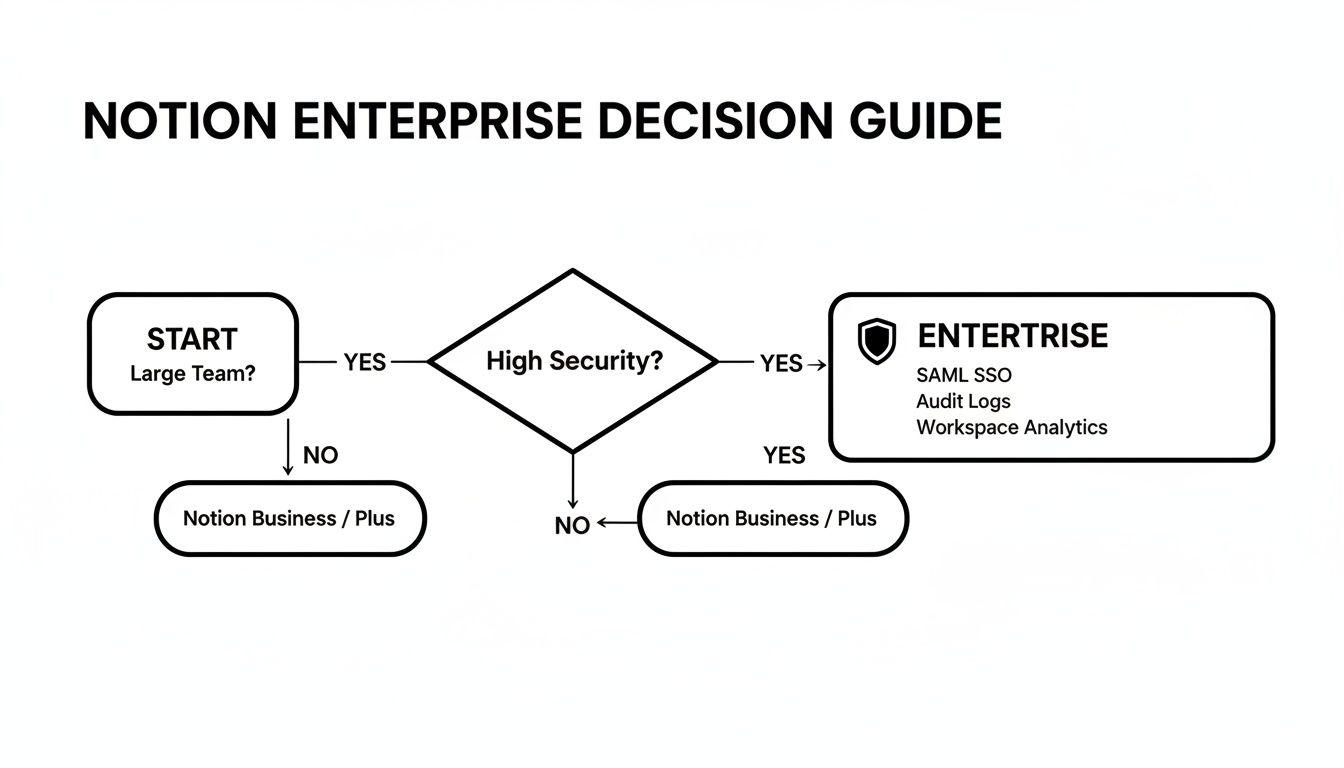
As you can see, once you need advanced security features like an audit log, the choice becomes clear—it’s time for Enterprise.
The Small Business Owner
Small business owners have to wear a lot of hats, essentially blending the needs of a freelancer and a project manager. The right plan really just depends on your team's size and how complex your day-to-day operations are.
- 1-3 People: The Plus plan is your sweet spot. It gives you the collaborative tools you need to work together without the higher price tag of more advanced features.
- 4+ People or Handling Sensitive Data: At this point, the Business plan is the smarter investment. SAML SSO makes onboarding (and offboarding) employees a breeze, and private teamspaces become essential for creating dedicated areas for HR, leadership discussions, or confidential client projects.
Which Notion Plan Is Best For You?
To make it even simpler, here's a quick reference table matching common user types to their best-fit Notion plan and the specific reasons they might need to level up.
| User Type | Recommended Starting Plan | Key Upgrade Triggers |
|---|---|---|
| Freelancer / Solopreneur | Free | Need to collaborate with more than 10 guests or upload files larger than 5MB. |
| Small Team (1-10 people) | Plus | Team grows beyond 10, or you need private teamspaces for different departments. |
| Project Manager | Business | Managing multiple distinct projects or teams that require separate, secure workspaces. |
| Marketing Team | Business | Need for SAML SSO for security and private teamspaces for campaign-specific work. |
| Growing Business (10+) | Business | Need for advanced security (SAML SSO, audit logs) and more granular permissions. |
| Large Corporation | Enterprise | Requirement for advanced security controls, a dedicated manager, and unlimited page history. |
Ultimately, the right plan is the one that supports your workflow today while giving you a clear path to grow tomorrow. Start with what you truly need, and keep an eye on these triggers to know when it's time for more power.
A Few Common Questions About Notion Pricing
To wrap things up, let's tackle a few of the most common questions that pop up when people are weighing their options. Sometimes a couple of quick, clear answers are all you need to make the right call.
Are There Any Discounts on Notion Plans?
Absolutely. The most straightforward way to save is by paying annually instead of monthly, which typically knocks about 20% off the total cost.
Beyond that, Notion is really generous with a few groups. If you're a student or educator with a valid school email address, you can get the Plus Plan completely free. They also run special programs for eligible nonprofits and startups, so it's always worth checking their official site to see if you qualify.
How Does Billing Work if My Team Size Changes?
Notion handles this pretty gracefully with a prorated system, so you're not paying for seats you aren't using.
When you add a new person to a paid plan, Notion just charges you a prorated amount for whatever time is left in your current billing cycle. On the flip side, if someone leaves the team and you remove them, Notion adds a credit to your account for the unused time. That credit then automatically gets applied to your next invoice. It's a fair system that keeps things simple.
A quick note on "Guests" vs. "Members": Guests are external folks you invite to specific pages, not your whole workspace. Your plan dictates how many free guests you can have, and the paid plans offer hundreds of invites. This is a super cost-effective way to collaborate with clients or contractors without adding them as full-fledged, paid members.
Ready to hook your email directly into that shiny new Notion workspace? NotionSender is the bridge you need, letting you save, manage, and even automate emails right from inside Notion. It’s a complete game-changer for your workflow. Find out more at https://www.notionsender.com.

