
A Practical Project Management Tool Comparison for Modern Teams
When you start comparing project management tools, one truth becomes crystal clear: the best tool is whatever fits your team’s unique workflow. There's no single right answer. For simple, visual task tracking, Trello is tough to beat. If you need more structured, robust planning for a growing team, Asana is a fantastic choice.
Technical teams almost always gravitate towards Jira's specialized features, while those who want an all-in-one workspace often land on Notion's incredible flexibility.
Navigating the Project Management Software Boom

Picking the right project management tool isn't just a small task—it's a critical business decision. Get it right, and you'll see a real boost in team productivity, workflow clarity, and even client satisfaction. But the wrong choice? That leads straight to confusion, missed deadlines, and a team that’s pulling their hair out.
This guide isn't another generic feature list. We're offering a practical project management tool comparison built for small businesses, marketing teams, and freelancers who are trying to cut through the noise of a very crowded market.
Why Is Everyone Talking About PM Tools?
The project management software market is exploding, and for good reason. It’s becoming essential for how modern businesses operate. This boom means we get more options and better features, but it also makes the decision-making process that much harder.
The money tells the story. Market valuations are soaring, with some analysts projecting the market could hit USD 40.12 billion by 2033. That’s a massive amount of investment and innovation pouring into this space. You can dig into more market growth statistics from recent studies if you're curious.
Choosing a tool is less about finding the one with the most features and more about finding the one whose philosophy aligns with how your team already works. A simple tool that gets used is always better than a complex one that gets ignored.
A Framework for Your Decision
To make a smart choice, you need a clear framework. This guide will walk you through evaluating the top tools—Asana, Trello, Jira, and Notion—based on what actually matters for your team's day-to-day success. We’ll compare them across the most important criteria to help you find that perfect fit.
| Tool | Primary Strength | Ideal For |
|---|---|---|
| Asana | Structured Task Management | Growing teams needing versatile project views (lists, boards, timelines). |
| Trello | Visual Simplicity | Small teams and individuals who prefer intuitive Kanban boards. |
| Jira | Agile Development | Software and engineering teams requiring sprint planning and bug tracking. |
| Notion | All-in-One Flexibility | Creative teams and businesses wanting a customizable workspace for docs and tasks. |
Defining Your Core Evaluation Criteria

Before you even start comparing project management tools head-to-head, you need a solid game plan. It's easy to get distracted by flashy features that don't actually solve your team's core problems. Think of this step as building your own scorecard—it keeps you focused on what really matters for your team’s productivity and success.
We've broken down the evaluation process into five essential pillars. Use these to look past the marketing hype and measure any tool against the real, day-to-day needs of your team.
Task Management Flexibility
At its core, any project management tool has to be great at, well, managing tasks. But "task management" isn't one-size-fits-all. Some teams live and breathe on visual Kanban boards, while others need the granular detail of a list or the long-range perspective of a Gantt chart.
A truly flexible tool lets people work in the view that makes the most sense to them without messing up the project's overall structure. The key is adaptability. A rigid system forces your team to change how they work; a flexible one fits right in.
Seamless Team Collaboration
A tool is useless if your team doesn't actually use it to communicate. You need features that bring conversations together and keep them in context. That means clear comment threads on individual tasks, simple file sharing, and real-time notifications that keep everyone on the same page without blowing up their inboxes.
A great project management tool doesn't just track work; it becomes the single source of truth for all project-related communication. This eliminates the "Where did we discuss this?" problem that plagues teams relying on scattered emails and chat messages.
When collaboration works, it cuts down on friction and confusion, making sure everyone is working from the latest information. The goal is to spend less time digging for updates and more time getting things done.
Automation and Integration Capabilities
Let's be honest, repetitive admin tasks are a massive productivity killer. Modern tools tackle this head-on with powerful automation. For instance, you could set a rule to automatically assign a task to the design lead the moment its status flips to "Ready for Design." It’s a small thing that saves time and stops work from falling through the cracks.
Integrations are just as important. Your project management software has to play nicely with the other tools you rely on every day, like Slack, Google Drive, or your CRM. A system that connects to your existing stack creates a cohesive digital workspace instead of just another walled-off silo of information.
Pricing and Scalability
Budget is always a reality. Many tools have free plans, but you have to dig into their limitations and figure out what it will cost to grow. Is that price-per-user going to become a problem as you add more people? Does the next pricing tier unlock one critical feature you need, or is it bloated with a bunch of extras you'll never touch?
Look closely at the value you're getting at each price point. A tool that can grow with you—offering more advanced features as you actually need them—is a much smarter long-term investment than one that forces you into an expensive upgrade for a basic necessity.
This decision often ties into how the software is deployed. The industry has made a massive shift to cloud-based solutions, which now hold over 58.0% of the market. Companies are choosing them for the flexibility, automatic updates, and lack of expensive on-premise hardware, which is a huge win for small and medium-sized businesses. If you want to dig deeper into this trend, you can review key project management software market insights.
Diving Deep: A Head-to-Head Comparison of Top Project Management Tools
Alright, let's move from the abstract to the practical. This is where the rubber meets the road as we pit our four contenders—Asana, Trello, Jira, and Notion—against each other. We’ll look at how each one stacks up against our core criteria, but more importantly, we’ll dig into the subtle differences that make or break a tool in your day-to-day work.
The goal here isn't just to list features. We’re going to explore the core philosophy behind each tool. Why? Because understanding how a platform thinks about work is the key to finding one that feels like a natural extension of your team, not something you’re constantly fighting against.
Task Management Philosophies and Views
How a tool lets you see and sort your work has a huge impact on your team's momentum. Each of our contenders takes a very different path, designed for different kinds of teams and workflows.
Trello: The Visual Kanban Specialist
Trello is built around one simple, brilliant idea: the Kanban board. The entire experience is about creating columns (or "lists") and sliding tasks (or "cards") from left to right as work progresses. Its visual simplicity is its biggest selling point.
- Perfect for: A marketing team managing a content calendar, where cards flow from "Ideas" to "Writing" to "Published."
- The Catch: While you can add calendars or lists with Power-Ups, its heart and soul is Kanban. If your team lives and breathes complex Gantt charts or needs deep, list-based subtasks, you might feel a bit boxed in.
Asana: The Versatile All-Rounder
Asana gets that not everyone on a team works the same way. It gives you a buffet of views: a classic list, a Kanban board, a Gantt-style timeline, and a calendar. Users can flip between them effortlessly.
This flexibility is a game-changer. A project manager can map out dependencies on a timeline while the creative team manages their daily to-dos on a board. Asana does a fantastic job of separating high-level planning from the on-the-ground execution, all within one project.
Jira: The Agile Powerhouse
Jira was purpose-built for software development teams running Agile frameworks like Scrum and Kanban. Its views are unapologetically technical, built around concepts like backlogs, sprints, and story points.
Jira’s real magic isn’t just in tracking a task; it’s in managing the entire development lifecycle. It’s brilliant at connecting issues to code repositories, squashing bugs, and spitting out velocity charts that are non-negotiable for sprint planning.
This specialization is a double-edged sword. It’s incredibly powerful for engineers, but it can feel like a foreign language to non-technical teams in marketing or HR. The terminology and rigid structure can be a major hurdle. For teams with specific technical needs, a more focused comparison might be beneficial, such as exploring the leading project management software tailored for engineering teams.
Notion: The Customizable Canvas
Notion flips the script entirely. Task management isn't a pre-built feature; it's a building block. You start by creating a database, and then you decide how you want to view that data. You can instantly turn the same set of tasks into a Kanban board, a list, a gallery, a calendar, or a timeline.
This is the ultimate in flexibility, but it comes with a steeper learning curve. You’re not just using a system; you’re designing it. This is a dream for teams with unique workflows but can feel daunting for those who just want to plug and play.
Collaboration and Communication Features
Great collaboration means keeping conversations where the work is happening. Let's see how each tool handles this.
Asana's Communication Hub
Asana is king when it comes to tying conversations to tasks. Every single task has its own comment thread where you can @mention teammates, drop in files, and spin off subtasks. This structure means all the back-and-forth about a piece of work stays with that work. No more digging through Slack or email.
Trello's Card-Based Simplicity
Trello keeps it clean and simple. Each card has its own comment section, checklists, and file attachments. It's incredibly straightforward, making it perfect for quick updates and feedback on a specific deliverable. It doesn't, however, have the broader project-level conversation tools you'll find in Asana.
Jira's Technical Integration
In Jira, collaboration is deeply woven into the development process. Comments on an issue are often packed with links to code commits, pull requests, and build statuses. It's less about general project chatter and more about focused, technical dialogue needed to resolve bugs and ship new features.
Notion's Integrated Documentation
This is Notion’s killer app. It effortlessly blends project management with documentation. A task can live on the very same page as the project brief, meeting notes, and design mockups. This creates a true single source of truth, cutting down on ambiguity because the context and the conversation are never separated.
Automation and Integration Capabilities
Automating the boring, repetitive stuff is how you get serious efficiency gains. Here’s a quick look at how each platform handles it.
- Trello's "Butler": Trello's built-in automation tool, Butler, is surprisingly powerful yet easy to use. You can create simple "if-this-then-that" rules like, "When a card moves to 'Done,' mark the due date as complete and @mention the project manager."
- Asana's "Rules": Asana offers more advanced, rule-based automation. You can create multi-step triggers and actions, like automatically assigning tasks to different people based on their status or adding followers when a due date gets close.
- Jira's Workflow Automation: Jira's automation is a beast, tied directly to its workflow engine. It can automate status transitions, update fields based on triggers from tools like GitHub, and send out highly complex notifications.
- Notion's API and Integrations: While Notion's native automation is still catching up, its powerful API opens the door to near-limitless customization with tools like Zapier or Make. It offers incredible potential but definitely requires a bit more technical setup.
At-a-Glance Feature Matrix for Top Project Management Tools
To make things easier, here’s a quick-scan table that breaks down how Asana, Trello, Jira, and Notion compare on the essentials.
| Feature | Asana | Trello | Jira | Notion |
|---|---|---|---|---|
| Primary Strength | Structured Task & Workflow Management | Visual Kanban Simplicity | Agile Software Development | All-in-One Customizable Workspace |
| Best For | Growing teams, marketing, operations | Small teams, freelancers, visual thinkers | Engineering & product teams | Creative agencies, startups, knowledge hubs |
| Core Views | List, Board, Timeline, Calendar | Board (primarily) | Scrum Boards, Kanban Boards, Backlogs | Custom Databases (Board, List, Calendar, Gallery, Timeline) |
| Collaboration | Task-specific comment threads | Card-based comments & checklists | Issue-based technical comments | Integrated docs and comments |
| Automation | Robust rule-based workflows | Intuitive "Butler" for simple rules | Deep workflow & development automation | API-driven via third-party tools |
At the end of the day, the right tool is the one that fits your team's culture and workflow like a glove. Trello brings elegant simplicity, Asana offers structured flexibility, Jira provides specialized power for developers, and Notion hands you the keys to build whatever you can imagine. Understanding these fundamental differences will help you make a smarter choice—one that truly helps your team get things done.
Matching the Right Tool to Your Team's Workflow
A feature list is just a bunch of bullet points until you see how it actually solves a problem. The real test for any project management tool is how well it fits into your team’s day-to-day rhythm. What feels like a perfect fit for one team can be a clunky, frustrating mess for another.
This is where context is everything. To close the gap between features on a page and real-world results, let's walk through a few scenarios for different types of teams. By digging into their specific challenges, we can figure out which tool isn’t just a decent option, but the best choice to help them succeed.
To start, this simple decision tree can help you narrow things down based on one of the most important factors: team size.
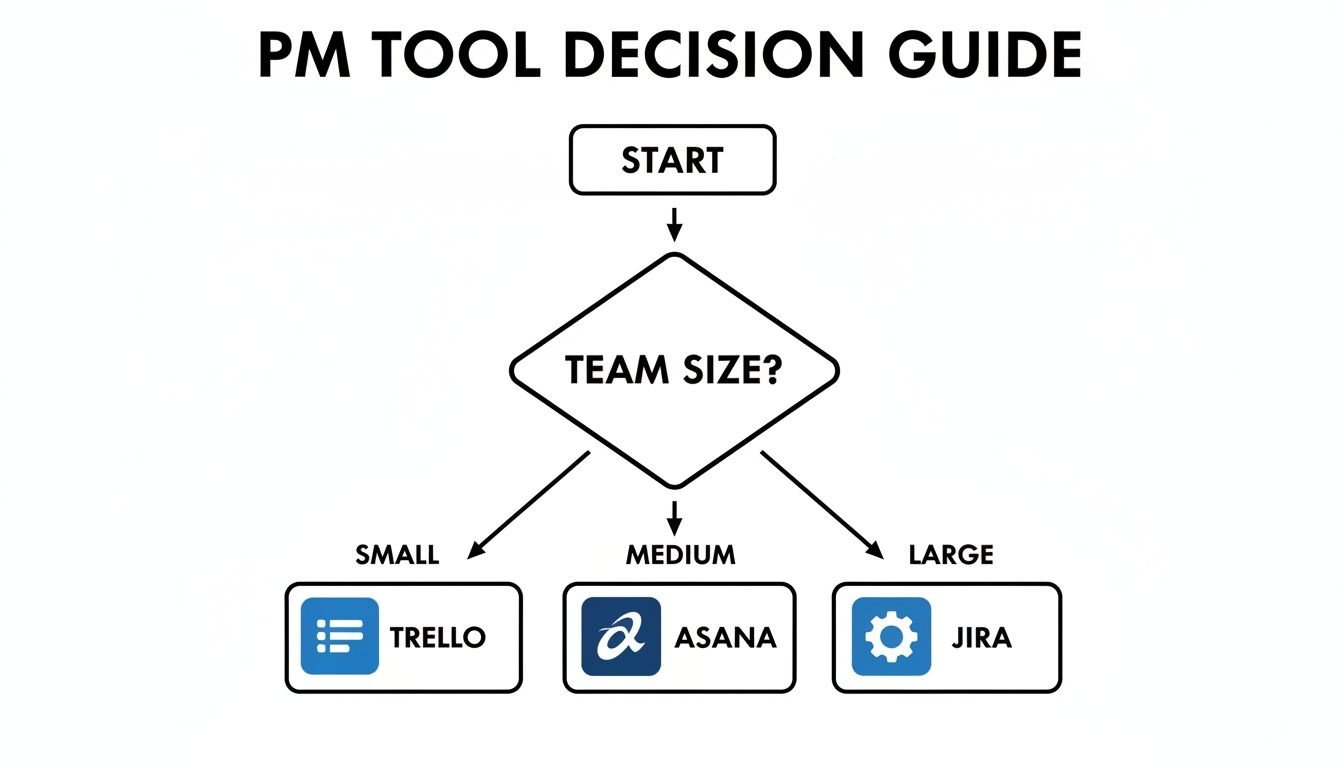
This flowchart gets right to the heart of it: the complexity of your tool should grow with the complexity of your team.
The Agile Marketing Agency
Picture a busy marketing agency with a dozen clients on the go. They’re juggling long-term content strategies, rapid-fire social media campaigns, and ongoing SEO projects. Everyone—from writers and designers to the account managers—needs a crystal-clear view of what’s due, what’s next, and where to find client feedback.
Optimal Tool: Asana
Asana is the easy winner here, and it comes down to one thing: versatility in project views. The project manager can use the Timeline view to map out an entire quarter’s content calendar, making sure every dependency is accounted for. At the same time, the creative team can live on the Kanban board, happily dragging tasks from "To Do" to "In Review" without getting lost in the weeds of high-level planning.
Asana’s superpower for cross-functional teams is its ability to let different people use the view that works for them, all while contributing to the same source of truth.
This flexibility is key. It smooths over the friction that happens when a tool tries to force everyone into the same rigid workflow. It gives planners the structure they need and creators the agility they crave—the exact balance a fast-moving agency needs.
The Small Business Scaling Operations
Now, think about a small e-commerce business that started in a garage and is suddenly taking off. They’re bringing on new people, managing more inventory, and desperately trying to create formal processes for things that used to be handled with a quick chat. Their main challenge is building a central nervous system for the company where SOPs, projects, and announcements can all live together.
This is a classic growing pain, where information starts getting trapped in silos. The market data reflects this shift. While large enterprises accounted for 60.35% of project management software spending in 2025, smaller businesses are catching on fast. SMEs are showing a remarkable 16.89% CAGR in adoption, largely because cloud-based tools are now affordable and accessible, making them crucial for growth. You can explore more insights on project management market dynamics to see how this trend is playing out.
Optimal Tool: Notion
For a business writing its operational playbook from scratch, Notion is the perfect choice. It's more than just a project manager; it's a blank canvas for building a custom company wiki. They can create a database to track product launches (viewed as a Kanban board), then link each product directly to its own page filled with marketing briefs, supplier info, and customer feedback.
This integrated setup means their processes and the actual work happen in the same place. New hires can get up to speed in a fraction of the time, and the whole team works from one unified space. If you want to dive deeper, check out our guide on 10 tips to help you get the most out of Notion.
The Solo Freelancer Juggling Clients
Finally, let's consider a freelance web developer. They’re managing multiple client projects at once, each with its own tasks, deadlines, and communications. What they need most is a dead-simple, visual way to see where everything stands so nothing falls through the cracks.
Optimal Tool: Trello
Trello's beautiful simplicity is exactly what a freelancer needs. Each client can get their own board, with lists for stages like "Backlog," "In Progress," "Awaiting Feedback," and "Complete." The drag-and-drop interface gives them an instant, low-effort overview of their entire workload.
For someone working alone, the complex reporting and layered views of a tool like Asana or Jira are just noise. Trello provides just enough structure to keep things organized without adding a bunch of administrative overhead. This lets the freelancer focus on billable work, not on managing their management tool.
Integrating Notion to Create a Central Command Center
We've compared task boards, timelines, and all the usual suspects, but there’s a persistent problem most project management tools just don't solve. It's the huge gap between where you manage the work and where a lot of that work happens: your inbox.
Client feedback, vendor invoices, fresh leads—this critical information often gets trapped in individual email accounts, completely disconnected from the projects they belong to. This is where Notion's fundamental design gives it a serious edge.
Unlike tools laser-focused on tracking tasks, Notion is a flexible, all-in-one workspace. It can be your project manager, your company wiki, and your CRM, all in one place. But the real game-changer is bridging that final gap by pulling your inbox directly into your Notion databases.
When you do that, Notion stops being just a place to store information and becomes a true command center for everything your team does.
Turning Your Inbox into an Actionable Database
What if you never had to manually copy and paste another email into a task card again? Tools like NotionSender create that exact connection, making your inbox and your Notion databases talk to each other. This isn't just about convenience; it fundamentally rewires how you handle information coming from outside your team.
By connecting your email, you can build automated workflows that are flat-out impossible with other project management tools. For any team that deals with clients, vendors, or customers, this capability puts Notion in a league of its own.
The magic is in treating email as just another piece of data inside a Notion database.
Every conversation, approval, and piece of feedback can be logged, tracked, and automated right alongside its corresponding project. You eliminate the single biggest silo in modern business communication.
This creates a single source of truth that is both complete and immediately actionable—a combination you'll rarely find anywhere else.
Practical Use Cases for Email Integration
The real value here clicks when you see it in action. This is about building smarter workflows that save real time and stop important details from slipping through the cracks.
Here are a few powerful ways teams are using this:
- Automated Client Feedback Loop: A client emails feedback on a design. Instead of someone forwarding it or summarizing it in a task, the email is automatically saved to the correct project card in Notion. The designer gets notified instantly, and the original feedback is right there for context.
- Streamlined Invoice Management: The finance team can run their entire invoicing process from a Notion database. When a project's status changes to "Completed," an invoice email is automatically sent to the client, pulling their contact info and the final project cost directly from the database properties.
- Unified Support Ticket System: A customer emails a support request. That email automatically creates a new ticket in the "Support" database in Notion. The ticket can then be assigned, its status tracked, and all follow-up emails are sent and received directly from that Notion page.
This level of integration is a massive differentiator. Other tools might have email add-ons, but Notion's database-first structure allows for much deeper and more powerful automation.
If you’re looking for more ideas, our guide on 7 ways to use Notion to send emails and supercharge your workflows is a great place to start. For any team struggling to connect their communication with their project tracking, this capability makes Notion an incredibly compelling option.
Making Your Final Decision
Alright, after a deep dive into all these tools, it's time to land the plane. Choosing a project management platform is a serious commitment. It weaves itself into your team's daily rhythm and can genuinely make or break your long-term success.
The final choice boils down to a surprisingly simple question: which tool's philosophy clicks with your team's culture?
Think of it like this. Trello is for teams who live on whiteboards and love seeing progress in a clear, visual line. Asana is built for organizations that need structure and multiple ways to look at the same project—perfect for planners and doers alike. Jira is the specialist, a high-powered environment designed from the ground up for technical teams running agile sprints. And then there's Notion, the ultimate blank canvas for teams who want to invent their own systems and keep their tasks right next to their documentation.
A Quick Checklist for Your Team
Before you sign on the dotted line, get your team in a room (or a Zoom) and hash out these questions. A few honest answers here will point you straight to the right tool.
- How do we actually work? Do we think in visual boards, detailed lists, or a bit of both? The tool needs to bend to your will, not the other way around.
- What's our biggest headache right now? Is it chaotic communication, zero visibility into who's doing what, or information scattered everywhere? Pick the tool that puts a bandage on your biggest wound first.
- How much power do we really need? Let's be real. A tool loaded with features nobody uses is a bigger waste than a simple one everyone adopts. We know over 77% of high-performing projects use project management software, but that only matters if people actually use it.
- Will this grow with us? Think about where the company will be in five years. Can this platform handle a bigger team, more complex work, and the integrations you'll inevitably need?
Your final decision isn't just about a feature list; it's about finding a system that reduces friction and makes working together feel more natural. The best platform is the one that gets out of the way and lets your team shine.
If your team's biggest struggle is connecting project tasks with client communication, Notion has a unique edge. By bringing your inbox into your workspace, you can centralize every email and conversation right inside your project database. To see how that works, you can learn how to create and send email directly from Notion and build a true command center for your work.
Making this decision together ensures the tool you pick becomes a genuine asset, not just another monthly subscription.
A Few Common Questions About Project Management Tools
Even after a deep-dive comparison, there are always a few lingering questions that pop up when a team is about to make its final decision. Let's tackle some of the most common ones to clear up any last-minute uncertainties before you pull the trigger.
Which Project Management Tool Is Best for Beginners?
If your team is just dipping its toes into project management software, Trello is almost always the best place to start. Its real power is its visual simplicity. You can get the hang of the drag-and-drop Kanban board in minutes, which helps new users understand the basics of workflow management without getting bogged down by a steep learning curve.
Asana is another solid pick for newcomers, especially if you think your needs might get more complex down the road. While it's packed with more features, its list view is as simple as a basic to-do list, making it incredibly approachable from day one.
Can I Use Notion as My Only Project Management Tool?
Absolutely. Plenty of small teams, creative agencies, and freelancers run their entire operation on Notion as their one and only project management tool. The platform's incredible flexibility means you can build out custom databases, workflows, and dashboards that are a perfect match for how you actually work.
But you have to be aware of the trade-offs. If your team needs highly specialized features right out of the box—things like advanced agile reporting, built-in time-tracking, or complex dependency management—a dedicated tool like Jira or Asana will feel more robust for those specific jobs.
The choice to go all-in on Notion usually boils down to a preference for total customization over a pre-built structure. If your team loves to build and tweak its own systems, Notion is a fantastic fit.
How Difficult Is It to Migrate Between These Tools?
Moving from one project management tool to another can be anything from a simple afternoon task to a major headache. The difficulty really depends on how complex your project data is.
Most of these platforms have a straightforward CSV import/export function, which does a decent job with the basics like task names, assignees, and due dates. For simpler projects, this is often all you need.
The real challenge comes when you need to bring over the more nuanced data:
- Task Dependencies: All those critical links between tasks that define your workflow.
- Custom Fields: The unique data points you've created to track what matters to your team.
- Comment History: The conversations where all the context lives.
- File Attachments: Every document, image, and asset tied to your tasks.
These details often get lost in translation. To make the move as smooth as possible, you need to plan it out. Run a small pilot project first to see what breaks, communicate the plan clearly to everyone involved, and block out some time for manual data cleanup after the import is done.
Ready to close the gap between your inbox and your project hub? NotionSender transforms your Notion workspace into a true command center by plugging email directly into your databases. You can automate client communication, manage support tickets, and streamline invoicing—all without ever having to leave Notion.

