
A Better Team Meeting Minutes Template for Notion
A solid team meeting minutes template is probably the single most powerful tool you can have to pull your meetings out of the unproductive swamp and turn them into focused, actionable sessions. It’s all about creating a consistent structure to capture what matters—agendas, decisions, and action items—so nothing gets lost in the shuffle.
Why Most Team Meetings Fail and How a Template Can Help
Let's be real for a second: how many hours have you lost to meetings that just go nowhere? I’ve been there. Discussions wander aimlessly, big decisions get made but never written down, and action items are handed out so vaguely they’re forgotten by lunch. It's not just a little frustrating; it's a massive, expensive problem.
The financial bleed from bad meetings is honestly staggering. In the U.S. alone, businesses are losing something like $375 billion annually to this stuff. A huge part of that comes from a simple lack of documentation. A shocking 65% of professionals admit they don't really record meeting outcomes, which is a direct line to miscommunication and stalled projects.
The right template changes this whole dynamic. I’ve seen it firsthand—it can cut meeting lengths by 23% and boost team satisfaction by a whopping 45%. If you're curious, you can explore more data on the impact of structured meeting tools to see the full picture.
The Real Cost of Unstructured Meetings
Without some kind of framework, meetings become a black hole for productivity. Key information vanishes, accountability gets fuzzy, and you end up talking about the same things week after week. It’s a vicious cycle that hurts more than just the bottom line.
Think about these common pain points. Do any of them sound familiar?
- No Clarity: Everyone walks out of the room unsure of what was actually decided or what they're supposed to do next.
- Wasted Time: The conversation drifts completely off-topic because there’s no agenda keeping everyone on track.
- Zero Accountability: Without a written record, there's no way to follow up and see who is responsible for what.
- Poor Alignment: Team members who missed the meeting are left completely in the dark, creating information silos that kill collaboration.
To visualize the difference, let’s quickly break down the before-and-after of implementing a template.
From Meeting Chaos to Template Clarity
| Meeting Problem | Without a Template | With a Template |
|---|---|---|
| Agenda | Topics are random and drift easily. | A clear, pre-defined agenda keeps everyone focused. |
| Decisions | Verbal agreements are easily forgotten. | Key decisions are documented for all to see. |
| Accountability | "Someone" will do it... eventually. | Action items are assigned with owners and due dates. |
| Follow-Up | Relies on individual memory. | A shared record ensures everyone is aligned. |
This simple shift from chaotic note-taking to a structured system is what separates a pointless meeting from a productive one.

This kind of collaborative energy is great, but without structure, it can quickly become disorganized. A template brings the focus needed to make it truly effective.
A Notion Template as Your Solution
This is where building a dedicated team meeting minutes template in Notion becomes a game-changer. It’s not just about jotting down notes; it's about creating a single source of truth that actually drives action.
By standardizing how you prepare for, run, and follow up on meetings, you create a system of record. This system ensures every discussion has a purpose, every decision is captured, and every action item is assigned and tracked to completion.
A well-designed template transforms messy conversations into a predictable, structured process. It forces you to think through the agenda beforehand, which is half the battle. During the meeting, it gives you designated spots for discussions, decisions, and tasks. And afterward, it lives on as a permanent, searchable record that keeps the entire team aligned and accountable. It's the difference between just having meetings and actually getting value from them.
Building Your Core Meeting Template in Notion
<iframe width="100%" style="aspect-ratio: 16 / 9;" src="https://www.youtube.com/embed/TxIrtrP3UfU" frameborder="0" allow="autoplay; encrypted-media" allowfullscreen></iframe>
To build a truly effective meeting minutes template in Notion, we need to think beyond simple text documents. The real power comes from using a database. This is what turns a static page of notes into a dynamic, sortable, and genuinely useful system for your entire team.
Let's start by creating a new database page. Think of this as the main hub—the digital filing cabinet that will hold every set of meeting minutes you create from now on. Each new entry in this database will represent a single meeting, all neatly organized by the properties you’re about to set up.
These properties are the secret sauce. They’re the tags and data points that let you filter, group, and find any piece of information in seconds. No more digging through a messy folder of old docs. Just a clean, organized dashboard.
Setting Up Essential Database Properties
The properties you choose here will make or break your template. It's not about adding every possible tag; it’s about picking the ones that bring the most clarity and make tracking progress feel effortless. A well-built database means you'll never have to hunt for a specific decision again.
Here are the foundational properties every great meeting template should have:
- Meeting Title (Primary Property): This is the default
Nameproperty. I highly recommend a consistent naming convention, like "Weekly Sync - [Project Name] - [Date]." It keeps things tidy. - Meeting Date: Use the
Dateproperty. This is non-negotiable for sorting meetings chronologically or using a calendar view. - Attendees: The
Personproperty is perfect for this. It lets you tag team members who were present, linking directly to their Notion profiles. Super handy. - Meeting Type: A
Selectproperty is your best friend here. You can create tags like "Weekly Sync," "Project Kick-off," "Client Update," or "Brainstorming Session." This makes filtering for a specific type of meeting a one-click affair. - Status: I always add another
Selectproperty with options like "Not Started," "In Progress," and "Completed." This gives you a quick, at-a-glance view of which meetings still have open action items.
By thoughtfully setting up these properties from the start, you're building more than just a template. You're creating an intelligent system that organizes itself, making accountability and follow-up almost automatic.
Turning Properties into Actionable Insights
With these core properties in place, your database is already a powerful tool. You can now create different views—maybe a calendar view sorted by Meeting Date or a board view grouped by Status—to visualize your team’s rhythm and progress.
This foundational setup is powerful on its own, but it's really just the beginning. The productivity space is always evolving; for instance, it's interesting to see Clickup's strategy against Notion with AI assistants, which underscores the need for robust, well-structured systems.
Once your database is solid, you can start exploring powerful integrations. For example, our guide on the different ways to use Notion to send emails shows how you can automate the distribution of your minutes directly from this database. This structure elevates your template from a simple note-taking tool into a central hub for team communication.
Designing a Template Body That Guides the Conversation
The database properties are a great start, but the real power of a team meeting minutes template is what’s inside the page itself. A well-designed body becomes your guide, creating a natural flow that makes taking notes feel intuitive and reviewing them later a breeze.
Essentially, you're building a map for the discussion. This internal structure prompts the note-taker to capture the right information in the right place, ensuring nothing critical gets missed—from the first agenda item to the final follow-ups. It transforms a blank page into a focused tool for getting things done.

Essential Sections for Your Template Body
First, let's create clear headings for each part of the meeting. This isn't just about keeping things tidy; it’s about setting clear expectations for what needs to be accomplished. In Notion, I like using H2 or H3 headings to break the page into scannable chunks.
These are the non-negotiable sections I build into every template:
- Agenda: Just a simple bulleted list where you can map out the topics. Filling this out before the meeting is a total game-changer for keeping everyone on track.
- Key Discussion Points: This is your main note-taking canvas. As the meeting unfolds, you can create subheadings under this for each agenda item to organize your thoughts.
- Decisions Made: For this, I always use a callout block. The visual separation makes decisions pop, so nobody has to hunt for them later. Be sure to clearly state the final outcome.
This kind of structure brings much-needed accountability. In fact, research shows that 62% of senior managers feel that meetings often miss the chance to bring their teams together, and a mere 17% believe their meetings are consistently productive. A solid template, as detailed in this deep dive into meeting templates, ensures every decision and task is captured.
Building a Powerful Action Items Table
Now for the most important part of any meeting minutes template: the action items. This is where you turn conversation into actual progress. Forget using simple bullet points here—a dedicated table is far more effective for tracking who's doing what.
Inside Notion, create a simple inline table with these three columns:
| Action Item | Owner | Due Date |
|---|---|---|
| Task description... | Use an @-mention... | Select a date... |
This format leaves zero room for confusion. Every task gets a clear description, a designated owner (using Notion’s @-mention feature is perfect for this), and a firm deadline. It’s a deceptively simple way to make sure responsibilities are crystal clear and nothing slips through the cracks.
Pro Tip: After the meeting, you can easily copy and paste these action items directly into your team's main project board. This small step is huge—it connects your meeting outcomes to your team's daily workflow, closing the loop between discussion and execution.
Put Your Workflow on Autopilot with Email Integration
A static template is a good start, but a connected one is a productivity machine. This is where your team meeting minutes template goes from being a simple record-keeping tool to a living, breathing hub for all your team's communication. When you integrate your email directly with your Notion database, you finally close the loop between discussion, documentation, and actually getting things done.
Think about this real-world scenario: a project manager gets a critical email from a client with questions for the next team sync. Instead of the old copy-paste routine, they just forward that email to a special address. Poof. It lands right in the correct Notion meeting page, ready for discussion. This isn't just a minor convenience; it's a fundamental shift in how you manage information.
Bridging the Gap with NotionSender
This is exactly the problem tools like NotionSender were built to solve. It gives you a unique email address for your Notion databases, letting you pipe information directly into your template. This one simple connection unlocks some seriously powerful automation that cuts down on manual data entry and saves a ton of time.
Here's how that plays out in practice:
- Capture Incoming Agendas: A team lead forwards a partner's proposed agenda. It instantly creates a new page in your meetings database, pre-filled with the email's content.
- Log Key Conversations: A crucial decision is confirmed over email. Forward it, and the entire conversation is attached to the relevant meeting minutes, creating a complete, searchable record.
- Simplify Pre-Meeting Prep: Team members can email their discussion points directly to the upcoming meeting's Notion page, making sure nothing gets lost in the shuffle.
This kind of integration is huge, especially when you consider how many meetings are just plain unproductive. Studies have found that only 30% of meetings are seen as effective, and a measly 37% even bother to follow an agenda. By sending email content straight into your Notion template, you turn scattered messages into a structured plan. Check out more stats on what makes meeting agendas work.
The setup is surprisingly straightforward. You just map email fields to your Notion properties.
This visual shows exactly how you can tell NotionSender, "put the email subject here, and the body content there," making sure every piece of information lands exactly where it belongs.
Send Summaries and Reminders Right from Notion
The magic works both ways. Once the meeting wraps up and you've finalized the minutes in Notion, you can fire off automated emails with summaries and action items directly to everyone involved. No more manually drafting and sending a dozen follow-up emails.
For instance, a project manager can set up a simple rule: when a meeting's status is changed to "Completed," an automation sends a nicely formatted summary to all attendees. It can even ping action-item owners with a reminder email the day before their deadline.
This creates a seamless, automated system for accountability. Your Notion database is no longer just a passive place to store information; it's an active communication tool that drives progress and keeps everyone on the same page.
We've put together a full guide on how to create and send email from Notion that walks you through setting up these exact workflows.
Practical Tips for Taking Better Meeting Notes
Look, having a slick Notion template is a great start, but it's only half the story. How you actually use it during a meeting is what separates organized teams from chaotic ones. The goal isn't to write a novel; it's to capture what actually matters without creating a word-for-word transcript.
The best habit you can possibly build? Prepare the template before the meeting. Seriously. Just opening the Notion page and filling in the agenda is a game-changer. It forces you to think through the meeting's purpose and gives everyone a clear path to follow, which is the best defense against conversations going off the rails.
Focus on Outcomes, Not Conversations
When the meeting is live, fight the urge to write down everything everyone says. Your real job is to be a detective for decisions and actions. Train your ear to listen for the language of commitment. When you hear things like, "I'll get that done," or "Okay, we're all agreed on this approach," that's your cue. Jot it down.
The most valuable meeting minutes are a record of what was decided, not a transcript of what was said. This shift in focus keeps your notes lean, actionable, and easy for anyone to skim later.
Get comfortable with Notion’s shortcuts. The second an action item comes up, create a new row in your action items table and @-mention the person responsible. This assigns clear ownership right then and there, killing any confusion about who's supposed to do what.
This is where you can start to see how a connected system comes together. Automation tools can bridge the gap between all the requests flying around in your email and your organized Notion template.
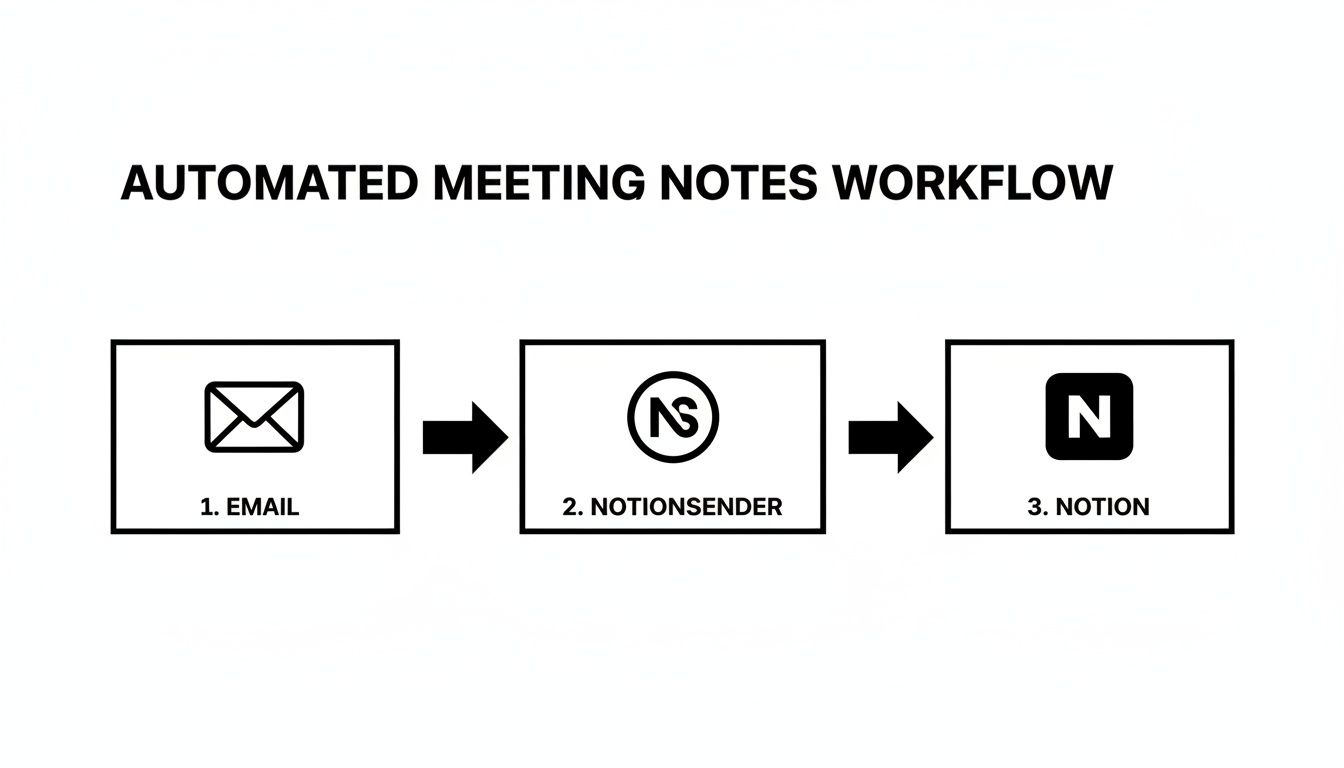
Something like NotionSender can create a seamless flow from your inbox directly into your meeting notes, making sure important context doesn't get lost in the shuffle.
Practice Active Listening to Structure on the Fly
Taking good notes is really about active listening. It’s the skill that helps you separate the signal from the noise—the random chatter from the concrete takeaways. As you're listening, you should be mentally sorting everything you hear into your template's buckets.
- Is this just part of the agenda discussion? Make a quick note under the relevant point.
- Is this a final decision? Pop it into that "Decisions Made" callout block.
- Is this a task for someone? That goes straight into the action items table.
This mental filing system helps you build well-structured notes in real-time. If you're looking for more ways to level up your Notion game, check out these 10 tips to help you get the most out of Notion. When you pair a solid template with these kinds of practical habits, you're not just taking notes—you're building a system for accountability and real progress.
A Few Common Questions About Meeting Templates
Rolling out a new system for meeting minutes always kicks up a few practical questions. Getting your team meeting template just right is an ongoing process, and tackling these common concerns early on helps everyone get on board faster and actually see the value in the new workflow.
Let's walk through a few questions that almost always come up when teams start to standardize how they document their meetings.
How Often Should I Update My Meeting Minutes Template?
It’s best to treat your template like a living document, not something you create once and forget about. A good rule of thumb is to give it a quick review every quarter, or anytime you spot a recurring problem.
For example, if you notice action items are consistently getting missed, maybe the table needs a new “Priority” column. Or if your team’s projects and goals have shifted, the template should reflect that. A team moving to a new project management style might want to add a "Sprint Goals" section. The key is to regularly ask your team what’s working and what isn’t—that’s how you keep the template a genuinely useful tool instead of just another piece of administrative busywork.
What Is the Best Way to Handle Confidential Information?
Sensitive topics require a bit of care. The first question to ask is whether the confidential details really need to be written down. More often than not, you can simply document the final decision or the resulting action item without getting into the sensitive context behind it. This is almost always the safest way to go.
If you absolutely must record the details, here’s a solid process to follow:
- Create a separate Notion page just for the confidential notes and immediately restrict its access.
- Lock down the page permissions so only the specific team members who need to see it can view it.
- Back in your main meeting minutes, just drop in a link with a simple note like, "Sensitive discussion details are in the restricted project document."
This approach keeps your main minutes clean and broadly accessible while making sure confidential information stays locked down. For a deeper dive into the mechanics, it’s helpful to understand what a template is at its core.
Remember, the whole point of meeting minutes is to create clarity and accountability, not a security risk. Always put protecting sensitive information first by walling it off from general notes and controlling who can see it.
Can This Template Be Adapted for Different Meeting Types?
Absolutely! In fact, you definitely should be adapting it. The core structure we've built is just a starting point. The real magic of Notion is its flexibility, which lets you spin up specialized versions for any kind of meeting you can think of.
Just duplicate your main template and start tweaking it for different scenarios. For example, you could easily create:
- A "Client Kick-off" version with dedicated sections for "Client Goals" and "Project Scope."
- A "Creative Brainstorm" version that swaps out tables for a gallery view to hold mood boards or a toggle for "Wild Ideas."
By adding a "Select" property to your database, you can tag each meeting by type. This makes it incredibly easy to filter your database later on and see all the minutes from, say, just your brainstorming sessions.
Ready to stop chasing down scattered notes and start building an automated communication hub? With NotionSender, you can send emails, capture agendas, and distribute follow-ups right from your Notion workspace. It creates a seamless flow that keeps everyone perfectly in sync.
Discover how NotionSender can supercharge your meeting productivity today.

