
What Is Email Automation? A Guide to Smarter Marketing

Email automation is essentially a system you set up once to send highly relevant emails to your subscribers automatically. Think of it as your own personal marketing assistant, working around the clock to send the perfect message to the right person at exactly the right time—no more hitting "send" manually for every single email.
It’s the key difference between shouting one generic message to a huge crowd and having a thoughtful, one-on-one conversation with each person individually.
How Email Automation Actually Works
At its core, email automation is a massive leap from sending manual, one-off campaigns. Instead of sitting down to write and blast a newsletter to your entire list, an automation system runs on a simple but incredibly powerful principle: "if this happens, then do that."
It’s a series of pre-built responses that are set in motion by a user's specific actions or data points. This ensures your communication is always timely and, more importantly, relevant to what they just did.
This whole process turns your email strategy from a static broadcast into a dynamic, responsive conversation. When someone new signs up, they don't have to hang around waiting for your next monthly newsletter; they can get a warm welcome message in their inbox instantly. This immediate, personal touch is what makes automation so effective.
The Core Components of Email Automation
To really get what email automation is all about, you need to understand its three fundamental building blocks. These components are the engine behind the whole operation, working together to create a seamless journey for your subscribers and guide them from one interaction to the next.
Let's break down the essential building blocks that make any email automation system tick. Understanding these parts is key to designing workflows that not only make sense but also deliver real results for your business.
| Component | What It Is | Why It Matters for Your Business |
|---|---|---|
| Trigger | The starting gun for an automated sequence. It’s a specific event that kicks everything off, like a new subscription, a purchase, an abandoned cart, or even a date field in your database. | Triggers ensure your emails are sent at the most relevant moment. This timeliness dramatically increases engagement because the message directly relates to a recent action. |
| Action | What the system does after a trigger occurs. The most common action is sending an email, but it could also be adding a tag to a contact, moving them to another list, or updating their profile. | Actions allow you to do more than just send emails. You can segment your audience, keep your data clean, and personalize future communications based on user behavior. |
| Workflow | The complete roadmap of the automated journey. It connects one or more triggers and actions into a logical sequence, often with delays or conditions built in. | Workflows let you build sophisticated, multi-step customer journeys. This is how you nurture leads over time, onboard new clients, and build lasting customer relationships. |
Think of a simple welcome sequence: the trigger is a "new subscriber." The first action is to send a welcome email. The workflow might then include a three-day delay before the next action: sending a second email with your best resources.
This visual shows exactly how these three elements connect to create a full automation cycle.
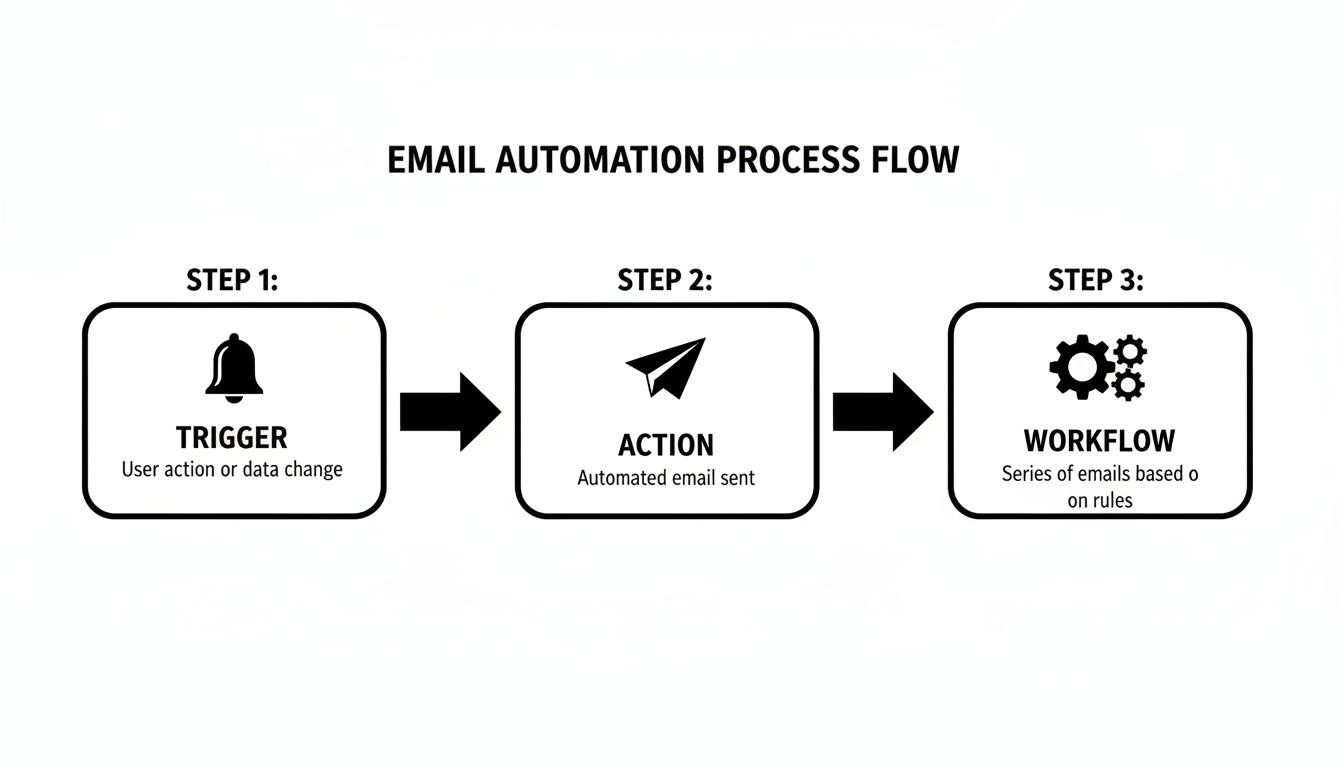
This simple model—a trigger kicking off an action inside a larger workflow—is what powers all effective automated email communication.
Why Automation Is No Longer Optional
Let's be real: the sheer volume of digital noise makes managing communications by hand an impossible task. Projections show that a staggering 347 billion emails will be sent and received daily worldwide in 2025. While automated emails are just a slice of that pie, their impact is massive. Research shows that while automation accounts for only 2% of email volume, it drives a whopping 37% of sales.
Automation isn't about replacing the human touch; it's about scaling it. It frees you from the soul-crushing repetitive tasks so you can focus on the strategy and creativity that people do best.
Ultimately, email automation is a system for building relationships at scale. For developers and technical teams looking to create custom integrations, you can dig deeper into connecting your tools with the NotionSender API documentation. By setting up smart workflows, you can build a consistent, personalized experience that nurtures leads, onboards new clients, and keeps customers coming back—all while you focus on the bigger picture of growing your business.
The Four Essential Types of Email Automation

Once you get the hang of triggers and workflows, the fun part begins: putting them to work for your business. Email automation isn't a single, monolithic tool. It’s more like a Swiss Army knife, packed with different tactics designed for specific communication jobs.
By breaking automation down into four core types, you can quickly see which strategy fits your immediate goals. Need to welcome a new client? Confirm a purchase? Celebrate a customer milestone? There’s an automated flow for that.
Drip Campaigns for Nurturing Leads
A drip campaign is a pre-planned series of emails sent to subscribers over a set period. Think of it as a slow, steady release of helpful information that builds a relationship, educates your audience, and gently nudges them toward taking action. It's your secret weapon for playing the long game.
These campaigns are effective because they break down information into bite-sized pieces. No one likes a massive info-dump. A drip campaign turns a monologue into an extended, valuable conversation that keeps your brand top-of-mind.
- Scenario: A project manager just signed a new client. Instead of remembering to send multiple onboarding emails, they can set up a 2-week drip sequence.
- Day 1: An email goes out introducing the project team and explaining what happens next.
- Day 4: A follow-up automatically shares a link to a shared resource folder.
- Day 10: A final email offers a few tips for a successful collaboration.
This automated sequence guarantees every new client gets the same professional, consistent onboarding experience—no manual effort required.
Transactional Emails for Critical Updates
Transactional emails are the workhorses of automation. They're sent automatically in response to a specific action a user takes, like making a purchase or changing a password. These aren't your typical marketing messages; they are functional, expected, and often crucial.
These emails boast some of the highest open rates out there—often exceeding 80%—because people are literally waiting for them to arrive. They’re looking for confirmation that a process worked.
Transactional emails are the backbone of customer trust. An instant order confirmation or password reset email provides immediate reassurance that a system is working as it should be.
Common examples include:
- Order and shipping confirmations
- Password reset instructions
- Welcome emails with login details
- Receipts and invoices
If someone buys a digital product from your store, the automated email that delivers their receipt and download link is a perfect example of a transactional email in action.
Behavioral Emails for Re-Engagement
This is where automation gets really smart. Behavioral emails are triggered by how a user interacts—or doesn't interact—with your website, app, or previous emails. This type of automation feels incredibly personal and timely because it’s a direct response to an individual's unique journey.
The classic example is the abandoned cart email. Data shows that nearly 70% of online shopping carts are left behind. A simple, automated email reminding the shopper about the items they left can recover a huge chunk of that otherwise lost revenue. If you're looking for more practical ideas, check out these 5 automated email flows that can make a real difference.
Triggered Emails for Milestones
Finally, we have triggered emails. These are sent based on specific, date-driven events in the customer lifecycle. Unlike behavioral emails that react to actions, these are tied to data points like anniversaries, birthdays, or subscription renewal dates.
These automations are fantastic for building long-term loyalty. They make customers feel seen and valued, showing that you're paying attention to them as people, not just entries in a database.
Common Triggered Email Scenarios:
- Happy Birthday Message: An automated email offering a special discount on a customer's birthday.
- Anniversary Celebration: An email celebrating the one-year anniversary of a client signing up, maybe with a small thank you gift.
- Subscription Renewal Reminder: An email sent 30 days before an annual subscription is set to expire.
For a creator selling an online course, a triggered email could be sent exactly one year after a student purchased the course, offering them an advanced-level program at a special "alumni" rate. It's a small touch that can lead to big results.
Key Business Benefits of Email Automation
Knowing how automation works is one thing, but the real question is, "So what? Why should I bother?" The answer is simple: it delivers tangible, game-changing results. This is especially true for small businesses and solo operators who need to make every single resource count.
This isn't just about firing off emails a little bit faster. It's about fundamentally changing how you operate, communicate, and grow your business. Think of email automation as a powerful engine humming along in the background, freeing you up to focus on the high-value work that actually requires your brainpower.
Reclaim Your Most Valuable Asset: Time
Let’s be honest, repetitive manual tasks are a silent killer of productivity. Think about every welcome email you've had to send, every project update you've typed out from scratch, or every follow-up you’ve had to remind yourself to send. Each one might only take a few minutes, but they add up—stealing hours of your creative and strategic work every single week.
Email automation gives you those hours back.
Imagine a freelance consultant who uses a simple workflow for client updates. When they change a project's status in their Notion database, a pre-written, personalized email automatically goes out. That small change could easily save them five hours a week—time they can now spend on client strategy or finding new business.
Build Stronger Relationships at Scale
As your client list or audience grows, keeping that personal touch becomes nearly impossible. Automation cracks this problem wide open, letting you nurture relationships consistently and making sure no one ever slips through the cracks. It gives a one-person shop the power to provide the same level of attention as a much larger company.
A well-crafted welcome series, for instance, makes a new subscriber feel seen and valued from day one. By dripping out helpful content over a few days, you build trust and establish your expertise without lifting a finger after the initial setup.
This is the real magic of automation: it doesn't replace the human touch; it scales it. It ensures every single person gets a timely, relevant, and personalized experience—which is the bedrock of any strong business relationship.
This consistent, personalized communication isn't just a nice-to-have; it directly fuels growth. The financial impact is pretty staggering. Research shows that automated emails generate 320% more revenue than non-automated ones. It's part of a bigger picture where marketing automation delivers an average ROI of $36 to $42 for every $1 spent, making it one of the most effective strategies out there. You can dig into more of this powerful data by exploring the marketing automation statistics on Cazoomi.com.
Increase Sales and Customer Retention
Automation isn't just for nurturing new leads. It’s a beast of a tool for driving sales and keeping the customers you already have happy. Even very simple workflows can have a massive impact on your bottom line.
Here’s how it works in the real world:
- Abandoned Cart Reminders: A small e-commerce shop owner can set up a workflow that sends a friendly nudge to customers who leave items in their cart. This one automation alone can recover lost sales and has been shown to boost revenue by up to 20%.
- Post-Purchase Follow-ups: A week after a customer buys something, an automated email can ask for a review or offer tips on how to get the most out of their purchase.
- Customer Re-engagement: If a customer hasn't bought anything in a while, you can automatically send them a special offer to win them back.
These timely touchpoints make for a better customer experience, encourage repeat business, and build lasting loyalty. By automating these crucial interactions, you create a system that doesn't just save you time—it actively works to grow your revenue around the clock.
How to Measure Your Automation Success
Launching an automated email workflow without tracking its performance is like driving with your eyes closed. You might be moving, but you have no idea if you’re heading in the right direction. Real, effective automation is powered by data, not guesswork. Learning to measure what matters is how you turn a good strategy into a great one.
This isn’t about drowning in spreadsheets or getting lost in analytics dashboards. It’s about focusing on a few key performance indicators (KPIs) that tell you a clear story about what’s working, what isn’t, and where you can make small tweaks for a big impact.
Moving Beyond Vanity Metrics
The first step is to learn the difference between numbers that make you feel good and numbers that actually drive decisions. A vanity metric might be your total subscriber count. Sure, a growing list is great, but it doesn’t tell you if your automations are actually engaging anyone. Actionable metrics, on the other hand, reveal exactly how people are interacting with your content.
Here are the core KPIs you should be tracking:
- Open Rate: The percentage of people who actually opened your email. This is your first and most important hurdle. A low open rate often points to a weak subject line or even a poor sender reputation.
- Click-Through Rate (CTR): The percentage of recipients who clicked on a link inside your email. This tells you if your message was compelling enough to inspire action.
- Conversion Rate: The percentage of recipients who completed a specific, desired action after clicking—like making a purchase or filling out a form. This is the ultimate measure of your automation's success.
- Unsubscribe Rate: The percentage of people who opted out of your list after getting an email. A high rate is a massive red flag that your content just isn't hitting the mark.
Understanding these numbers in context is everything. For instance, an automated welcome series should have a much higher open rate than a monthly promotional newsletter simply because it’s timely and people are expecting it.
Actionable vs. Vanity Metrics in Email Automation
This table helps you focus on the KPIs that truly matter for business growth by comparing them against metrics that look good but offer little strategic value.
| Metric Type | Examples | Why It's Important |
|---|---|---|
| Actionable Metrics | Click-Through Rate (CTR), Conversion Rate, Unsubscribe Rate, Revenue Per Email | These metrics directly reflect user engagement and business outcomes. They tell you if your content is persuasive and driving the desired actions, allowing you to make informed decisions to improve your strategy. |
| Vanity Metrics | Total Subscribers, Total Emails Sent, Social Media Likes/Follows | While these numbers can look impressive, they don't provide insight into the quality of engagement or the ROI of your efforts. A large subscriber list is meaningless if no one opens or clicks your emails. |
Focusing on actionable metrics ensures you’re optimizing for what truly grows your business, not just chasing numbers that look good on a report.
Core Metrics That Truly Matter
Let’s zero in on the big three: open rate, CTR, and conversion rate. Think of these metrics as a funnel that shows the entire customer journey from the moment an email lands in their inbox to the moment they take action.
1. Open Rate: The Gateway to Engagement
Your open rate is your first impression. If it’s low, nothing else you do matters because no one is seeing your message. The single biggest factor here? Your subject line. Is it clear, intriguing, and relevant to the trigger that sent the email?
For some practical tips on improving this crucial metric, you might be interested in our guide on how to increase your open rates with 10 email marketing tricks.
2. Click-Through Rate: The Measure of Persuasion
Once they’ve opened the email, the CTR tells you if your content and call-to-action (CTA) were actually effective. A high open rate paired with a low CTR is a classic sign that your subject line made a promise that the email body didn’t deliver on.
3. Conversion Rate: The Bottom Line
This is where the rubber meets the road. Did your automation achieve its goal? Tracking conversions links your email efforts directly to revenue or lead generation, giving you undeniable proof of the ROI of your work.
The performance gap between standard campaigns and automated ones is enormous. Why focus so much on these metrics? Because automated emails can achieve 52% higher open rates, 332% higher click rates, and an incredible 2,361% better conversion rate compared to regular broadcast emails. You can discover more insights about email marketing performance at Omnisend.com.
By consistently monitoring these core KPIs, you move from just using automation to mastering it. You can A/B test subject lines, refine your CTAs, and optimize your workflows to ensure every automated email is working as hard as it possibly can for your business.
Automating Your Email Directly from Notion
<iframe width="100%" style="aspect-ratio: 16 / 9;" src="https://www.youtube.com/embed/cv3VAq4paX0" frameborder="0" allow="autoplay; encrypted-media" allowfullscreen></iframe>
Understanding how email automation works in theory is one thing. The real magic happens when you connect that theory to the tools you already live in every day. For countless freelancers, small businesses, and project managers, that central hub is Notion.
This is where you can stop juggling a separate email platform, a CRM, and your project boards. Instead, you can build powerful automations right from your Notion databases. This approach doesn't just simplify your workflow; it connects everything and makes your entire process incredibly efficient. Tools like NotionSender are built for this very purpose—to turn Notion into a true email automation engine.
Building Workflows Inside Your Workspace
Think of your Notion workspace as more than just a place to store information. Imagine it as the command center for all your client communication.
Every little update—changing a project's status, adding a new lead, or setting a follow-up date—can become the trigger for a personalized email. You're no longer manually exporting contact lists or copy-pasting the same update into a dozen emails. Your workflow becomes your marketing system.
- Centralized Control: Manage all your contacts, projects, and email campaigns from one place. No more switching between ten different tabs.
- Data-Driven Triggers: Use any property in your Notion database—a status, a date, or even a checkbox—to kick off an entire email sequence.
- Seamless Integration: Your data stays perfectly in sync, so you never have to worry about sending an email with outdated information.
The core idea is simple but powerful: if it happens in your Notion database, it can trigger an email. This transforms your static project plans into active communication tools that work for you 24/7.
Here’s a look at the clean interface where you can manage your email campaigns without ever leaving Notion.
As you can see, the setup lets you create, monitor, and send campaigns from your primary workspace. It makes automation feel like a natural part of your existing process, not another tool you have to learn.
A Practical Example: Freelancer Project Updates
Let's walk through a real-world scenario. A freelance web designer uses a Notion database to track all her client projects. The database has properties for Client Name, Client Email, Project Status, and Last Update Sent.
Manually sending weekly progress reports is a drag, and it's easy to forget. Here’s how she automates it with NotionSender:
- Create a Trigger: She sets the automation to fire whenever the
Project Statusproperty is changed to "Client Review." - Use a Personalized Template: She designs a simple email template that pulls information directly from the Notion database. The email starts with, "Hi
{{Client Name}}," and includes a link to the latest designs. - Schedule the Action: The moment she updates that status, the system automatically sends the pre-written, personalized email to the address in the
Client Emailfield. - Log the Communication: After the email goes out, the automation updates the
Last Update Sentproperty to today's date, creating a perfect, hands-off record of all client communication.
This one workflow saves her hours every month, keeps clients happy and informed, and ensures her communication is always professional and consistent. To see how you can build a similar system, check out our detailed guide on how to create and send email from Notion.
Unlocking No-Code Automation Power
This entire approach is part of the bigger no-code movement, which gives non-technical folks the power to build incredible systems without writing a single line of code. You don't need to be a developer to create complex workflows that run your business more efficiently.
This shift puts the power of sophisticated automation into the hands of creators, marketers, and project managers. If you're curious about other ways to simplify your workflows, you might find some great ideas in this roundup of the 5 Best No Code Automation Tools.
By integrating email directly with Notion, you're not just saving time. You're building a smarter, more connected operating system for your entire business.
Frequently Asked Questions About Email Automation
Even after seeing all the benefits, jumping into email automation can feel a little daunting. That's totally normal. Let's tackle some of the most common questions that pop up for freelancers, small business owners, and project managers.
Our goal here is to clear up any lingering confusion and give you the confidence to get your first workflow up and running.
Is Email Automation Only for Large Companies?
Not at all. In fact, you could argue it’s more valuable for small businesses and solo operators. Big companies use automation to handle their massive scale, but small teams use it for leverage. It’s like having a digital assistant working around the clock.
Think about it: this is how a one-person shop can provide the same kind of timely, personal communication that a huge marketing department does. It levels the playing field, helping you build real customer relationships without being glued to your inbox 24/7.
Will My Automated Emails Sound Robotic?
This is probably the biggest fear people have, but it’s based on a misunderstanding of what good automation looks like. That "robotic" feeling comes from lazy, generic emails blasted out to an entire list with no thought for context.
Modern automation is the exact opposite—it’s designed to be deeply personal. Instead of a one-size-fits-all message, you use triggers and individual data to send something that’s genuinely relevant to that specific person, at that specific moment.
A well-designed automated email often feels more personal than a manual one because it's perfectly timed and directly related to the recipient's immediate needs, making them feel seen and understood.
You can use their name, reference a past purchase, or trigger a message based on an action they just took. It’s no longer a broadcast; it’s a one-on-one conversation.
How Do I Start Without Getting Overwhelmed?
The secret is simple: start small. Pick one high-impact task and automate it. The biggest mistake people make is trying to build a dozen complex, multi-step workflows from day one. That’s a fast track to burnout.
Instead, create a simple workflow that delivers immediate value. Here are a few perfect starting points:
- A Welcome Email: Automatically send a warm greeting the moment someone new subscribes.
- A "Thank You" Email: Instantly confirm a purchase and give them a receipt or next steps.
- A Simple Follow-Up: Trigger an email a week after a project wraps up to ask for feedback.
Once you see that first automation working its magic, you'll gain both confidence and momentum. From there, you can build on your success and tackle more advanced workflows down the road.
What Is the Difference Between Email Automation and a Newsletter?
This is a really important distinction, and it gets to the heart of what is email automation.
An email newsletter is a one-to-many broadcast. You write it, you schedule it, and it goes out to your whole list (or a big segment of it) at the same time. It's a public announcement.
Email automation, on the other hand, is a series of one-to-one conversations happening constantly in the background. Each one is triggered by an individual's unique actions or timeline. It's a personalized journey, not a single event.
Here's a simple way to think about it:
- Newsletter: Your monthly update goes out to everyone at 10 AM on Tuesday.
- Automation: Sarah gets a welcome email the moment she signs up on Friday night. Mike gets a completely different email when he downloads a guide on Saturday morning.
Newsletters are for scheduled announcements. Automation is for building relationships that respond to individual behavior in real time.
Ready to stop managing emails and start building automated systems? NotionSender turns your Notion workspace into a powerful communication hub, allowing you to create and automate personalized email workflows directly from your databases. Start automating your communication and save hours every week with NotionSender.

