
What Is Email Parsing and How Does It Automate Your Workflow

Let's be honest, your inbox is a goldmine of information, but it's also a chaotic mess. It's like having a library where all the books are thrown in a giant pile. This is where email parsing comes in.
Think of it as a super-smart assistant who can instantly read any email, pick out the important bits—like an invoice number, a client's name, or a meeting time—and neatly organize them for you. It's the magic that turns messy email threads into clean, structured data you can actually use.
Unlocking the Data Trapped in Your Inbox
Every single day, your inbox gets filled with valuable data. Every order confirmation, customer question, and project update contains details that could help you run things more smoothly. But there's a huge problem: this information is "unstructured." It's just sitting there, trapped inside paragraphs of text, making it almost impossible to use without someone manually digging it out.
This is exactly why email parsing is such a game-changer. It’s the key that unlocks all that trapped information. Instead of you or your team spending hours copying and pasting details from your email into another app, a parser does it for you in a split second, and without making typos.
The Problem with Manual Data Entry
Doing this stuff by hand is more than just slow—it's a massive drag on your time and energy. With a mind-boggling number of emails flying around the globe every day, the manual approach just doesn't scale, especially for busy entrepreneurs and project managers.
Trying to keep up manually creates some serious headaches:
- It's a Time Sink: Your team ends up wasting precious hours on tedious data entry instead of focusing on work that actually grows the business.
- Mistakes Happen: We're all human, and typos are inevitable. One wrong digit in an order number or a misspelled email address can cause huge problems and unhappy customers.
- Decisions Get Delayed: When you have to wait for someone to manually enter data, you can't make fast, smart decisions.
Email parsing cuts right through these problems. It automates the whole extraction process, making sure data is captured instantly and far more accurately than any human ever could.
This is a core part of a bigger idea: Automating Data Entry. For a tool like NotionSender, this isn't just a feature; it's the foundation of what makes it so powerful. By parsing emails, you can automatically send structured information straight into your Notion workspace.
We've written a whole guide on how to send emails to Notion that shows this in action. It's a simple bit of automation that can easily save teams hundreds of hours a year.
To really see the difference, let's compare the old way with the new way.
Manual Email Processing vs Automated Email Parsing
| Task | Manual Method (Before Parsing) | Automated Method (With Parsing) |
|---|---|---|
| Processing Invoices | Manually open each email, find the invoice number, amount, and due date. Copy and paste into a spreadsheet or accounting software. | The parser automatically extracts all key invoice details and sends them directly to your Notion database or accounting tool. |
| Managing Leads | A team member reads every new lead email, copies the contact info (name, company, phone), and manually creates a new entry in your CRM. | A new lead fills out a form, and the parser instantly grabs their details from the notification email and creates a new, complete record in your CRM. |
| Tracking Shipments | Find the shipping confirmation email, click the tracking link, and manually update the order status in your system. | The parser identifies the tracking number and carrier from the email and automatically updates the order status in your e-commerce platform. |
| Scheduling Meetings | Read through an email thread to find the agreed-upon date and time, then manually create a calendar event and invite attendees. | The parser recognizes meeting details and can automatically create a calendar event, adding the right people and description. |
It's pretty clear that automation isn't just a convenience—it fundamentally changes how you handle the daily flow of information, freeing you up to focus on what truly matters.
How Email Parsing Actually Works Under the Hood
Picture a digital mail clerk who not only opens your emails but also knows exactly what to do with the information inside. When a new email hits your inbox, the parsing tool springs into action. It’s not just reading words; it's actively hunting for specific patterns you've taught it to find.
Think of these patterns as signposts. It could be something as simple as the phrase “Invoice Number” or a more complex pattern like a date always formatted as MM/DD/YYYY. Once the parser spots a match, it carefully plucks out the data next to it—the invoice number itself or that specific date—and neatly files it away in a structured format, like a new row in a spreadsheet or an entry in your Notion database.
This diagram lays out the simple but powerful journey from a messy inbox to clean, structured data.
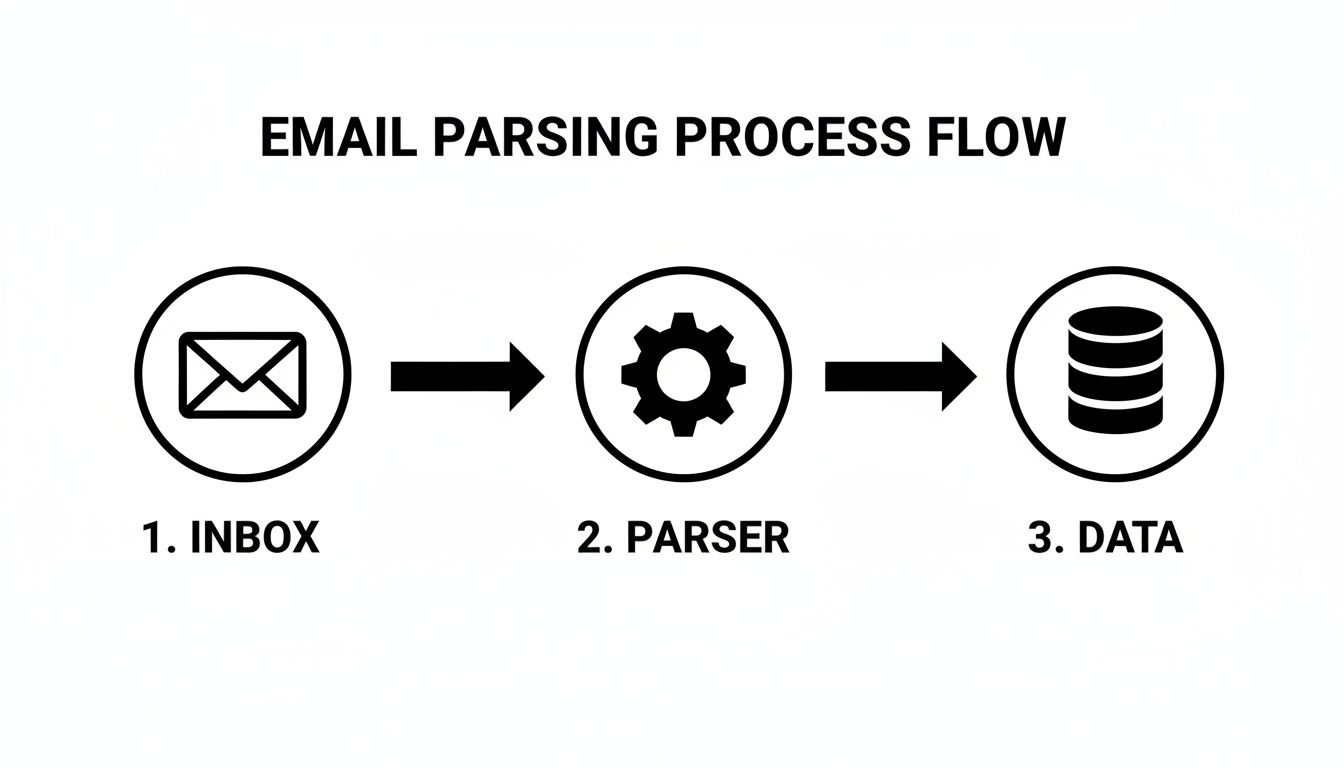
At its heart, this is what workflow automation is all about: turning chaotic, unstructured information into an orderly, actionable resource without you lifting a finger.
Two Core Methods of Parsing
Not all email parsers are built the same, though. The technology generally splits into two camps, and knowing the difference will help you pick the right tool for the job.
-
Rule-Based Parsers: This is the old-school, straightforward approach. You set up explicit rules or templates that tell the parser exactly where to look for data. For example, a rule might be, "Find the text immediately following 'Client Name:' and label it 'Client'." It’s incredibly reliable for emails that never change their layout, like system-generated alerts or standard order confirmations.
-
AI-Powered Parsers: Here's where things get smart. This more advanced method uses machine learning (ML) and natural language processing (NLP) to understand an email's context and structure, even if the layout is completely different from the last one. Instead of rigid rules, you train the AI by feeding it examples. This makes it a champ at handling unpredictable emails, like customer support tickets or invoices from a dozen different vendors.
An AI-powered parser is like teaching an assistant to recognize an invoice by its key ingredients—an invoice number, a total, a due date—rather than by its exact design. That adaptability is a game-changer for dealing with real-world email chaos.
This kind of intelligent tech is a huge reason the global Email Parser Market is exploding. In fact, recent advances like machine learning have boosted parsing efficiency by as much as 40%, helping tools keep up with the endless variety of email formats across platforms like Gmail and Outlook. If you want to dive deeper, you can read the full research about email parsing market trends to see where the industry is headed.
The Real-World Benefits of Automating Email Data
Knowing the theory behind email parsing is one thing, but seeing its real-world impact is where things get exciting. Automating how you handle incoming email isn't just a minor workflow tweak; it's a fundamental upgrade that delivers some seriously tangible benefits across your entire operation.

This process introduces three game-changing advantages that directly solve some of the most common business headaches: time wasted on manual work, costly human errors, and sluggish decision-making.
Reclaim Your Most Valuable Asset: Time
Let’s be honest, the most immediate and satisfying benefit of email parsing is getting a huge chunk of your day back. Manual data entry is a soul-crushing, repetitive task that eats up productive hours you could be spending on things that actually matter—like strategy, talking to customers, or creative problem-solving.
Imagine an e-commerce manager who no longer has to manually copy-paste order details from Shopify notifications into a spreadsheet. Instead, a parser instantly grabs the customer's name, address, and what they bought, then automatically creates a new task in their Notion logistics board. Magic.
By eliminating manual data entry, you’re not just saving a few minutes here and there. You are fundamentally redirecting your team's energy from tedious admin work to tasks that actually drive growth and innovation.
Take invoice management, for example. Modern parsing tools can extract payment details with over 99% accuracy using AI, slashing processing time from hours to mere minutes. It’s no surprise that small businesses adopting these solutions report up to an 80% reduction in manual data entry. You can find more insights on how AI is changing the email parser market on wiseguyreports.com.
Achieve Near-Perfect Data Accuracy
Humans make mistakes. It happens to the best of us, especially when doing the same boring task over and over. A single typo in an address, a misplaced decimal in an invoice, or an incorrect phone number can snowball into shipping errors, payment disputes, and unhappy customers.
Automated systems, on the other hand, don't get tired or distracted.
An email parser follows its rules with perfect consistency, every single time. This reliability ensures that the data flowing into your CRM, project management tools, or accounting software is clean, accurate, and trustworthy. And high-quality data is the bedrock of good business intelligence.
Make Decisions at the Speed of Business
In today's fast-paced world, speed is a serious competitive advantage. Waiting for someone to manually compile data creates a lag that can cause you to miss opportunities or react too slowly to problems. Email parsing delivers that information in near real-time.
Think about these scenarios:
- Lead Management: A sales inquiry hits your inbox and is parsed the second it arrives. A new lead is instantly created in your CRM, and your team can follow up immediately—while the lead is still hot.
- Customer Support: A support ticket is automatically categorized and assigned based on keywords found in the email, dramatically reducing response times and improving customer satisfaction.
- Project Feedback: Client comments from an email are extracted and dropped directly into the relevant project card in Notion, keeping the entire team in sync without missing a beat.
This instant data flow empowers you to make faster, better-informed decisions based on the most current information available. It keeps your business agile and ready for whatever comes next.
Alright, theory is one thing, but the real magic happens when you see how email parsing solves actual, day-to-day business headaches. This isn't just a fancy tech concept; it's a practical tool that turns your inbox from a cluttered archive into a smart, automated command center.
Let's dig into some real-world examples of how you can put this to work.
This setup is exactly what we're talking about. Email parsing is the invisible engine connecting your inbox to your CRM, accounting software, and other tools, making workflows like this possible.
Supercharge Your Sales and Lead Management
Every time a potential customer fills out a contact form, an email lands in your inbox. Without automation, this kicks off a tedious manual process: a salesperson has to copy the name, email, and message, then paste it all into your CRM. It's slow, mistakes happen, and a hot lead can go cold waiting for a follow-up.
Email parsing flips that script entirely.
- An Email Arrives: A new lead notification hits your inbox. Instantly, the parser gets to work.
- Data Is Pulled: It scans the email, grabbing key details like "Name," "Email," "Phone," and "Inquiry."
- CRM Is Updated: In seconds, that structured data creates a new, perfectly formatted lead record in your CRM. The sales team can act immediately.
For small businesses and e-commerce stores, this is a game-changer. Industry benchmarks show that parsing sales leads from inquiry emails can boost conversion rates by 25-30%. You're not just saving time; you're capturing revenue that would otherwise slip through the cracks.
Simplify Invoicing and Financial Tracking
Invoice management is another time-sink ripe for automation. When a vendor sends an invoice as a PDF, someone has to open the file, hunt for the invoice number, due date, and total, and then manually type it all into your accounting software.
An email parser handles all of it. It can scan the email body or even read the attached PDF, pull out all the critical financial data, and push it directly into your bookkeeping tool. No human touch needed. This doesn't just save hours of mind-numbing work; it guarantees your financial records are always spot-on.
Organize Projects and Client Communication
If you're a project manager, your inbox is probably a chaotic mix of client feedback, meeting notes, and status updates scattered across countless email threads. It’s nearly impossible to keep everything straight. Email parsing is the lifeline you need to bring order to that chaos.
Imagine every single client email being automatically sorted and filed away in a specific project database. Suddenly, you have a single source of truth for all communication, and nothing gets lost in the shuffle.
This is exactly what tools like NotionSender were built for. You can set up a parser to automatically grab details from client emails—like project IDs, specific feedback, or action items—and send them straight to a dedicated Notion database. Our guide on saving emails to Notion walks you through setting up this exact kind of powerful workflow.
This also has a huge ripple effect on your customer service. For any business looking to automate customer service for faster support, email parsing is foundational. It can automatically read incoming support requests, create tickets, and categorize them, ensuring inquiries are handled faster and more efficiently.
How to Choose the Right Email Parsing Tool
<iframe width="100%" style="aspect-ratio: 16 / 9;" src="https://www.youtube.com/embed/NRaOThq1zV0" frameborder="0" allow="autoplay; encrypted-media" allowfullscreen></iframe>
Picking the right email parsing tool can feel like a chore, but it really just boils down to one simple idea: find a solution that fits your workflow, not the other way around. For freelancers and small businesses, the fanciest tool isn't always the best. What you really need is something that gets the job done with the least amount of hassle.
Your decision should really hinge on a few key things that will directly impact how you work. Think about how easy it is to get started, how well it plays with the apps you already rely on, and of course, how accurately it can grab the information you need.
Key Factors for Your Decision
As you start looking at different options, keep these points in mind. They’ll help you cut through the marketing fluff and focus on what actually matters for your business.
- Ease of Use: You shouldn't need a degree in computer science just to automate your inbox. Look for tools with a clean, intuitive interface that lets you set up rules without touching a single line of code. The whole point is to save time, not to spend a week learning a complicated new system.
- Integration Capabilities: A parser is only as good as its connections. Prioritize tools that offer dead-simple integrations with the software you live in every day, whether that's Notion for keeping projects on track, Slack for team pings, or your CRM for managing new leads.
- Parsing Accuracy: The tool has one primary job: get the data right. A solid parser, especially one powered by modern AI, can figure out different email layouts and still pull the correct information. This ensures your automated workflows are built on a foundation of clean, reliable data you can actually trust.
- Scalability: As your business grows, your tools need to keep up. Go for a platform that can handle more and more emails without slowing down or suddenly costing a fortune.
It's no surprise the email parsing software market is taking off. There's a huge demand for tools that plug right into existing workflows. In fact, cloud-based solutions now account for over 60% of the market, offering the flexibility and scale that small businesses and freelancers depend on. Discover more insights about the email parsing software market on marketsizeandtrends.com.
Comparing Email Parsing Solutions
To give you a better picture of what's out there, let's break down the three main types of parsing solutions. Each one has its own strengths and is built for different kinds of users.
If you’re a developer who wants total control, digging into a tool’s documentation, like the NotionSender API documentation, is a great way to see just how flexible it is for custom projects.
For everyone else, this table should help clarify things.
| Solution Type | Best For | Ease of Use | Key Feature |
|---|---|---|---|
| Integrated Workflow Tools | Small businesses, freelancers, and teams wanting an all-in-one solution that connects email to apps like Notion. | Very Easy | Seamlessly ties data extraction into other workflow automation steps. |
| Standalone Parsers | Tech-savvy users who need a dedicated tool for complex data extraction before sending it somewhere else. | Moderate | Powerful, highly customizable parsing engines with advanced rule-setting. |
| Custom Scripts | Developers and big companies with unique needs and the resources to build and maintain their own solution. | Difficult | Complete control over the entire process, tailored to specific needs. |
When you weigh the options, an integrated tool like NotionSender often hits that perfect sweet spot. It gives you that easy, user-friendly setup but also packs the powerful integrations you need to build real, hands-off automations. It's all about turning your inbox from a chore into a genuinely productive part of your business.
Answering Your Top Email Parsing Questions
Diving into email parsing is a game-changer, but it's totally normal to have a few questions pop up before you jump in. Let's tackle some of the most common ones so you can feel confident about adding this to your workflow.
Is My Data Secure with an Email Parser?
This is usually the first question people ask, and for good reason. The short answer is: yes, as long as you choose a reputable tool. Top-tier email parsers are built with security at their core. They use heavy-duty encryption to protect your data both as it travels from your inbox and when it's stored.
Think of it like an armored truck for your information.
Good providers are also transparent about their data privacy policies, making it clear your information is only used for its intended purpose and never shared. Always pick a tool that's upfront about its security measures and complies with data protection laws.
Do I Need to Be a Developer to Use an Email Parser?
Nope, not at all. While developers can definitely build their own custom parsing solutions, the beauty of modern tools is that they’re made for everyone. Most offer a simple, visual setup where you can create rules without touching a single line of code. It’s often as easy as highlighting the piece of text you want to grab and giving it a name.
The best tools today are built on a "no-code" or "low-code" philosophy. The whole point is to empower business owners, project managers, and freelancers to build their own powerful automations without needing a technical background.
What Happens If My Email Layouts Change?
This is a really practical concern, especially if you're pulling information from a bunch of different sources, like invoices from various suppliers. How a parser handles this depends on its underlying technology.
- Rule-Based Parsers: If an email's design changes, you’ll probably have to go in and tweak your rules. This approach works best when you're dealing with emails that always have a consistent, predictable structure.
- AI-Powered Parsers: This is where modern tools really shine. AI-driven parsers are much more adaptable. Instead of looking for data in a specific spot, they learn to identify it by context—like knowing a string of digits is an invoice number because it's right next to the word "Invoice." This means they can often handle layout changes automatically, which saves you a ton of maintenance headaches down the road.
This kind of adaptability is exactly what makes tools like NotionSender so reliable for handling the messy, real-world emails we all get, without needing constant babysitting.
Ready to stop manually copying and pasting from your inbox? NotionSender makes it easy to automatically capture important data from your emails and send it directly to your Notion workspace. Start automating your workflow today.

